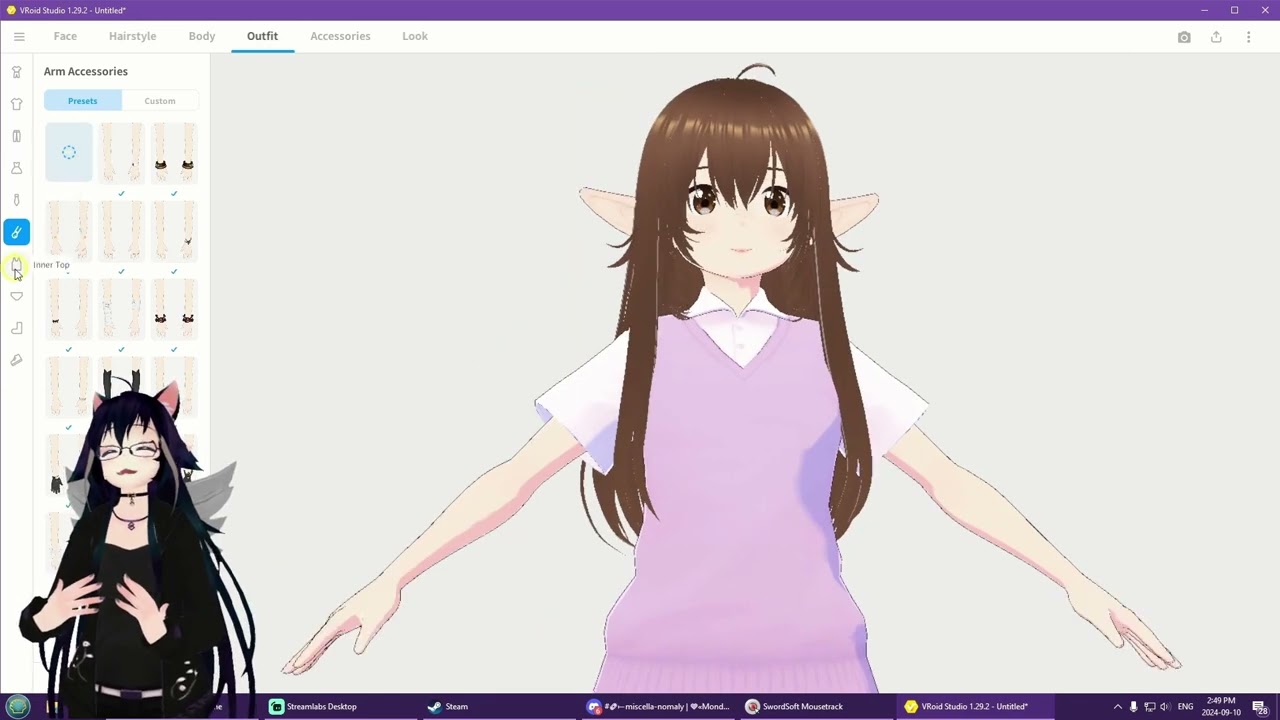
♡ MondoCat.TV's How To Upload a Vroid avatar to VRChat with NO BLENDER in 15 minutes Noob Tutorials
Автор: MondoCat
Загружено: 2024-09-18
Просмотров: 2861
Описание:
--------
💜 Intro
--------
Hi I'm Mondo, I'm an old lady and this is a tutorial for noobs by a noob!
This is a tutorial on how to make a vroid avatar and upload it to vrchat with NO blendering needed! In 15 minutes! (Some parts are sped up for tutorial's sake!)
** This is assuming you have creator companion and unity set up and installed! See the previous tutorial [ • ♡ MondoCat.TV's - How To Upload Avatars (... ] for how to do that! **
** MAKE SURE C:\Program Files\Unity\Hub\Editor HAS 2022.3.22f1 FOLDER IN IT. NOT 6000. YOU HAVE THE /WRONG/ VERSION OF UNITY UNLESS YOU SEE 2022.3.22f1**
If you have any questions or just wanna hang or game with a bunch of mostly old and/or neurodivergent people, check out our community of wholesome yet slightly crude soon-to-be-friends :D : / discord / http://www.mondocat.tv
--------
💜 Do you need help?
--------
/ discord - Please see this channel in our Discord for discussion and free help! :) (Ages 18+)
--------
💜 pls laike n subskrib!!!!!!!!!!14352352seven#52%#^&bbq
--------
I don't have a job, so I do nerd stuff in hopes of donations from kind strangers to put pineapples and/or pizza on my table. If you would like to throw me a tip, I will be eternally grateful! Or if you want to show support for Pineapple on pizza.... ;3
/ discord Server Sub (Special exclusive channel & emotes)
/ membership Patreon
https://ko-fi.com/mondocat Ko-Fi
--------
💜 Timestamps
--------
00:00 Intro
00:07 Launch Vroid Studio ( https://store.steampowered.com/app/14... )
00:13 Create New Character (Make sure to select vrm0.0 model, NOT THE NEWER ONE!)
00:42 Customize Your Character
02:45 Double Check Face In Expression Editor
03:15 Puttin On Your Hair!
04:27 Edit Body Color / Proportions
05:06 Equip That Outfit!
07:00 Put On Glasses, Ears, and Tail!
07:55 Edit Rim Shading / Outline
08:32 Export to VRM0.0 (NOT 1.0) (THEY SWITCHED THE LOCATION SINCE THIS VIDEO WAS MADE!)
09:41 Google "VRM Converter For VRChat" ( https://booth.pm/en/items/1025226 )
10:00 Open Creator Companion ( • ♡ MondoCat.TV's - How To Upload Avatars (... If you need help with this! )
10:09 Click "Settings" ⋙ Packages ⋙ Add Repository
10:18 Paste the JSON from booth ( https://esperecyan.github.io/VRMConve... [THIS URL MAY CHANGE!] )
10:34 Click "Create New Project" ⋙ Avatars Unity 2022 Avatar Project
10:55 Search for "VRM" ⋙ Install "VRM Converter for Vrchat"
11:25 Drag your .VRM you saved from Vroid Studios INTO the Assets folder of your Unity Project ( Import does not currently work, and IDK why honestly. )
11:35 Click on your model to make sure the inspector pops up normally.
11:38 Click "VRM" at the top ⋙ "Duplicate And Convert For VRChat" ⋙ "Duplicate And Convert For VRChat"
11:58 Use "WASD" and the mouse to move around Unity (But you dont need to, tbh)
12:25 Click on your model in the Heirachy (Left Side)
12:31 Scroll down to "Eyes"
12:36 Change Looking Up X to "3", Looking Down X to "3", Looking Left Y to "-3" (Negative 3), and Looking Right Y to "3".
13:00 Click "VRChat SDK" at the top of Unity
13:03 Hit "Control Panel"
13:04 Login To VRChat (Not pictured)
13:08 Click the "Builder" Tab
13:10 Enter Name / Description
13:19 Under "Thumbnail" Click "Capture From Scene" and then "Capture"
13:27 Check "This Information Provided Above Is Accurate" at the bottom
13:29 Click "Build & Publish"
13:48 Launch VRChat & Enjoy!
--------
💜 SOMETHING DIDNT WORK!
--------
Did you make sure to select the VRM0.0 edition on export? VRM1.0 WILL NOT WORK. "Dress-up Feature" ALSO WILL NOT WORK.
Try following the steps again in a new project! If you still get the same issue, post in the comments below and I'll try to help :3
--------
💜 Did I fuck up?
--------
If I fucked up, please politely send me a kind DM on how I can correct myself. I am autistic and sometimes do dumb shit, but I will never intend on doing bad things!
Thank you so much for helping me learn and get better :3
Повторяем попытку...
Доступные форматы для скачивания:
Скачать видео
-
Информация по загрузке:


![Самая ПРОДВИНУТАЯ VR-игра в МИРЕ! [Resonite]](https://image.4k-video.ru/id-video/eLoVnZZWwEM)