Скачать
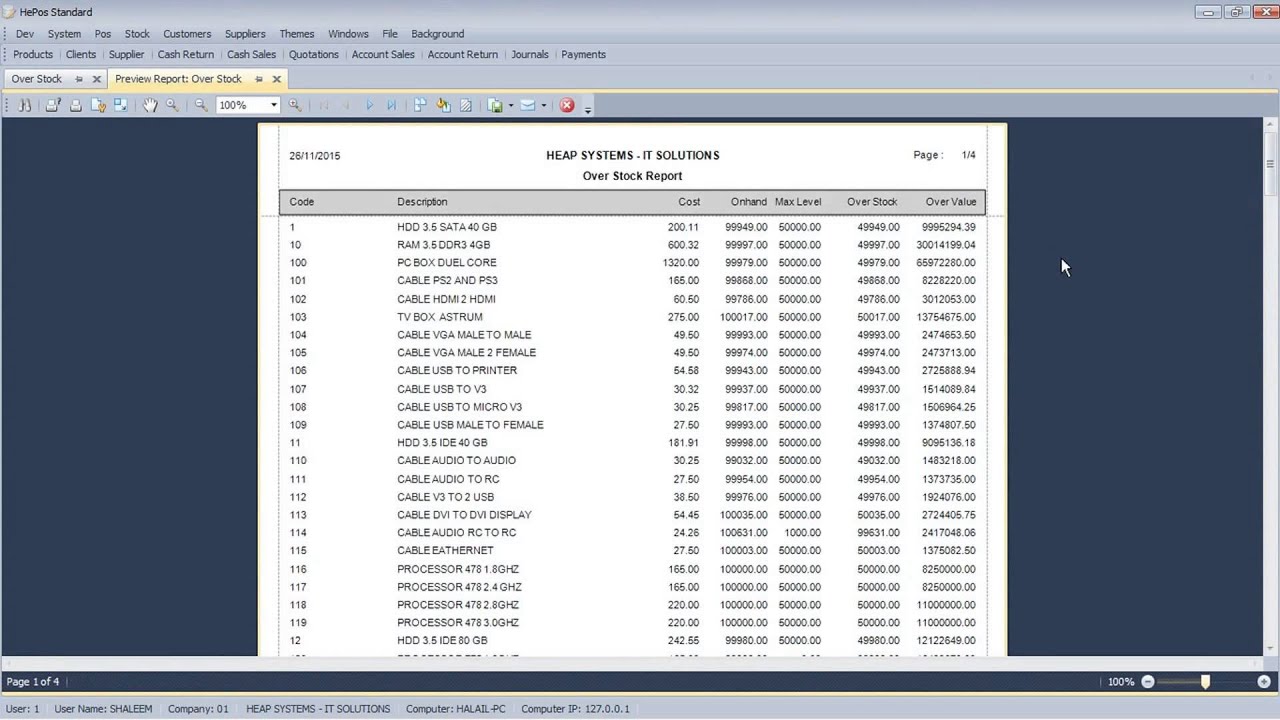
How To Print Or Preview OverStock
Автор: HEAP SYSTEMS
Загружено: 2015-11-28
Просмотров: 33
Описание:
Overstock Report
The Overstock option is used to provide a detailed report on all stock items that are Overstocked.
An item qualifies as overstocked when the Onhand quantity exceeds the maximum level set for the item.
To access the Overstock Reports, go to Stock main menu, select Reports sub-menu and click on the Overstock from the list of reports.
From Company:
Select the Company that you require for this report.
After selecting the required values, click the Print button on the window to print or Preview button to view this report.
Copyright ©2015 by HEAP SYSTEMS All Rights Reserved.
Не удается загрузить Youtube-плеер. Проверьте блокировку Youtube в вашей сети.
Повторяем попытку...
Повторяем попытку...
Доступные форматы для скачивания:
Скачать видео
-
Информация по загрузке: