Office Assistant, Compilation, Clippy, Clippit, Hoverbot, Dot, Genius, Robot, Links, Rocky
Автор: John Daniels
Загружено: 2021-05-06
Просмотров: 48236
Описание:
The Office Assistant is a discontinued intelligent user interface for Microsoft Office that assisted users by way of an interactive animated character which interfaced with the Office help content. It was included in Microsoft Office for Windows (versions 97 to 2003), in Microsoft Publisher and Microsoft Project (versions 98 to 2003), Microsoft FrontPage (versions 2002 and 2003) and Microsoft Office for Mac (versions 98 to 2004).
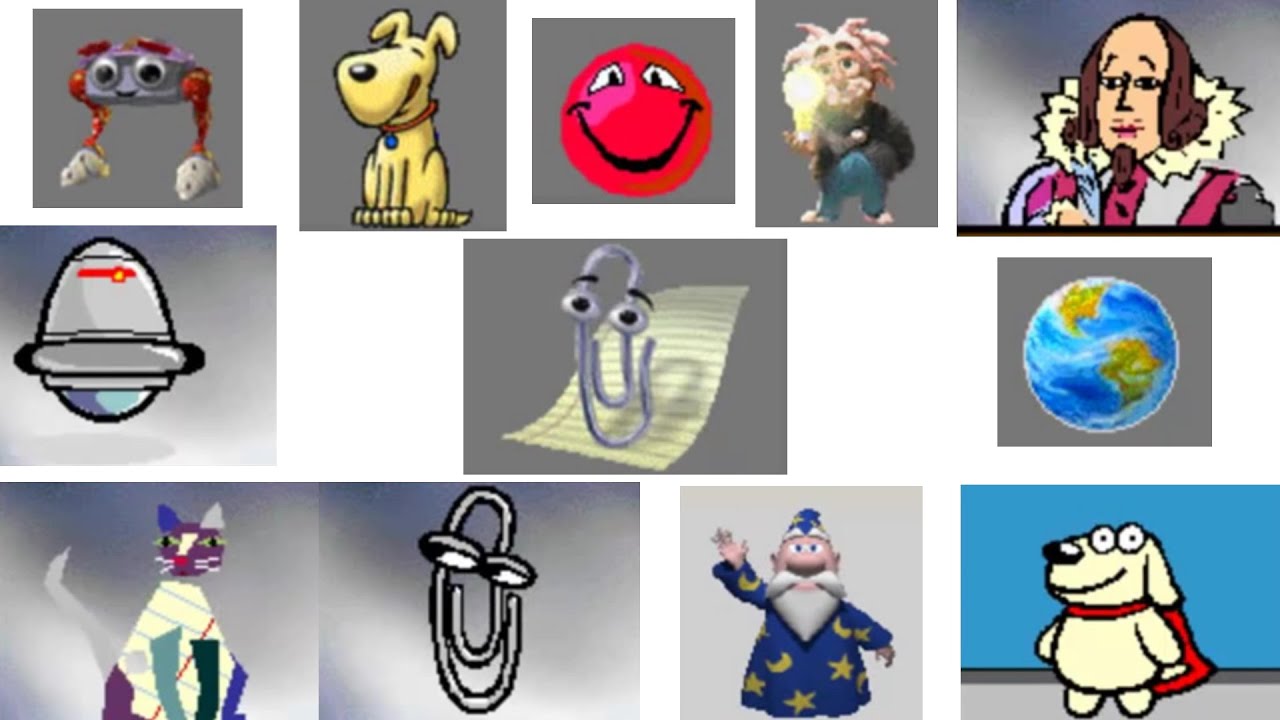
The default assistant in the English version was named Clippit (commonly nicknamed Clippy), after a paperclip.[1][2] The character was designed by Kevan J. Atteberry on a Macintosh computer.[2][3] Clippit was the default and by far the most notable Assistant (partly because in many cases the setup CD was required to install the other assistants), which also led to it being called simply the Microsoft Paperclip.[4] The original Clippit in Office 97 was given a new look in Office 2000.
The feature drew a strongly negative response from many users.[5][6] Microsoft turned off the feature by default in Office XP, acknowledging its unpopularity in an ad campaign spoofing Clippit.[7] The feature was removed altogether in Office 2007 and Office 2008 for Mac, as it continued to draw criticism even from Microsoft employees.
The default assistant Clippit has been heavily mocked in popular culture, being parodied, appearing in memes, and even being made fun of by Microsoft themselves from 2001 onwards.[citation needed]
According to Alan Cooper, the "Father of Visual Basic," the concept of Clippit was based on a "tragic misunderstanding" of research conducted at Stanford University, showing that the same part of the brain in use while using a mouse or keyboard was also responsible for emotional reactions while interacting with other human beings and thus is the reason people yell at their computer monitors.[8] Microsoft concluded that if humans reacted to computers the same way they react to other humans, it would be beneficial to include a human-like face in their software.[8] As people already related to computers directly as they do with humans, the added human-like face emerged as an annoying interloper distracting the user from the primary conversation.[8]
First introduced in Microsoft Office 97,[9] the Office Assistant was codenamed TFC during development.[10] It appeared when the program determined the user could be assisted with using Office wizards, searching help, or advising users on using Office features more effectively. It also presented tips and keyboard shortcuts. For example, typing an address followed by "Dear" would cause the Assistant to appear with the message, "It looks like you're writing a letter. Would you like help?"
Apart from Clippit, other Office Assistants were also available:
The Dot (a shape-shifting smiley-faced red ball)
Hoverbot (a robot)
The Genius (a caricature of Albert Einstein, removed in Office XP but available as a downloadable add-on)
Office Logo (a jigsaw puzzle)
Mother Nature (a globe)
Scribble (an origami-esque cat)
Power Pup (a superhero dog)
Will (a caricature of William Shakespeare).
In many cases the Office installation CD was necessary to activate a different Office assistant character, so the default character, Clippit, remains widely known compared to other Office Assistants.
In Office 2000, the Hoverbot, Scribble and Power Pup assistants were replaced by:
F1 (a robot)
Links (a cat)
Rocky (a dog)
The Clippit and Office Logo assistants were also redesigned. The removed assistants later resurfaced as downloadable add-ons.
The Microsoft Office XP Multilingual Pack had two more assistants, Saeko Sensei (冴子先生), an animated secretary, and a version of the Monkey King (Chinese: 孫悟空) for Asian language users in non-Asian Office versions.[11] Native language versions provided additional representations, such as Kairu the dolphin in Japanese.
A small image of Clippit can be found in Office 2013 or newer, which could be enabled by going to Options and changing the theme to "School Supplies". Clippit would then appear on the ribbon.
Technology
The Office Assistant used technology initially from Microsoft Bob[12] and later Microsoft Agent, offering advice based on Bayesian algorithms.[13] From Office 2000 onwards, Microsoft Agent (.acs) replaced the Microsoft Bob-descended Actor (.act) format as the technology supporting the feature. Users can add other assistants to the folder where Office is installed for them to show up in the Office application, or install in the Microsoft Agent folder in System32 folder. Microsoft Agent-based characters have richer forms and colors, and are not enclosed within a boxed window. Furthermore, the Office Assistant could use the Lernout & Hauspie TruVoice Text-to-Speech Engine to provide output speech capabilities to Microsoft Agent, but it required SAPI 4.0. The Microsoft Speech Recognition Engine allowed the Office Assistant to accept speech input.
More info: https://en.wikipedia.org/wiki/Office_...
Повторяем попытку...
Доступные форматы для скачивания:
Скачать видео
-
Информация по загрузке: