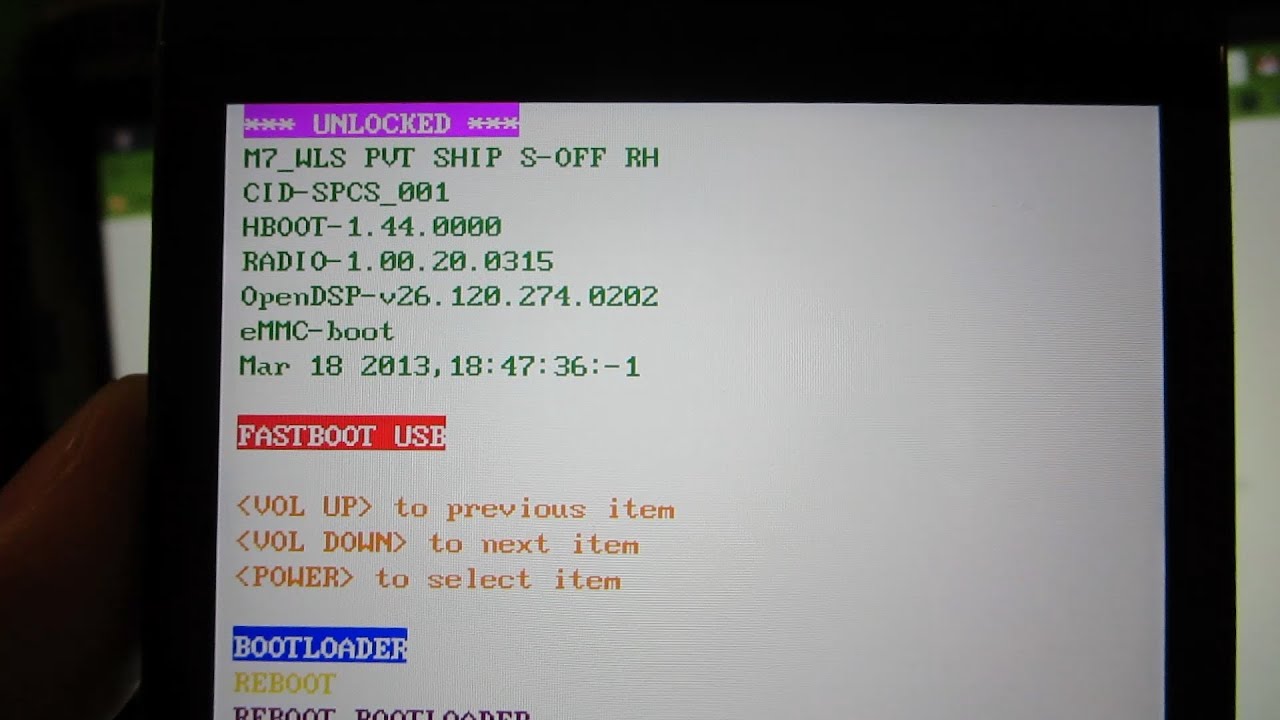
S-OFF for the HTC One!
Автор: wwjoshdew
Загружено: 2013-06-07
Просмотров: 23220
Описание:
-------- PLEASE CLICK "SHOW MORE" --------
Please Subscribe: http://tinyurl.com/wwjoshdew
If you Subscribe, you won't miss any new videos!
Customize your bootloader! - http://ow.ly/p4uE4
Why S-OFF? For stuff like this: http://bit.ly/13Nh3oY
I did not title this "HOW TO" for a reason... As it wasn't an instructional video by any means! Just recording my attempt at S-OFF, and it worked!
For a how to video, see here: • How to Get S-Off on Your HTC Device Using ...
All of my HTC One Videos: http://goo.gl/3Q6nP
Buy your HTC One Here: http://amzn.to/15bK1Cp
Buy the Black One here: http://amzn.to/GEpE8w
UPDATE! - http://i.imgur.com/paduy7l.png I got S-OFF yesterday and then RUU'd the latest build and had to redo this process again. I was LOCKED and was able to use the thread's instructions to get unlocked again! You do NOT have to be UNLOCKED to run this! I was LOCKED and NOT rooted, and it worked fine! revone will get you UNLOCKED without having to go to HTC Dev and unlock that way!
This is a REALLY ROUGH video, as I wasn't sure if it would work or not, but wanted to get it on video! So if you don't like it, I'm sorry. I just wanted to document my attempt to get S-OFF, and it worked!
This works on ALL VARIANTS of the HTC One!
XDA Thread Here: http://goo.gl/UX6gZ
Please follow me for the latest videos!
Twitter: / wwjoshdew
Facebook: http://fb.com/wwjoshdew
(Other Social Media links are below.)
Please Subscribe to my YouTube Channel.
You'll get notified as soon as I upload a new video!
Please Click Here: http://tinyurl.com/wwjoshdew
Click here for all of my videos: http://goo.gl/Up5lq
My Unlisted YouTube Videos: http://goo.gl/OPrdy
My Favorite YouTube Videos: http://goo.gl/wdhJZ
Watch me play games and live stream???
http://www.ustream.tv/channel/wwjoshdew
/ profile
(I'll Tweet when I'm live streaming.)
Please STALK ME with the links below!
Gaming Channel: http://goo.gl/TvigNm
2nd Channel: http://goo.gl/CkHcwh
Instagram: http://goo.gl/ojTFn
Vimeo: http://goo.gl/7Zt31v
Vine: http://goo.gl/66FEbk
GPlus: http://goo.gl/imdZ1
**** Android Rooting/Modifying Disclaimer ****
You are making these modifications to your device. You understand that I can't be held responsible if you do not follow directions and brick your device. You are the only person responsible if you brick your device, as you're the one choosing to modify your devices. You are voiding your warranty by rooting, making modifications, and install custom roms. There is a SOFT BRICK where you can recover your device with an RUU, SBF, TAR, or etc. Then there is a HARD BRICK where you can NOT recover your device and have to pay FULL PRICE for a new phone. I encourage you to watch the WHOLE VIDEO before following along and continuing to void your warranty. In most cases you can unvoid your warranty by flashing back to stock, as your carrier (in most cases) will NOT be able to tell you ever modified your device. With HTC, they do put "RELOCKED" on your bootloader, so that's an exception to the rule. With Samsung, they show how many times you've modified your device (a flash counter). You CAN reset it in most cases with Chainfire's TriangleAway app (Click here: http://goo.gl/VkHKL). You have been warned! Rooting (most of the time) is safe and a lot of times, noob proof. But not following directions CAN result in a soft or hard brick. Thank you for listening, if you read all of this!
Повторяем попытку...
Доступные форматы для скачивания:
Скачать видео
-
Информация по загрузке: