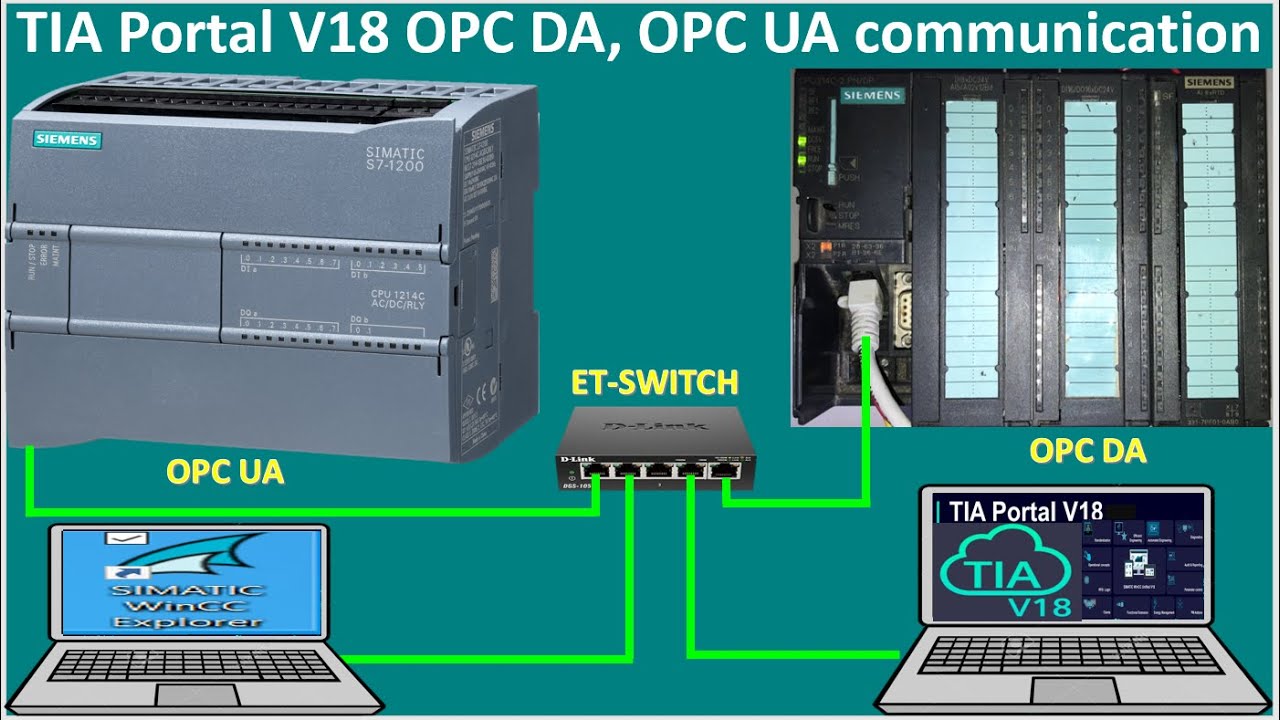
TIA Portal V18 connect with WinCC Explorer V8.0 OPC UA for PLC S7-1200 and OPC DA for PLC S7-300
Автор: General Technology Knowledge
Загружено: 2023-09-28
Просмотров: 1118
Описание:
Hello everyone!
Today I would like to show and share about TIA Portal V18 connect with WinCC Explorer V8.0 OPC UA for PLC S7-1200 and OPC DA for PLC S7-300 full tutorial.
If everyone have any questions please kindly drop comment under my videos or contact me by:
/ plc.scada.7564
Link below is related to PLCs programming:
PLC S7-200 Smart Subroutine Block connect with WinCC Explorer V8.0 SCADA
• PLC S7-200 Smart Subroutine Block connect ...
PLC S7-200 Smart OPC Server PC Access Smart link with WinCC Explorer V8.0 full tutorial
• PLC S7-200 Smart OPC Server PC Access Smar...
TIA Portal V18 WinCC Professional motors control TagPrefix full tutorial
• TIA Portal V18 WinCC Professional motors c...
WinCC Explorer V8.0 full tutorial step by step in 8 hours
• WinCC Explorer V8.0 full tutorial step by ...
WinCC Explorer V8.0 how to create analog alarms logging
• WinCC Explorer V8.0 how to create analog a...
How to Enable or Configure the Picture Tree and OS Project Editor in WinCC Explorer V8.0 SCADA
• How to Enable or Configure the Picture Tre...
WinCC Explorer V8.0 how to create digital alarms logging
• WinCC Explorer V8.0 how to create digital ...
WinCC Explorer V8.0 how to export trends value as excel/csv file
• WinCC Explorer V8.0 how to export trends v...
WinCC Explorer V8.0 open popup screen by using VB Script part2
• WinCC Explorer V8.0 open popup screen by u...
WinCC Explorer V8.0 open popup screen by using VB Script part1
• WinCC Explorer V8.0 open popup screen by u...
WinCC Explorer V8.0 step by step about screens navigation series in 8 hours
• WinCC Explorer V8.0 step by step about scr...
WinCC Explorer V8.0 create popup and control simulation without real PLCs part2
• WinCC Explorer V8.0 create popup and contr...
WinCC Explorer V8.0 create popup and control simulation without real PLCs part1
• WinCC Explorer V8.0 create popup and contr...
WinCC Explorer V8.0 faceplate connect with temperature sensors Part-2
• WinCC Explorer V8.0 faceplate connect with...
WinCC Explorer V8.0 faceplate connect with temperature sensors Part-1
• WinCC Explorer V8.0 faceplate connect with...
TIA Portal V18 Migration Tool convert data from SIMATIC V5.7 HF4 Manager to TIA Portal V18
• TIA Portal V18 Migration Tool convert data...
TIA Portal V18/WinCC Advanced screen navigation & control
• TIA Portal V18/WinCC Advanced screen navig...
7 types diagram using single button for control contactor or PLCs
• 7 types diagram using single button for co...
Full tutorial about WinCC faceplates, popup, screens navigation in 12 hours
• Full tutorial about WinCC faceplates, popu...
WinCC Explorer V8.0 faceplates tutorial Part-4| TIA Portal V18 tutorial| PLC S7-1500 tutorial
• WinCC Explorer V8.0 faceplates tutorial Pa...
WinCC Explorer V8.0 faceplates tutorial Part-3| TIA Portal V18 tutorial| PLC S7-1500 tutorial
• WinCC Explorer V8.0 faceplates tutorial Pa...
WinCC Explorer V8.0 faceplates tutorial Part-2| TIA Portal V18 tutorial| PLC S7-1500 tutorial
• WinCC Explorer V8.0 faceplates tutorial Pa...
WinCC Explorer V8.0 faceplates tutorial Part-1| TIA Portal V18 tutorial| PLC S7-1500 tutorial
• WinCC Explorer V8.0 faceplates tutorial Pa...
Export tags from SIMATIC Manager V5.7 to TIA Portal V18| PLC training| PLC tutorials| PLC simulation
• Export tags from SIMATIC Manager V5.7 to T...
WinCC Explorer V8.0 screens navigation and control| PLC S7-1200 training| PLCs S7-1200 tutorials
• WinCC Explorer V8.0 screens navigation and...
WinCC Explorer V8.0 how to create screen navigation and connect with PLC S7-300| PLCs training
• WinCC Explorer V8.0 how to create screen n...
Simatic manager connect with WinCC Explorer faceplates control | PLC S7-300
• Simatic manager connect with WinCC Explore...
Motor control STAR-DLETA by using PLC S7-300 & SIMATIC Manager software| PLC training| PLC tutorial
• Motor control STAR-DLETA by using PLC S7-3...
Motor control STAR-DLETA by using PLC S7-300 and SIMATIC Manager software| PLC training|PLC tutorial
• Motor control STAR-DLETA by using PLC S7-3...
PLC S7-1200 linked data with PLC S7-300 via Modbus TCP IP communication| PLC Siemens tutorials
• PLC S7-1200 linked data with PLC S7-300 vi...
PLC S7-300 connect with WinCC Explorer V8 via MPI PC Adapter cable|SIMATIC Manager V5.7 HF4 tutorial
• PLC S7-300 connect with WinCC Explorer V8 ...
TIA Portal V18 full tutorial in 12hours about animation, pop up and faceplates unified
• TIA Portal V18 full tutorial in 12hours ab...
PLC S7-1500 TIA Portal V18 web configure tags| TIA Portal V18 tutorial| SCADA configuration step
• PLC S7-1500 TIA Portal V18 web configure t...
PLC S7-1500 connect with PLC S7-300 via Modbus TCP communication Part-2
• PLC S7-1500 connect with PLC S7-300 via Mo...
PLC S7-1500 connect with PLC S7-300 via Modbus TCP communication Part-1
• PLC S7-1500 connect with PLC S7-300 via Mo...
TIA Portal V18 tutorial create program motor control logic by using single push button (NO) Part7
• TIA Portal V18 tutorial create program mot...
WinCC Explorer V8 connect with PLC S7-1500 via Modbus communication
• WinCC Explorer V8 connect with PLC S7-1500...
TIA Portal V18 tutorial create program motor control logic by using single push button (NO) Part6
• TIA Portal V18 tutorial create program mot...
How to simulation Electrical diagram 12hours start Motor1 then 12hours start Motor2 (3D Drawing)
• How to simulation Electrical diagram 12hou...
PLC S7-1500 (Slave) link data with PLC S7-300 (Master) via Profibus-DP communication
• PLC S7-1500 (Slave) link data with PLC S7-...
I'm also sorry if I have mistake in this video.
Please like share and subscribe my video also to get new notification and new video.
Good luck for everyone!
Thanks!
Повторяем попытку...
Доступные форматы для скачивания:
Скачать видео
-
Информация по загрузке:





![Modbus TCP/IP Wincc Runtime Advance TIA Portal [Connect Modbus TCP/IP Wincc RT Advance With S7-1200]](https://image.4k-video.ru/id-video/LWuMR6vkM-U)


