Volvo C30 S40 V50 C70 MID WalkThrough Radio Climate Control Vehicle Information
Автор: 4DIYers
Загружено: 2020-01-10
Просмотров: 131579
Описание:
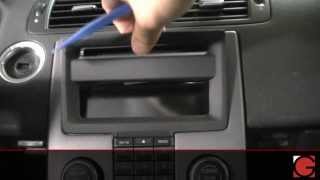
Video walkthrough on the multi information display, this includes the radio, climate control, and personal settings on a Volvo C30. This is a 2007 model, this also applied to the Volvo S40, V50, and C70 models and may apply to other models as well. On Volvos this is known as the waterfall and it’s basically an open design, having a waterfall shape and in behind there is a storage compartment. #volvo #volvoc30 #audio
Website: http://4diyers.com
Patreon: / 4diyers
Facebook: / 4diyers
Twitter: / 4diyers
Instagram: / 4diyers
Tumblr: / 4diyers
Pintrest: / 4diyers
Turn the key in the accessories position. This display basically controls all the user functions of the car. First is the am/fm controller, this is fairly self-explanatory and switches between the am and fm radio broadcasting.
The car is also equipped with a cd player that can read MP3s and auxiliary port which is located behind the waterfall. To toggle between those two audio sources, that is controlled by another button labeled mode on the other side of the cd eject. Pressing it activates the function, with the changed display, pressing it again switches between the cd and auxiliary options.
Next going into the menu, select the CD menu which has its own subsection. We can randomize the music on the disc, have that option off, or play a single folder. Pressing enter will toggle those options on or off. To go back to the subsection, press exit. We can display the disc’s text, meaning the name of the track.
And finally audio setting. Here we can separately set up the front and rear equalizers. The third option is adjusting the sound volume for the disc so you don’t have a large variation between the radio and cd music.
And the final option in this subsection is a reset.
Pressing exit, going back to the same menu, next going down the climate control settings.
First is the automatic fan speed and this is used for when the car first starts up, bringing the interior quickest to your set temperature. We have low, normal, and high presets.
A recirculation timer can be set up, this allows the air to recirculate for 3-12 minutes depending on the ambient temperature. And those settings can be reset. Back to the main menu and moving onto the car’s settings.
The same option can be used when unlocking the car too. The doors can also auto-lock. The next option is when unlocking the doors using the remote. Pressing the unlock button once can either unlock the driver’s door or all the doors. If only the driver’s door is unlocked, press the remove button again and all the doors unlock.
Approach lighting is an option on the remote. For home safe lighting, this is the duration the lights will remain on when the car is off after the high beam lever is pulled back. Information will show the vehicle’s VIN. Along with the number of keys registered to the car’s programming.
Exiting out of the menu preferences, on the display, it’ll show the climate control temperature, fan speed, what vents are activated, and track or radio station being played. Pressing enter on the button panel, this will pull up the cd’s folders.
Using the directional pad will allow you to scroll through all the folders. Entering one of the folders will bring up all the tracks within and here you can see the names displayed. Pressing the right direction on the pad will display more of the text, but there is a max character limit so it may not fully display the name. Pressing enter will play the track and exit brings you out of the folder, pressing exit another time brings you back to the main screen.
Pressing the tuning button, this will bring up the audio sound settings. You can then select the range by rotating the tuning knob. The tuning knob when on the main screen can either select radio stations or tracks on a cd too.
Pressing and holding the right or left movement on the main screen when having a cd activated will scroll faster through a track, skipping a few seconds at a time. Moving onto the climate control features, this car is equipped with dual climate control, meaning that the temperature can be adjusted separately for the left and right sides.
Pushing the button, a light will stay illuminated for one side and the other side will turn off. The side with the illuminating light is now being individually controlled. Pressing it again moves onto the opposite side. Then pressing it another time brings back both sides operating as one.
Thank you to all those who watch my videos and support my content. Don't forget to subscribe to my channel for future tutorial videos and like my video if you found it helpful. New videos are always being uploaded every week!
© 4DIYers 2013
All Rights Reserved
No part of this video or any of its contents may be reproduced, copied, modified or adapted, without the prior written consent of the author.
Повторяем попытку...

Доступные форматы для скачивания:
Скачать видео
-
Информация по загрузке:



![Руководство по обслуживанию дизельных двигателей Volvo 1.6D V50/C30/S40 [Масло и фильтры] 2011–20...](https://ricktube.ru/thumbnail/nIxwhM41Pd0/mqdefault.jpg)


