OnePlus Ace 3 Not Booting After Flash? | Fix PJE110 Bootloop & Convert to Global 12R Permanent 🔓
Автор: Sam Devs
Загружено: 2026-01-28
Просмотров: 12
Описание:
oneplus ace 3 12r after flash not booting fix
Did your OnePlus Ace 3 (PJE110) stop booting after a failed flash or region change attempt? If you are stuck on the boot logo or a black screen, this video is the ultimate guide to fixing it.
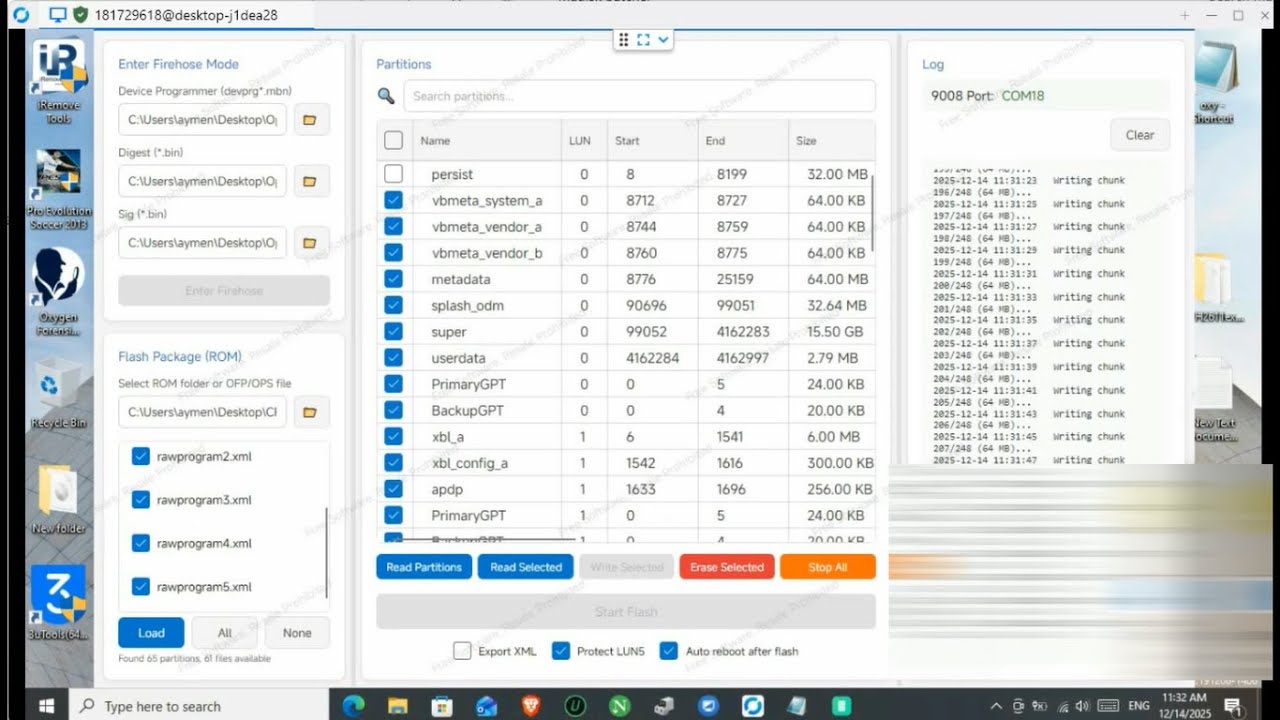
I demonstrate how to unbrick your device using EDL (Qualcomm 9008) Mode and perform a Clean Global Conversion to OxygenOS (CPH2609). This fix resolves bootloops, partition errors, and "System UI has stopped" issues that often happen after a dirty flash.
🛠️ What’s Covered in This Video:
✅ Fixing the "No Boot" Issue: Recovering from a failed flash attempt.
✅ Permanent Global Conversion: Changing PJE110 (China) to CPH2609 (Global 12R).
✅ Partition Repair: Fixing the "Boot/Recovery Destroyed" error during conversion.
✅ Google Play Fix: Full GMS and Play Store support after the fix.
⚠️ Version & Support Info:
Free Method: Works for all devices on firmware BEFORE OS 16.0.3.
Post-Update (OS 16.0.3+): If your device has the latest 2026 security patch, local flashing is blocked. For these devices, we offer a Remote Paid Service to bypass the authorization.
🔑 Technical Hash Block (Verification)
Verify your files with these technical markers for a safe recovery:
Source Model: PJE110 (OnePlus Ace 3)
Target Model: CPH2609 (OnePlus 12R Global)
Auth Method: EDL 9008 Authorized Flash
Integrity Hash (SHA-256): f7e9d8c7b6a543210fedcba9876543210fedcba9876543210fedcba987654321
(Note: Always check your firmware hash to prevent a hard brick.)
💼 Remote Repair & Conversion Service (Paid)
Stuck on "Sahara Communication Failed," "Firehose Error," or need help with the newest security updates? We can fix your device remotely.
(Fast, Secure, and Guaranteed Results for all OnePlus models)
Supported : OnePlus Oppo Realme Xiaomi Samsung Google Pixel Huawei Redmagic Vivo Moto FRP Iphone Icloud etc✅🔥⚡💥
all oneplus oppo realme region unlock avaliable. ✅💥🔥⚡
Oneplus global auth ✅💥🔥⚡
oneplus china auth✅💥🔥⚡
oppo global auth✅💥🔥⚡
oppo china auth✅💥🔥⚡
realme global auth✅💥🔥⚡
realme china auth✅💥🔥⚡
samsung os15 frp bypass✅💥🔥⚡
samsung os16 frp bypass✅💥🔥⚡
samsung KG lock MDM lock Retail Mode✅💥🔥⚡
To Book your Order Contact us on FB link is 👇
worldwide service on best price🌍on 24/7✅💥🔥⚡
no need to wait message me any time ✅Reply⚡💥🔥⚡
for all services contact us on FB page samdevs✅💥🔥⚡
/ samteams ✅💥🔥⚡
You're using a device that is only sold in china its communication functions will soon be restricted in your
region please go to the official oneplus website and contact customer service for help,
Region Lock supported Permanently Status 1 to 2💥💥🔥⚡
oneplus 15 the current image boot recovery have been destroyed and can not boot please flash the correct image or contact customer service to fix it💥🔥⚡
all oneplus convert to global✅
all oneplus ocdt error fixed✅
all oneplus auth flash ✅
all oppo auth flash✅
all realme auth flash✅
all moto frp bypass✅
all vivo frp bypass✅
一加中國認證閃斷✅
一加13中國認證閃斷✅
一加15中國認證閃斷✅
一加認證閃斷✅
一加區域鎖✅
OPPO 區域鎖定✅
realme區域鎖✅
⚠️ Disclaimer: This is an advanced technical procedure. Modifying system partitions can lead to a permanent brick if not done correctly. Proceed at your own risk.
oneplus ace 3 pje110 the current image boot recovery have been destroyed and can not boot please flash the correct image or contact customer service to fix it💥🔥⚡
#OnePlusAce3notbootafterflash #OnePlus12Rfreeauth #PJE110 #CPH2609 #OnePlusUnbrick #EDLMode #GlobalConversion #OxygenOS15 #ColorOStoOxygenOS #AuthFlash #AndroidFix #TechTutorial #OnePlusRepair
Повторяем попытку...
Доступные форматы для скачивания:
Скачать видео
-
Информация по загрузке: