Itel A50 Charging Problem Solution | USB Port | Sub Board Strip | PMIC Repair | Step by Step Guide
Автор: Mobile hardware solutions
Загружено: 2026-01-28
Просмотров: 30
Описание:
In this video, we provide a complete Itel A50 charging problem solution, covering issues such as:
No charging
Slow charging
USB port loose or damaged
Charging not detected
Sub-board strip failure
PMIC voltage output problems
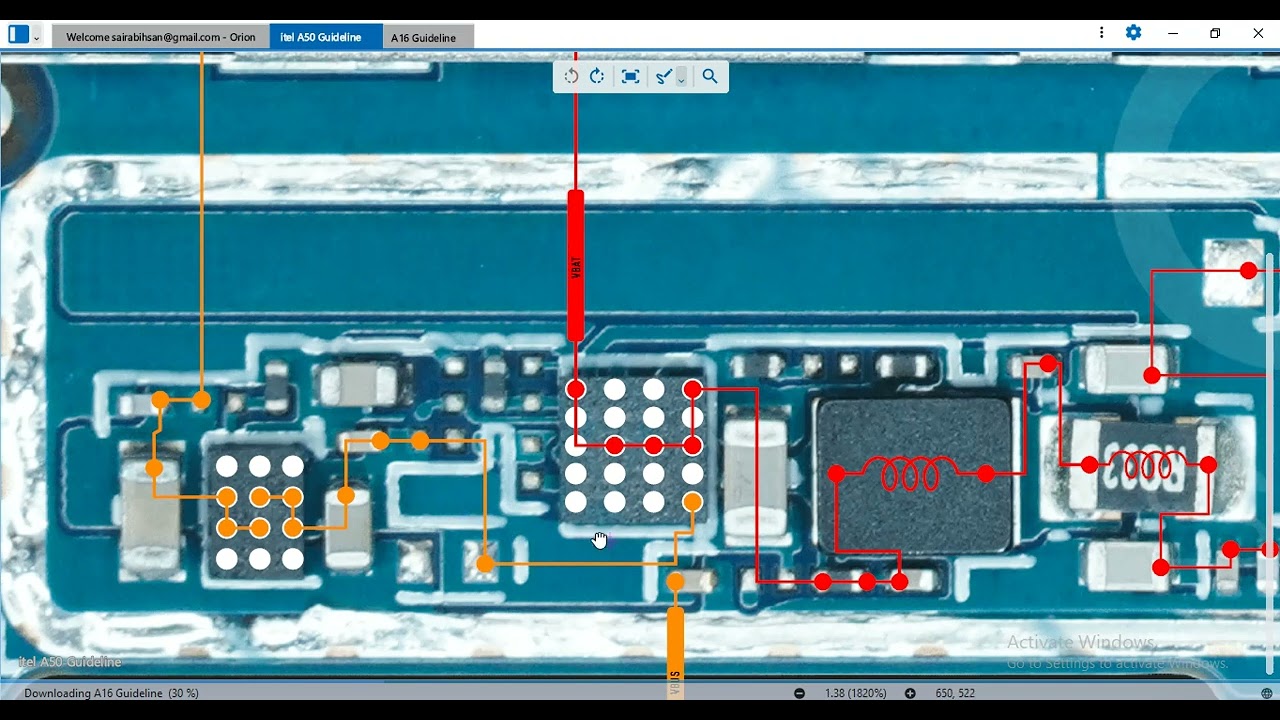
This board-level repair guide includes USB port inspection, sub-board strip testing, filter/diode check, PMIC voltage tracing, jumper solutions, and connector repair. Perfect for mobile repair technicians looking for step-by-step visual instructions.
🔍 30 Most Searching Titles
Itel A50 charging problem solution
Itel A50 USB port repair
Itel A50 no charging fix
Itel A50 slow charging solution
Itel A50 charging not detected repair
Itel A50 sub-board charging ways
Itel A50 motherboard charging repair
Itel A50 PMIC charging solution
Itel A50 USB port connector repair
Itel A50 charging line test
Itel A50 fast charging problem fix
Itel A50 sub-board strip solution
Itel A50 charging IC replacement guide
Itel A50 USB Type-C charging repair
Itel A50 battery not charging
Itel A50 charging voltage troubleshooting
Itel A50 motherboard charging line check
Itel A50 charging circuit repair
Itel A50 sub-board voltage output test
Itel A50 USB port continuity testing
Itel A50 charger not connecting solution
Itel A50 Type-C connector soldering repair
Itel A50 board-level charging fix
Itel A50 PMIC voltage output repair
Itel A50 USB data line troubleshooting
Itel A50 slow charging hardware solution
Itel A50 charging jumper point repair
Itel A50 charging port PCB replacement
Itel A50 mobile charging repair guide
Itel A50 complete charging problem hardware solution
🔧 30 Step-by-Step Repair Instructions
Power off Itel A50
Remove SIM tray
Heat and remove back cover
Disconnect battery connector
Unscrew mid-frame screws
Inspect USB port for physical damage
Clean port using isopropyl alcohol
Test charger and cable output
Inspect sub-board strip for continuity
Replace damaged strip if broken
Inspect motherboard charging lines
Measure 5V input at USB port
Trace VBUS to PMIC
Inspect fuses and filter capacitors
Test diodes on charging path
Replace faulty filters or diodes
Check USB D+ / D– data lines
Check PMIC charging enable signals
Test battery connector positive/negative lines
Test sub-board output voltage
Jumper charging lines if necessary
Reflow Type-C connector if loose
Reflow PMIC if voltage unstable
Replace PMIC if dead
Reconnect battery and test charging
Test fast charging detection
Verify stable voltage under load
Reassemble mid-frame
Fully assemble phone
Final QC charging test
#️⃣ Hashtags
#ItelA50 #ChargingProblem #USBPort #SubBoard #PMICRepair #MobileRepairGuide #MobileTechnician #BoardLevelRepair #ChargingStrip #BatteryNotCharging #USBPortRepair #FastChargingFix #MobileHardwareRepair #StepByStepRepair #ItelRepair
Повторяем попытку...
Доступные форматы для скачивания:
Скачать видео
-
Информация по загрузке: