Learn This and Build a 3D Warehouse Faster Than You Think – Step-by-Step Tutorial
Автор: Tarakos - Virtual made Reality
Загружено: 2025-11-24
Просмотров: 139
Описание:
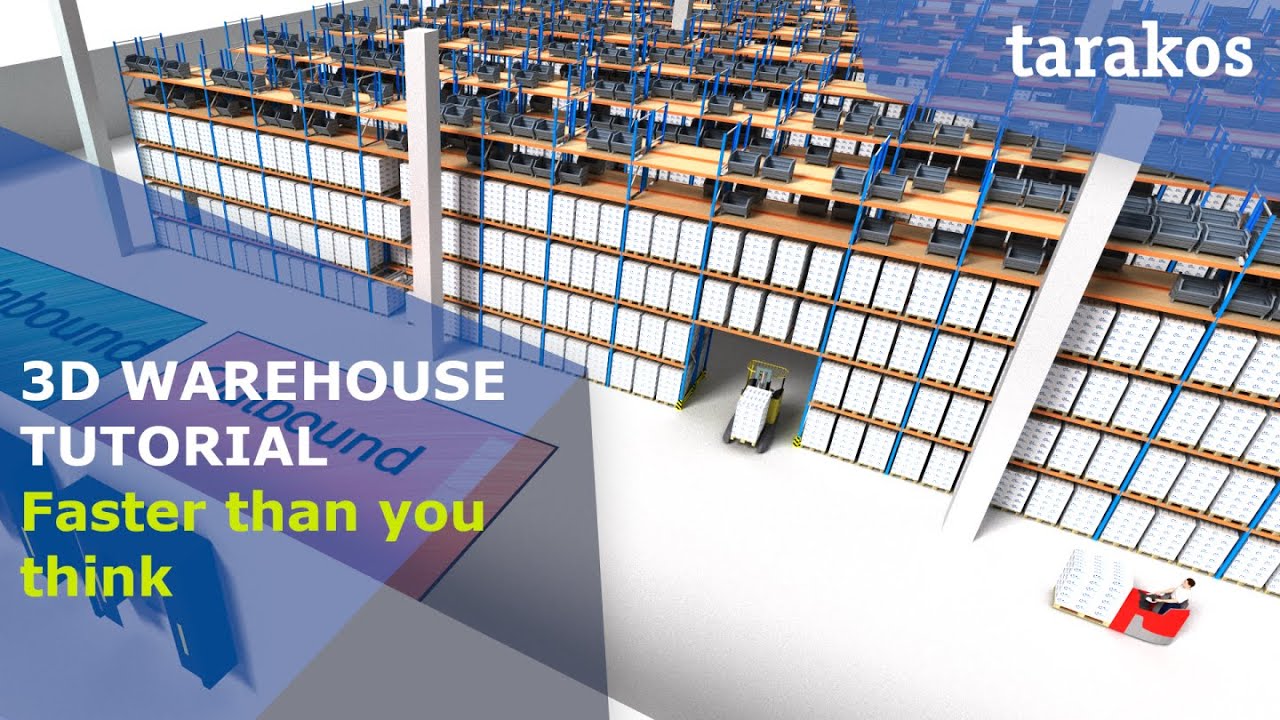
If you’re working in warehouse design, intralogistics projects or automation layout planning, this video shows you how to build a convincing 3D warehouse model fast – ready for customer presentations, internal decision-making and training.
Plan a 3D warehouse without classic CAD skills – in this step-by-step tutorial you’ll learn how to build a representative 3D warehouse model in taraVRbuilder in a very short time.
Perfect for warehouse planners, logistics engineers, 3PLs, system integrators and intralogistics consultants who need to present layouts clearly to customers and stakeholders.
Starting from a 2D layout (e.g. DXF from AutoCAD), you’ll see how to create a fully walkable 3D warehouse – including building, pallet racks, buffer areas, shop floor zones, routes, vehicles and animated workers. This is made possible through:
Extensive libraries for building components
An integrated rack configurator for pallet racking
Shop floor modules for inbound and outbound
Buffer blocks
Predefined animation modules for vehicle and pedestrian movements
Smart assistant functions to generate and modify complete rack areas and hall grids automatically
Ideal for: concept design, bid & proposal layouts, customer presentations, intralogistics projects and teaching logistics / industrial engineering.
Chapters
0:00:03 – Import 2D Plan - Import a 2D layout (DXF from AutoCAD) as the basis for your 3D warehouse.
0:00:21 – Create Own Library - Create a project-specific favorites library to place frequently used objects faster.
0:00:58 – Create Building - Build the warehouse shell with walls and doors – hall geometry in just a few clicks.
0:02:38 – Create Pillars via Grid - Automatically generate pillars in a defined grid pattern.
0:03:44 – Create Racks - Create pallet racks and define number of aisles, aisle width, etc.
0:04:44 – Configure Rack Groups - Set rack length, number of bays and pallet positions per bay.
0:05:10 – Select Stored Goods - Assign types of stored goods to different rack areas.
0:05:42 – Storage Zones - Define storage zones – which goods belong in which rack section.
0:06:26 – Cut Throughs in Racks - Create drive-throughs and passages in racks for forklifts and traffic routes.
0:07:07 – Add Beams and Shelves - Configure rack equipment (beams, shelves, depth supports, etc.).
0:08:20 – Widen Passageways - Widen passages and aisles to optimize traffic and safety.
0:08:34 – Add Ram Protection - Add rack protection to visualise safety elements.
0:09:25 – Walkthrough - Interactively walk through the warehouse in 3D.
0:09:40 – Define Shop Floor - Define shop floor areas for inbound and outbound, color-code and label them.
0:11:04 – Workers, Paths and Buffers - Define buffer areas, transport routes and assign vehicle types.
0:12:11 – Set Conveying Speed - Set conveying speeds to make movements more realistic.
0:12:44 – Place Some Pallets - Fill storage locations with pallets and load units.
0:12:58 – Sort Project Tree - Structure the project tree and organize objects logically.
0:13:34 – Add More Storage - Add more buffer areas and additional storage zones.
0:15:20 – Warehouse Tour - Guided tour through the finished 3D warehouse model.
Who is this tutorial for?
Warehouse & logistics planners
3PLs and logistics service providers
Material handling & intralogistics system integrators
Sales & application engineers who present layouts to customers
Universities & technical colleges teaching logistics / industrial engineering
If you are involved in warehouse design, intralogistics projects or automation layout planning, this video shows how to create a convincing 3D warehouse model quickly – ready for customer meetings, management decisions and training.
Want to design and present your own warehouse layouts in 3D?
Request taraVRbuilder and test it yourself: https://www.tarakos.de/taravrbuilder....
3D-Lagerhaus planen ohne CAD – in diesem Tutorial siehst du Schritt für Schritt, wie du mit taraVRbuilder in kurzer Zeit ein repräsentatives 3D-Modell deines Warenlagers aufbaust.
Ideal für Lagerhausplaner, Logistikplaner, 3PLs und Intralogistik-Berater, die ihren Kunden Layouts schnell und verständlich präsentieren möchten.
Du lernst, wie du aus einem 2D-Grundriss (z. B. DXF aus AutoCAD) ein voll begehbares 3D-Lagerhaus generierst – inklusive Gebäude, Palettenregalen, Pufferflächen, Shopfloor-Bereichen, Fördertechnik-Elementen, Fahrwegen und animierten Fahrzeugen/Personen. Und das alles ohne klassische CAD-Kenntnisse, dank:
Umfangreicher Bibliotheken für Gebäudeteile
Integriertem Regalkonfigurator
Shopfloor-Modulen für Inbound/Outbound
Pufferbausteinen und zusätzlichen Lagerflächen
Vordefinierten Animationsbausteinen für Fahrzeuge und Personen
Smarten Assistenzfunktionen, um ganze Regalbereiche und Hallenraster automatisch zu erzeugen und zu verändern
Perfekt für: Konzeptplanung, Angebotserstellung, Kundenpräsentationen und Ausbildung von Logistikern & Wirtschaftsingenieuren.
Повторяем попытку...
Доступные форматы для скачивания:
Скачать видео
-
Информация по загрузке: