SAP Query - Set up JOINs properly | Left outer JOIN
Автор: ERP UP
Загружено: 2023-11-14
Просмотров: 10499
Описание:
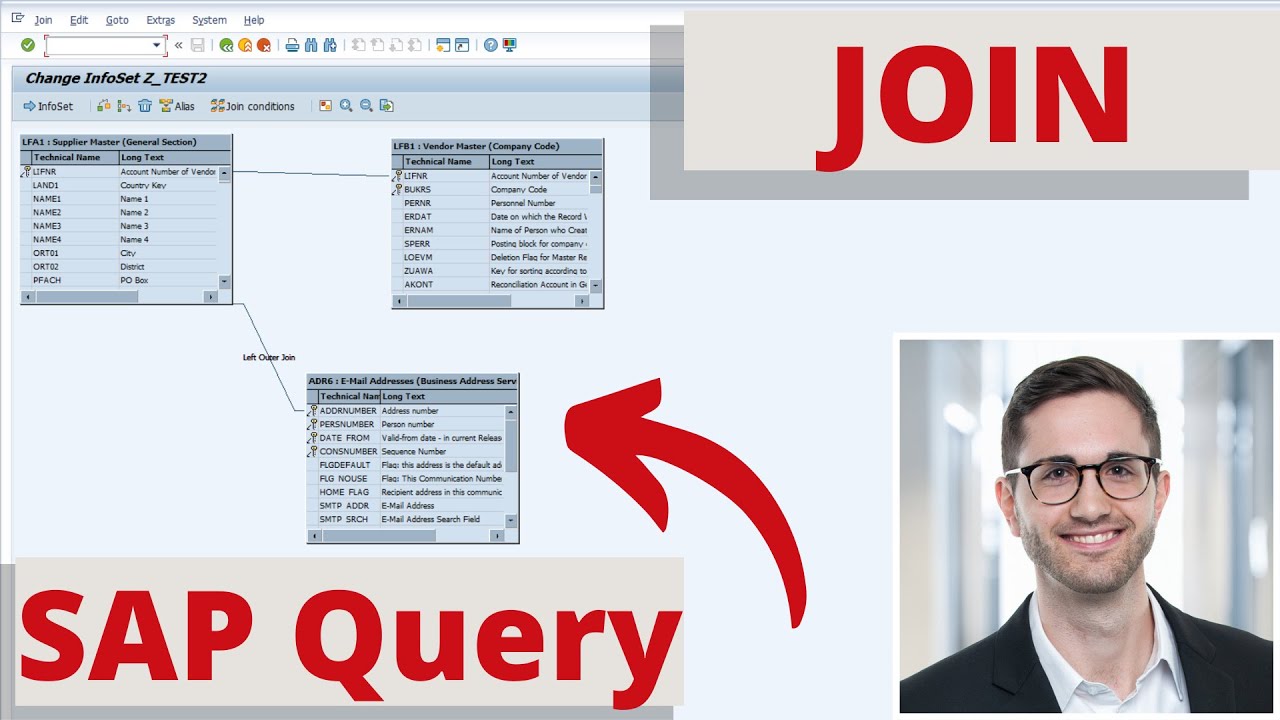
If you notice that a desired entry is missing from the list output, although it exists in the database table, this may be due to the join in the info set.
In a join, the desired result is transferred to the list output if a valid entry can be found in both join tables. If an entry is missing in one table and there is no intersection, no result at all is returned for that condition/row.
It is therefore quite possible that a supplier's address data is incomplete or not maintained at all. If you now link the two tables LFA1 and ADR6, there is an entry for a supplier in table LFA1, but not in table ADR6. This means that one of the vendors does not appear in the output at all.
This problem can be easily avoided by using a left outer join. In this case, the entry in the first table is always output, even if there is no entry in the second table. As in the example above, the vendor data from table LFA1 is present and the corresponding fields from table ADR6 are empty.
You can easily set the join condition in the join definition (Ctrl + Shift + F6) in the InfoSet (transaction SQ02). Left-click on the join line and select "left outer join".
Like, comment and subscribe. Thank you for your support :)
▬ Content ▬▬▬▬▬▬▬▬▬▬▬▬
00:00 - JOIN in SAP Query
03:06 - Left outer JOIN in SAP Query
03:55 - Outro
▬ Music Intro/Outro ▬▬▬▬▬▬▬▬▬▬▬▬
Oh My - Patrick Patrikios
Feels - Patrick Patrikios
▬ Useful links ▬▬▬▬▬▬▬▬▬▬▬▬
German Blog: https://erp-up.de/blog/
My book recommendations: https://erp-up.de/book-recommendation...
100 Tips and Tricks in SAP ERP: https://www.udemy.com/course/100-tips...
Support ERP UP: https://erp-up.de/support-erp-up/
Support ERP UP over Amazon: https://amzn.to/3f40uSG
PayPal-Donation: https://www.paypal.com/paypalme/andre...
Linkedin: / andreas-geiger
Xing: https://www.xing.com/profile/Andreas_...
Повторяем попытку...
Доступные форматы для скачивания:
Скачать видео
-
Информация по загрузке: