ycliper

Популярное

Музыка Кино и Анимация Автомобили Животные Спорт Путешествия Игры Юмор

Интересные видео

2025 Сериалы Трейлеры Новости Как сделать Видеоуроки Diy своими руками

Топ запросов

смотреть а4 schoolboy runaway турецкий сериал смотреть мультфильмы эдисон
Скачать

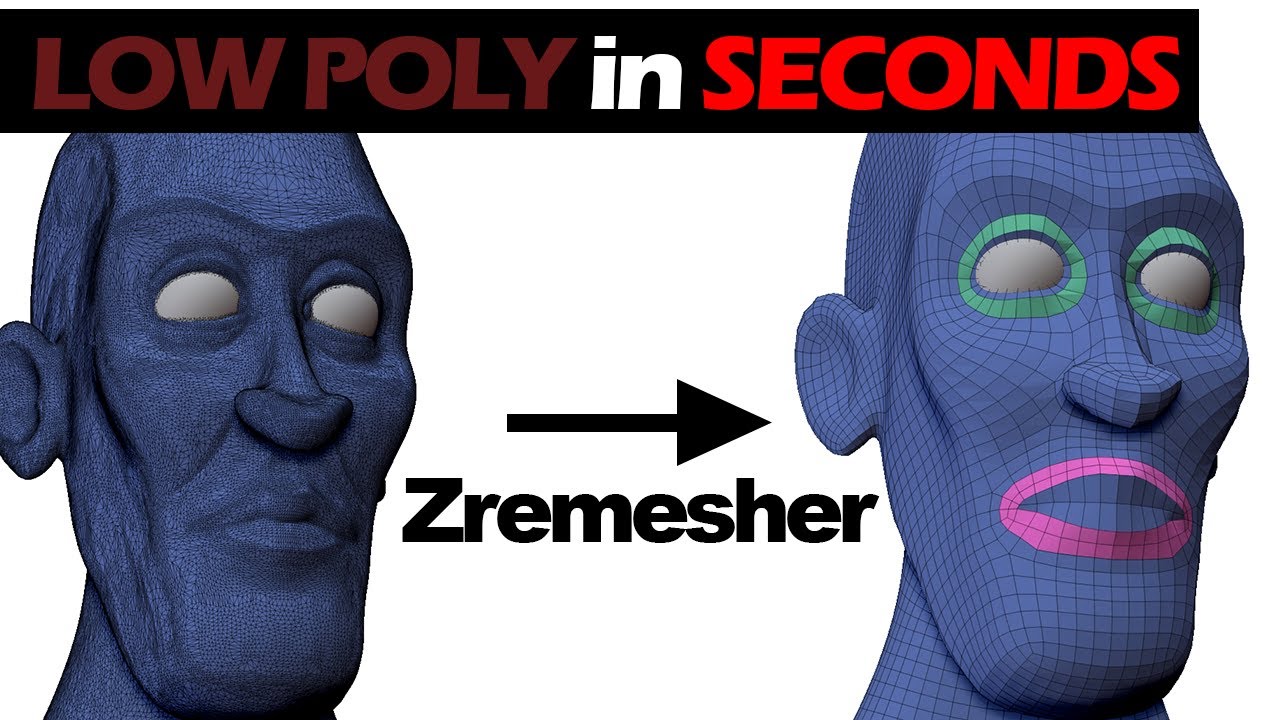
Auto RETOPOLOGY With Zremesher | Zbrush Retopology Tutorial.

Автор: Starving Animator

Загружено: 2024-02-08

Просмотров: 11582

Описание: Zremesher is super effective to create low poly models with just a few clicks. The topology is not going to be perfect, but for many models you might not need it. This is just a quick step-by-step guide for those of you who are new and in a hurry!

There's methods to get even better topology with Zremesher than the default 1 click option. In the video I go through Adaptive Size and the Zremesher Guide Brush to add some control to the process. But these are just some of the tools to get a better Zremeshed model.

Please consider Subscribing for tutorials and more 3D content ! Leave a question in the comments if you have any or just say hi ! :)

What You’ll Find on my Youtube Channel:
Both In-Depth and Quick Tutorials: Dive into our step-by-step tutorials covering ZBrush, Blender, Maya and other powerful sculpting software. Learn techniques for character design, organic shapes, and intricate details.

Inspiring Showcases: Feast your eyes on sculptures and animations. I showcase my work and projects hopefully providing inspiration and motivation for your own projects.

Behind-the-Scenes: Peek behind the curtain as we reveal my creative process. From concept sketches to the final render, you’ll witness the magic of 3D and VFX unfold.

Community Interaction: As a tutor and an artist I love watching others work and interact with fellow artists. Share your work, ask questions, and connect with fellow sculptors. I believe in lifting each other up and celebrating artistic growth.

ABOUT ZBRUSH and DIGITAL SCULPTING:
ZBrush is the industry standard digital sculpting software that empowers artists, designers, and creators worldwide. Developed by Pixologic, it combines 3D and 2.5D modeling, texturing, and painting into a powerful creative tool.

Digital Sculpting and Painting: ZBrush allows you to sculpt and paint virtual clay in a real-time environment. Imagine having the freedom to shape and texture your creations just as you would with physical clay.

Limitless Creativity: With ZBrush, your imagination is the only limit. You can create intricate models and illustrations that push the boundaries of what’s possible. Whether you’re a film studio artist, game developer, jewelry designer, or illustrator, ZBrush provides the tools you need to stand out in today’s fast-paced industry.

ZBrush is not just software; it’s an art tool crafted by artists, for artists. It empowers you to bring your creative visions to life, whether you’re sculpting characters, designing props, or exploring new worlds.

Не удается загрузить Youtube-плеер. Проверьте блокировку Youtube в вашей сети.
Повторяем попытку...
Auto RETOPOLOGY With Zremesher | Zbrush Retopology Tutorial.

Поделиться в:

Доступные форматы для скачивания:

Скачать видео

  • Информация по загрузке:
Скачать аудио

Похожие видео

How to POSE in ZBRUSH | Transpose Master | QUICK Tutorials

How to POSE in ZBRUSH | Transpose Master | QUICK Tutorials

5 советов по автоматической ретопологии в ZBrush

5 советов по автоматической ретопологии в ZBrush

Cleaner Topology with Poly Group It - Zbrush 2021

Cleaner Topology with Poly Group It - Zbrush 2021

Face Retopology Tutorial: Step-by-Step Guide to Perfecting Your 3D Model

Face Retopology Tutorial: Step-by-Step Guide to Perfecting Your 3D Model

How To SCULPT EYES | Simple Eyelids Made Easy | Zbrush Quick Tutorials

How To SCULPT EYES | Simple Eyelids Made Easy | Zbrush Quick Tutorials

How to successfully sculpt Male, Female and Baby Faces | Couch Wisdoms

How to successfully sculpt Male, Female and Baby Faces | Couch Wisdoms

How to use ZREMESHER to create efficient TOPOLOGY in ZBRUSH | Tutorial

How to use ZREMESHER to create efficient TOPOLOGY in ZBRUSH | Tutorial

How to SCULPT LIPS  | Zbrush QUICK Tutorials

How to SCULPT LIPS | Zbrush QUICK Tutorials

ZBrush - Z-REMESHER: объяснение (за 3 МИНУТЫ!!)

ZBrush - Z-REMESHER: объяснение (за 3 МИНУТЫ!!)

Экспорт моделей и карт из ZBrush | Карты Normal и Displacement | CG скульптинг, уроки на русском

Экспорт моделей и карт из ZBrush | Карты Normal и Displacement | CG скульптинг, уроки на русском

Quick and easy retopology of head in Zbrush (with bonus UV mapping)

Quick and easy retopology of head in Zbrush (with bonus UV mapping)

Из ZBrush в Maya и ZBrush — ретопология и UV-развертка с помощью Quad Draw

Из ZBrush в Maya и ZBrush — ретопология и UV-развертка с помощью Quad Draw

047 ZBrush 2018 Polypainting For PolygroupIt

047 ZBrush 2018 Polypainting For PolygroupIt

Введение в ТОПОЛОГИЮ для игровых персонажей!

Введение в ТОПОЛОГИЮ для игровых персонажей!

Zremesher - Все настройки ОБЪЯСНЕНЫ!

Zremesher - Все настройки ОБЪЯСНЕНЫ!

Zbrush Face retopology EASY - Zbrush 2022

Zbrush Face retopology EASY - Zbrush 2022

Intro to ZBrush 045 - Use ZRemesher to auto retopologize your meshes for nice, even geometry!!

Intro to ZBrush 045 - Use ZRemesher to auto retopologize your meshes for nice, even geometry!!

ZBrush — извлечение брони (за 2 минуты!!)

ZBrush — извлечение брони (за 2 минуты!!)

Zbrush Beginner Tutorial | Learn Zbrush in 40 min!

Zbrush Beginner Tutorial | Learn Zbrush in 40 min!

Подразделения против Dynamesh в ZBrush

Подразделения против Dynamesh в ZBrush

© 2025 ycliper. Все права защищены.


  • Контакты
  • О нас
  • Политика конфиденциальности


Контакты для правообладателей: [email protected]