How to use the sketch carving toolpath | 2.5D Toolpaths | V12.5 Tutorials
Автор: Vectric Ltd
Загружено: 2025-05-27
Просмотров: 2921
Описание:
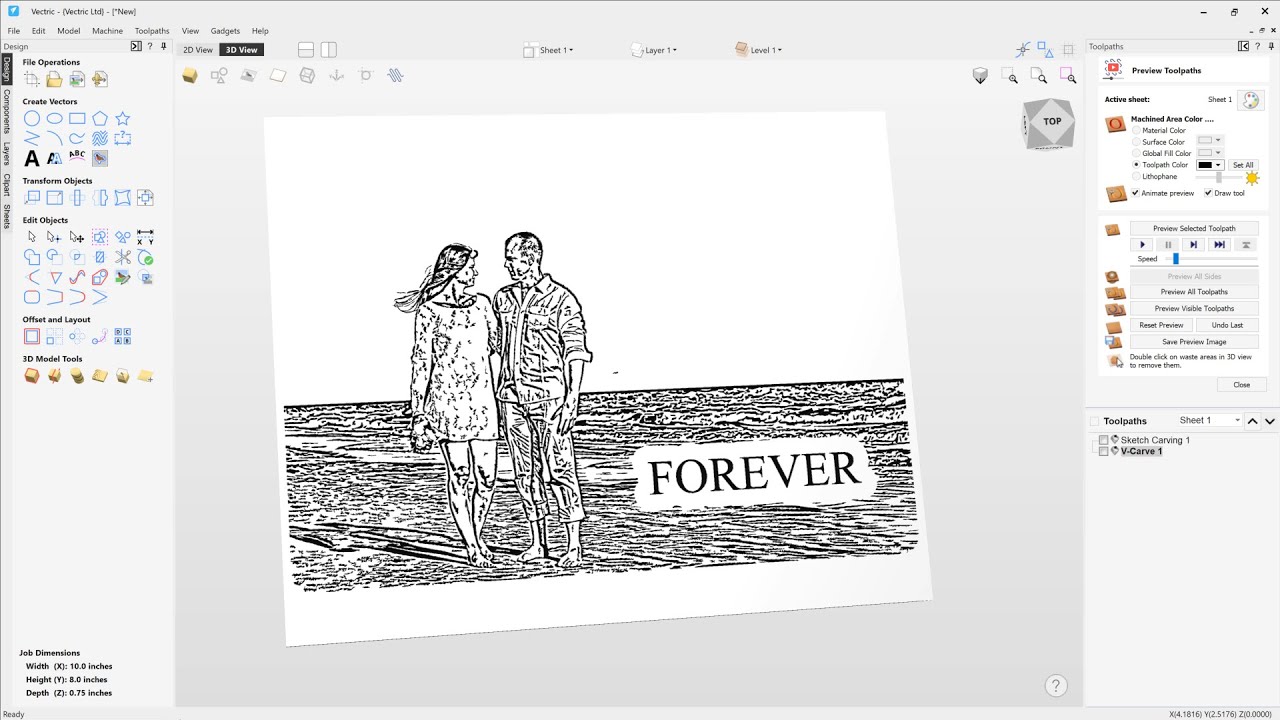
In this tutorial we will illustrate how sketch carving can take a high quality image or a 3D model and create a v-carved toolpath that picks out the key parts of your source imagery. The resulting toolpaths are quicker to machine than a 3D toolpath, and produce impressive stylistic results without much extra work required from the user.
BOOKMARKS:
~ Sketch Carve A Bitmap - 00:58
~ Sketch Carve Toolpath - 04:56
~ Sketch Carve - Boundry - Vectors - 08:33
~ Adding Text - 10:01
~ Sketch Carving A 3D Model - 11:48
~ Material Setup - 13:06
~ Sketch Carve Toolpath - 15:06
~ Adding Text - 18:30
~ Adding a thicker object outline - 19:03
To download the files used in this tutorial, view related videos or take advantage of our bookmarking system within the videos please head over to the support section of our website here:
https://www.vectric.com/support/tutor...
#Vectric #CNCsoftware #CNCtutorial #VectricSoftware #CNCsoftwaretutorial #CNC #sketchcarving #sketchcarve #toolpaths #2.5D
Subscribe to Vectric on YouTube: / vectric
See more Vectric tutorial videos and downloadable files: https://www.vectric.com/support/tutor...
Vectric on Facebook: / vectric
Vectric on Instagram: / vectricltd
Повторяем попытку...
Доступные форматы для скачивания:
Скачать видео
-
Информация по загрузке:


