ycliper

Популярное

Музыка Кино и Анимация Автомобили Животные Спорт Путешествия Игры Юмор

Интересные видео

2025 Сериалы Трейлеры Новости Как сделать Видеоуроки Diy своими руками

Топ запросов

смотреть а4 schoolboy runaway турецкий сериал смотреть мультфильмы эдисон
Скачать

Instant Photoshop Depth Map: Output Depth Map Only Trick

Автор: What Make Art

Загружено: 2025-09-11

Просмотров: 940

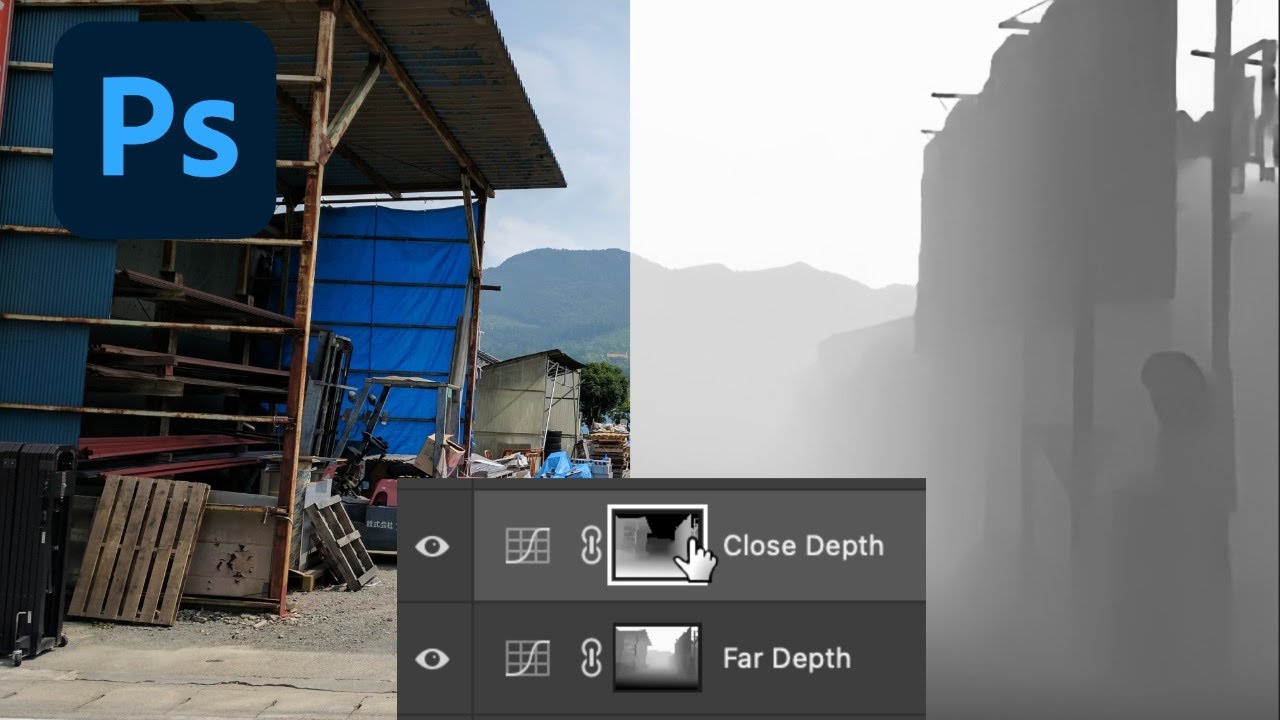
Описание: Create a clean depth map in Photoshop in minutes using Neural Filters (Depth Blur) and turn it into a reusable alpha channel. Then use layer masks with Curves and Hue/Saturation to add realistic atmospheric perspective—lowering contrast and saturation in the distance while boosting clarity and color in the foreground. Perfect for portraits, landscapes, and product shots when you want fast, controllable depth-based edits.

You’ll learn how to: open Depth Blur and output a depth map only, save the selection as an alpha channel, build separate “far” and “close” masks, flip masks, and make targeted tonal and color adjustments with pro tips like Ctrl/Cmd-click to load masks and Alt/Option-click to compare changes.

Chapters
0:00 What is a depth map?
0:11 Open Neural Filters (Depth Blur)
0:25 Output Depth Map Only preview explained
0:35 Output to a new layer
0:46 Make a selection from the depth map
1:01 Create adjustment layer to generate Alpha 1
1:16 Save and prep the depth channel
1:31 Curves setup for depth masking
1:43 Invert/flip the close vs. far mask
1:58 Far depth: lower contrast with Curves
2:17 Close depth: increase contrast for foreground
2:32 Quick before/after with Alt/Option
2:43 Reusing masks for new adjustments
2:57 Far depth: lower saturation
3:11 Close depth: raise saturation
3:22 Recap and workflow tips

Key steps covered
• Filter → Neural Filters → Depth Blur → Output Depth Map Only
• Channels: Ctrl/Cmd-click a channel icon to load a depth selection
• Save it as Alpha (rename to “Depth Map” for safekeeping)
• Build two adjustment layers (Curves): Far Depth and Close Depth
• Invert one mask (Ctrl/Cmd + I) so background vs. foreground are separated
• Lower contrast/saturation in the distance; increase contrast/saturation up close
• Alt/Option-click the layer eye for quick before/after

Shortcuts used
Load selection from channel/mask: Ctrl/Cmd + click
Invert mask: Ctrl/Cmd + I
Solo layer visibility: Alt/Option + click layer eye
Duplicate layer: Right-click → Duplicate

Hashtags
#Photoshop #DepthMap #NeuralFilters

Не удается загрузить Youtube-плеер. Проверьте блокировку Youtube в вашей сети.
Повторяем попытку...
Instant Photoshop Depth Map: Output Depth Map Only Trick

Поделиться в:

Доступные форматы для скачивания:

Скачать видео

  • Информация по загрузке:

Скачать аудио

Похожие видео

Have you seen this HIDDEN WAY to make Depth-Based Adjustments in Photoshop?

Have you seen this HIDDEN WAY to make Depth-Based Adjustments in Photoshop?

Как использовать карты глубины в Photoshop. Урок #Nucly

Как использовать карты глубины в Photoshop. Урок #Nucly

Golden Yellow Roses Painting | Elegant Floral Art for Relaxation & Home Decor | Screensaver

Golden Yellow Roses Painting | Elegant Floral Art for Relaxation & Home Decor | Screensaver

Create Heightmaps From ANY Image! (Is It REALLY That Easy?)

Create Heightmaps From ANY Image! (Is It REALLY That Easy?)

DaVinci Resolve AI Depth Map in 3 Minutes

DaVinci Resolve AI Depth Map in 3 Minutes

MAPA de Profundidad MANUAL con PHOTOSHOP | Alain Perdomo

MAPA de Profundidad MANUAL con PHOTOSHOP | Alain Perdomo

Как использовать карты глубины Photoshop для размытия фона (эффект малой глубины резкости)

Как использовать карты глубины Photoshop для размытия фона (эффект малой глубины резкости)

Как улучшить качество изображения | Нейросети апскейлеры | Метод AI + Photoshop подробная инструкция

Как улучшить качество изображения | Нейросети апскейлеры | Метод AI + Photoshop подробная инструкция

Мастер высокодетализированных карт глубины для лазерной гравировки с ЧПУ и 3D-печати!

Мастер высокодетализированных карт глубины для лазерной гравировки с ЧПУ и 3D-печати!

10 SECRETS To Make Your Photography Look 3D (&

10 SECRETS To Make Your Photography Look 3D (& "POP!")

This HIDDEN Masking Tool Will Change How You Edit Photos

This HIDDEN Masking Tool Will Change How You Edit Photos

Is this the new KING of AI depth maps for laser?

Is this the new KING of AI depth maps for laser?

ПРЕВОСХОДНЫЙ дизайн рекламы манипуляции продуктом ✅🔥 Полный урок по Photoshop

ПРЕВОСХОДНЫЙ дизайн рекламы манипуляции продуктом ✅🔥 Полный урок по Photoshop

Это ИЗМЕНИЛО мой подход к редактированию... Изучите кривые Lightroom за 20 минут

Это ИЗМЕНИЛО мой подход к редактированию... Изучите кривые Lightroom за 20 минут

Photoshop's Hidden Depth Mask: Make Photos Look 3D!

Photoshop's Hidden Depth Mask: Make Photos Look 3D!

How To INSTANTLY Make Your Photoshop COMPOSITES Better With Atmospheric Perspective!

How To INSTANTLY Make Your Photoshop COMPOSITES Better With Atmospheric Perspective!

Для Чего РЕАЛЬНО Нужен был ГОРБ Boeing 747?

Для Чего РЕАЛЬНО Нужен был ГОРБ Boeing 747?

El SECRETO de la LUZ PERFECTA gracias al MAPA de PROFUNDIDAD en Photoshop | Alain Perdomo

El SECRETO de la LUZ PERFECTA gracias al MAPA de PROFUNDIDAD en Photoshop | Alain Perdomo

Photoshop: Perspective Technique For Awesome Composite Images!

Photoshop: Perspective Technique For Awesome Composite Images!

Speed Up 3D Compositing: Material, Object and Depth Masks from 3D Stager to Photoshop

Speed Up 3D Compositing: Material, Object and Depth Masks from 3D Stager to Photoshop

© 2025 ycliper. Все права защищены.


  • Контакты
  • О нас
  • Политика конфиденциальности


Контакты для правообладателей: [email protected]