ycliper

Популярное

Музыка Кино и Анимация Автомобили Животные Спорт Путешествия Игры Юмор

Интересные видео

2025 Сериалы Трейлеры Новости Как сделать Видеоуроки Diy своими руками

Топ запросов

смотреть а4 schoolboy runaway турецкий сериал смотреть мультфильмы эдисон
Скачать

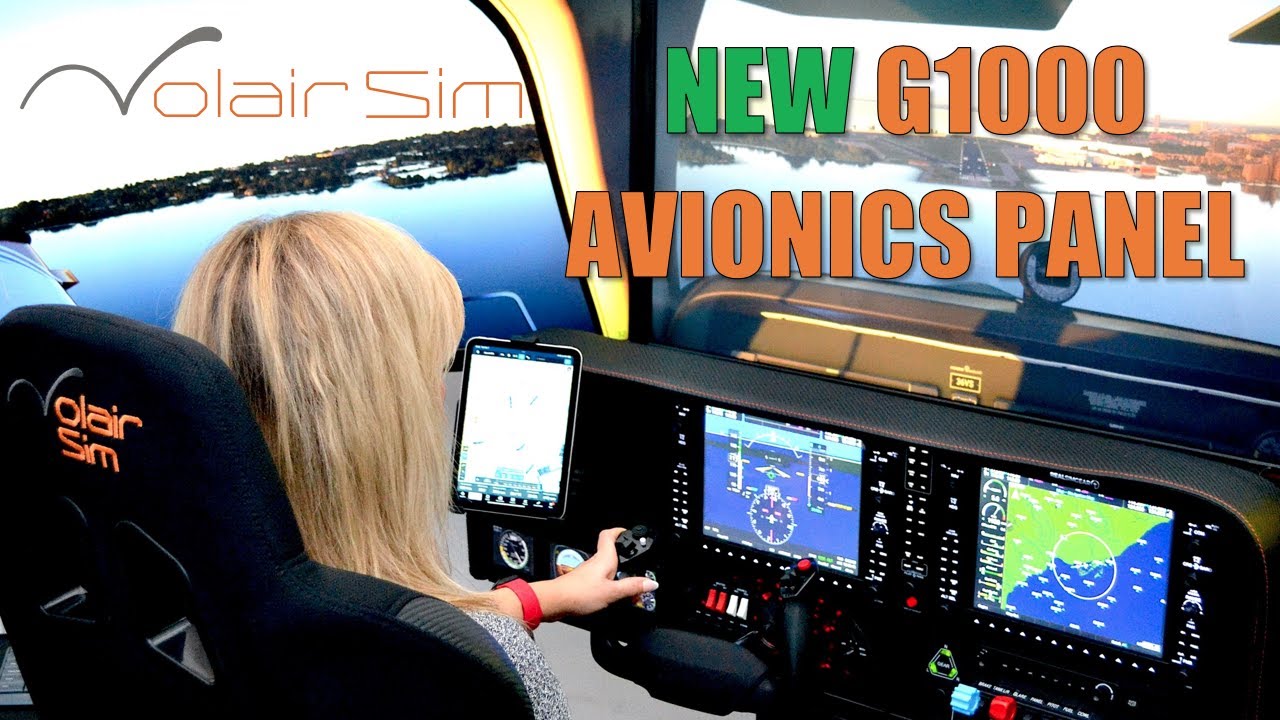
Volair Sim Avionics Panel for the G1000 Suite from RealSimGear

Автор: Volair Sim

Загружено: 2023-05-08

Просмотров: 4163

Описание: Volair Sim Avionics Panel G1000 for use with the RealSimGear (RSG) G1000 Avionics Suite.
Designed to seamlessly integrate with the Volair Sim Chassis.
To order, please visit: https://volairsim.com/product/volair-...

Volair Sim Avionics Panel G1000 is compatible with the following accessories:

Volair Sim chassis (all versions)
RealSimGear G1000 Suite (PDF, MFD, GMA audio panel)
Honeycomb Bravo Throttle Quadrant
Logitech Pro Flight Instruments

Compatible with the following yokes:

Honeycomb Alpha Yoke
Yoko Yoke
Brunner Yoke
Logitech (Saitek) Yoke

Features:

Attaches in minutes to your Volair Sim cockpit (no drilling)

Powder-coated steel construction with padded carbon-fiber-look glare-shield with hand-stitching
Includes seat riser kit which allows Volair Sim Chassis users to increase seat height by 3” to improve monitor visibility over the panel glare-shield

AMPS STANDARD (38mmx30mm) ball mount drill pattern and space for attaching a tablet (e.g. iPad or iPad mini). Note: Ball mount is not provided.
Example: RAM Mounts Ball Adapter with AMPS Plate RAM-B-347U with B Size 1" Ball

Up to two (2) Logitech (Saitek) Pro Flight (rectangular) instruments. One instrument can be mounted to the left of Yoke. Second instrument can be mounted in the space reserved for the Honeycomb Bravo Throttle Quadrant using the provided adapter plate.

Up to three (3) Logitech (Saitek) Flight Instrument Panels (e.g. Airspeed Indicator, Attitude Indicator, and Altimeter as back-up instruments) that can be mounted using the provided adapter plate.

Please see the Video Overview and the Installation Manual

NOTE: G1000 PDF and MDF, electronic components or controllers are NOT included.

We recommend using 32" monitors as max size if using the Avionics Panel with the Volair Sim cockpit. If using the optional Triple Monitor Stand, the max display size is 50".

Item #: VS-AP1-G1000

#flightsim #flightsimulator2020 #flightsim #xplane #msfs2020

Не удается загрузить Youtube-плеер. Проверьте блокировку Youtube в вашей сети.
Повторяем попытку...
Volair Sim Avionics Panel for the G1000 Suite from RealSimGear

Поделиться в:

Доступные форматы для скачивания:

Скачать видео

  • Информация по загрузке:

Скачать аудио

Похожие видео

Измените свой способ полёта! | FlightSimBuilder G1000 | Первый взгляд и простая настройка | Проте...

Измените свой способ полёта! | FlightSimBuilder G1000 | Первый взгляд и простая настройка | Проте...

Using iPad with the Volair Sim Avionics Panel and Cockpit

Using iPad with the Volair Sim Avionics Panel and Cockpit

FlightSimBuilder: G1000, который должен рассмотреть каждый любитель полетов

FlightSimBuilder: G1000, который должен рассмотреть каждый любитель полетов

LATEST G1000 Product Comparison | SIMiONIC, Aviatek, Virtual-Fly, and RealSimGear | Overview

LATEST G1000 Product Comparison | SIMiONIC, Aviatek, Virtual-Fly, and RealSimGear | Overview

MSFS2020 | Triple Screen Setup | No Surround

MSFS2020 | Triple Screen Setup | No Surround

My Cirrus SR22T Flight Sim-The next best thing to flying a real Cirrus

My Cirrus SR22T Flight Sim-The next best thing to flying a real Cirrus

Austin tries the RealSimGear G1000 Suite for the first time

Austin tries the RealSimGear G1000 Suite for the first time

Active Target 2 XL новый датчик, стал лучше?!  чем оtветит GARMIN

Active Target 2 XL новый датчик, стал лучше?! чем оtветит GARMIN

Как настроить G1000 Suite на X Plane

Как настроить G1000 Suite на X Plane

Volair Sim - Triple Display Stand

Volair Sim - Triple Display Stand

How to Build a MODULAR Flight / Space Sim Cockpit? (Plans Included)

How to Build a MODULAR Flight / Space Sim Cockpit? (Plans Included)

Внутри Царь-бомбы

Внутри Царь-бомбы

Высокомерный полицейский остановил чернокожего агента ФБР и пожалел об этом

Высокомерный полицейский остановил чернокожего агента ФБР и пожалел об этом

Настоящий пилот авиакомпании пробует штурвал и дроссель Honeycomb Alpha и Bravo

Настоящий пилот авиакомпании пробует штурвал и дроссель Honeycomb Alpha и Bravo

Volair Sim Avionics Panel Version 2 - Now Honeycomb Yoke Compatible

Volair Sim Avionics Panel Version 2 - Now Honeycomb Yoke Compatible

ULTIMATE Home Flight Simulation Cockpit | @virtualflysimulators Yoko & TQ6+ | @RealSimGear G1000

ULTIMATE Home Flight Simulation Cockpit | @virtualflysimulators Yoko & TQ6+ | @RealSimGear G1000

Switch Panel Showdown | Virtual-Fly SWITCHO | RealSimGear | Logitech | SIMiONIC | DesktopAviator

Switch Panel Showdown | Virtual-Fly SWITCHO | RealSimGear | Logitech | SIMiONIC | DesktopAviator

FlightSimBuilder G1000 Unboxing | Glass Panel Avionics | Flight Sim Setup

FlightSimBuilder G1000 Unboxing | Glass Panel Avionics | Flight Sim Setup

BEAUTIFUL Home Flight Sim Cockpit w/ Virtual-Fly VF1000 and X-Plane 11 | Flight Simulator | G1000

BEAUTIFUL Home Flight Sim Cockpit w/ Virtual-Fly VF1000 and X-Plane 11 | Flight Simulator | G1000

Fully Integrated Single [+] Multi-Engine Home Flight Simulator Panel for Flight Training | G1000

Fully Integrated Single [+] Multi-Engine Home Flight Simulator Panel for Flight Training | G1000

© 2025 ycliper. Все права защищены.


  • Контакты
  • О нас
  • Политика конфиденциальности


Контакты для правообладателей: [email protected]