ycliper

Популярное

Музыка Кино и Анимация Автомобили Животные Спорт Путешествия Игры Юмор

Интересные видео

2025 Сериалы Трейлеры Новости Как сделать Видеоуроки Diy своими руками

Топ запросов

смотреть а4 schoolboy runaway турецкий сериал смотреть мультфильмы эдисон
Скачать

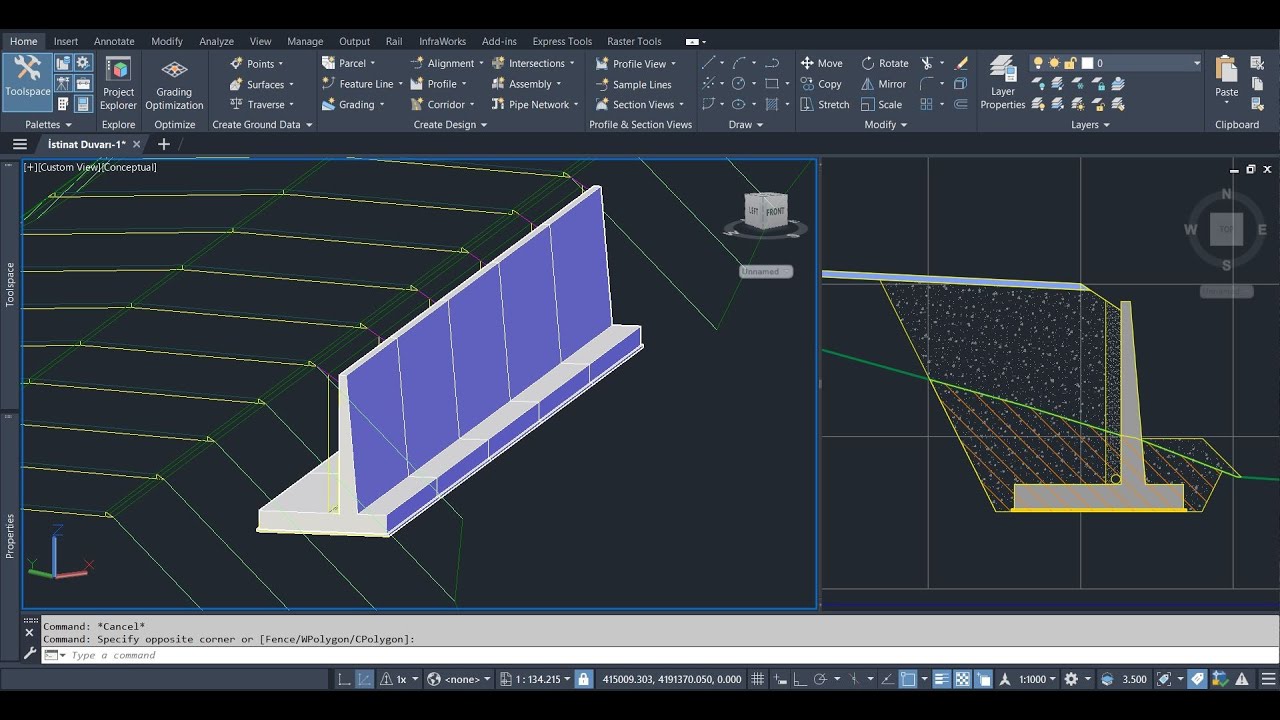
Autocad Civil 3D - Betonarme İstinat Duvarı (Dolguda) - Concrete Retaining Wall (Fill)

Автор: Civil 3D

Загружено: 2024-04-20

Просмотров: 6604

Описание: Create concrete retaining wall with assembly and its calculation
Tip kesit ile betonarme istinat duvarı çizimi ve hesaplarının yapılması

Contact for assembly: [email protected]

Betonarme İksa Duvarı (Yarmada) - Concrete Shoring Wall (Cut):    • Autocad Civil 3D - Betonarme İksa Duvarı (...  

Linkedin Account:
  / civil-3d-designer-76a248299  


OPERATION STEPS IN THE VIDEO
Purpose: A reinforced concrete retaining wall will be added to a filled section of a road project, and calculations will be made.
Horizontal alignment, profile, assembly and section views of the road have been drawn previously.
1. A corridor for the road will be created.
Then, assembly for the retaining wall will be created, planned dimensions will be entered, and a retaining wall will be implemented between km 0+040-0+090.
2. A 3D Solid model of the retaining wall will be created from the corridor, and this model will be displayed in a profile view.
The top of the foundation of the retaining wall, which has the same slope as the road, will be moved to a fixed elevation by targeting the newly drawn profile.
Similarly, the top of the retaining wall, which has the same slope as the road, will be moved to a fixed elevation by targeting the newly drawn profile.
3. Successively, shear key, Ø300 drain pipe and Ø100 weephole will be added to the retaining wall.
4. Gravel fill will be added behind the wall for water drainage.
Then, excavated areas for the foundation of the retaining wall with slope will be calculated.
5. Excavation-fill volume of the road will be calculated in the interval (km 0+040-0+090) where the retaining wall is located.
For this, two surfaces will be created:
a. Datum Surface
b. Reference Surface (A surface joined of terrain surface and retaining wall excavation surfaces)
*The outer boundary of the corridor will be targeted to create the reference surface accurately.
6. In this project, backfill behind the retaining wall will be done with a different material from the road fill.
For this, backfill will be applied to the backside of the retaining wall.
Similarly, backfill will be applied to the front side of the retaining wall.
7. Sloped excavation of retaining wall, lean concrete, concrete, gravel fill, backfill behind, and backfill in front of the retaining wall will be calculated.
*To calculate the net excavation volume, " gravel fill" and "Backfill Volume Behind" will be subtracted from the previously calculated excavation-fill volume interval where the retaining wall is located.
8. A console will be added.
*Gravel fill and backfill volume will be updated automatically.
9. The excavation-fill volume of the entire road will be calculated. Since the excavation-fill volume has already been calculated in the interval (km 0+040-0+090), where the retaining wall is located this interval will not be included.

Не удается загрузить Youtube-плеер. Проверьте блокировку Youtube в вашей сети.
Повторяем попытку...
Autocad Civil 3D - Betonarme İstinat Duvarı (Dolguda) - Concrete Retaining Wall (Fill)

Поделиться в:

Доступные форматы для скачивания:

Скачать видео

  • Информация по загрузке:

Скачать аудио

Похожие видео

Autocad Civil 3D - Harçlı İstinat Duvarı (V2)

Autocad Civil 3D - Harçlı İstinat Duvarı (V2)

Crear muro de contención en Civil 3D-por tramos en secciones transversales

Crear muro de contención en Civil 3D-por tramos en secciones transversales

Autocad Civil 3D Membuat Dinding Penahan Tanah (Retaining Wall)

Autocad Civil 3D Membuat Dinding Penahan Tanah (Retaining Wall)

Самые удовлетворяющие видео рабочих, идеально выполняющих свою работу!

Самые удовлетворяющие видео рабочих, идеально выполняющих свою работу!

Site Grading in Civil 3D

Site Grading in Civil 3D

ODT (Obra de Drenaje Transversal) - ISTRAM

ODT (Obra de Drenaje Transversal) - ISTRAM

Retaining Wall in Civil 3D

Retaining Wall in Civil 3D

Что с Адамом Кадыровым?

Что с Адамом Кадыровым?

Autocad Civil 3D - Betonarme İksa Duvarı (Yarmada) - Concrete Shoring Wall (Cut)

Autocad Civil 3D - Betonarme İksa Duvarı (Yarmada) - Concrete Shoring Wall (Cut)

Автокад для НАЧИНАЮЩИХ (AutoCad) по ШАГАМ. Урок 1. Для новичков, Как работать в Автокаде, начало раб

Автокад для НАЧИНАЮЩИХ (AutoCad) по ШАГАМ. Урок 1. Для новичков, Как работать в Автокаде, начало раб

CREAR una superficie de un muro a partir de solo polilíneas para calculo de volúmenes.

CREAR una superficie de un muro a partir de solo polilíneas para calculo de volúmenes.

Autocad Civil 3D - Skewed Box Culvert - Verevli Kutu Menfez

Autocad Civil 3D - Skewed Box Culvert - Verevli Kutu Menfez

Drawing and Displaying 3D Models in Civil 3D Webinar

Drawing and Displaying 3D Models in Civil 3D Webinar

Autocad Civil 3D - Diş Kazısı - Step Excavation (Multiple Bench Excavation) - V1

Autocad Civil 3D - Diş Kazısı - Step Excavation (Multiple Bench Excavation) - V1

AutoCAD Civil 3D - Dinding Penahan Tanah (Retaining Wall)

AutoCAD Civil 3D - Dinding Penahan Tanah (Retaining Wall)

Autocad Civil 3D - Box Culvert - Kutu Menfez

Autocad Civil 3D - Box Culvert - Kutu Menfez

Civil 3D Retaining Wall Design: Link Subassembly to Feature Line for Cut/Fill Section Quantity

Civil 3D Retaining Wall Design: Link Subassembly to Feature Line for Cut/Fill Section Quantity

Проектирование сайтов в Civil 3D для начинающих

Проектирование сайтов в Civil 3D для начинающих

Autocad Civil 3D - Pipe Culvert - Boru (Büz) Menfez

Autocad Civil 3D - Pipe Culvert - Boru (Büz) Menfez

Моделирование переходов коридоров Civil 3D с использованием любого узла

Моделирование переходов коридоров Civil 3D с использованием любого узла

© 2025 ycliper. Все права защищены.


  • Контакты
  • О нас
  • Политика конфиденциальности


Контакты для правообладателей: [email protected]