Sentient Contributor Role Guide
Автор: Defi Edwin
Загружено: 2025-10-17
Просмотров: 227
Описание:
How to Get Started with Sentient AGI discord roles
Sentient AGI is building a community owned artificial general intelligence ecosystem with over $85 million in funding. Anyone can participate through the Contributor Program, which allows individuals to contribute, grow, and earn recognition within the project.
1. Join the Community
1. Visit discord.gg/sentientfoundation
2. Verify your account once you join the server.
3. Go to the # claim-contributor-roles channel.
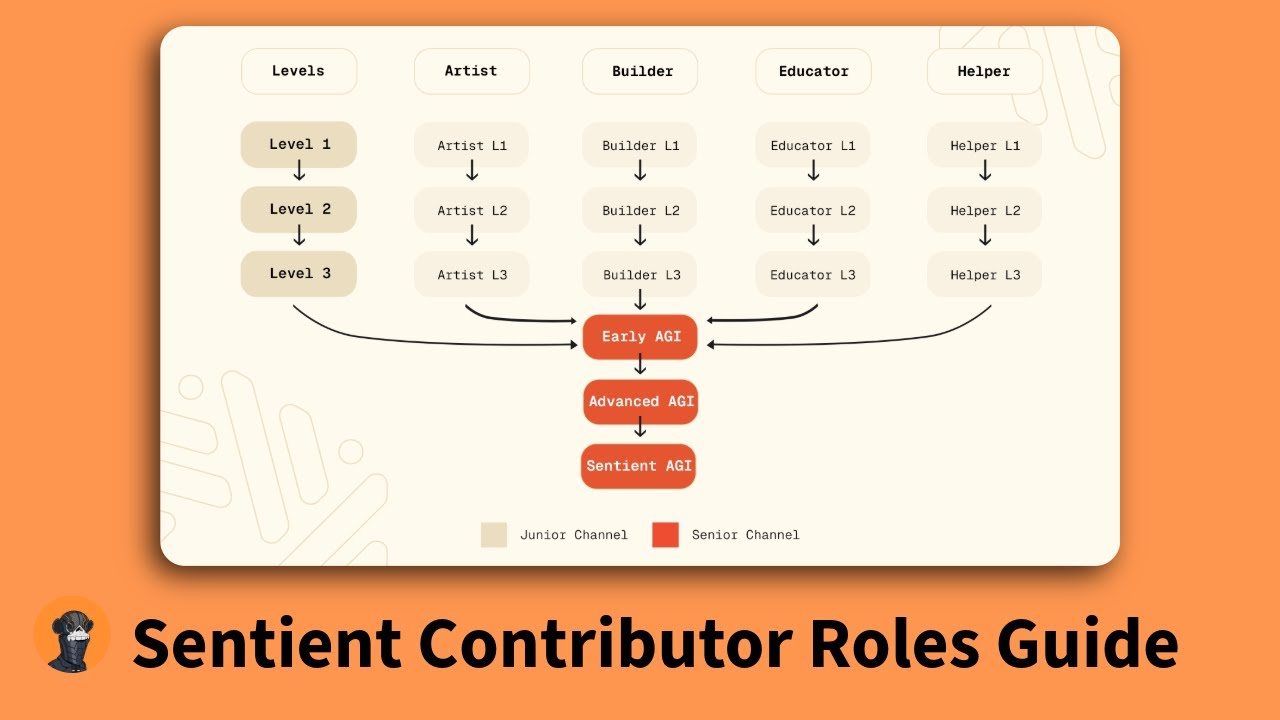
4. Choose the role path that best matches your skills:
Artist - create original visuals, graphics, or designs
Builder – develop tools, applications, or technical experiments
Educator – write guides, threads, and educational content
Helper – assist new members and maintain community engagement
Once you select a role, you will begin at Level 1 (Junior) and can immediately start contributing.
2. Contribute Through Your Role
Your contributions should align with the role you selected. Examples include:
Posting educational content about Sentient AGI (Educator)
Designing or illustrating creative assets (Artist)
Developing utilities or integrations (Builder)
Assisting and guiding members in the Discord server (Helper)
If you post on X (Twitter), share meaningful, original content related to Sentient AGI. After posting, submit your work in the appropriate Junior channel (for example, # educator-junior). Reactions to your Discord message help determine your progress within the system. So try to get more to level up
3. Record and Submit Your Work
Every contributor is required to maintain a record of their work through Notion templates.
To set this up:
1. In the # claim-contributor-roles channel, locate your role category (Artist, Builder, Educator, or Helper).
2. Click “Visit Site” to open the Notion page for your role.
3. Sign in or create a Notion account, then duplicate the template.
4. Fill in the following details for each contribution:
Date of contribution
Link to your post or submission
Number of views or engagements
Any additional relevant information
Once completed, return to the # claim-contributor-roles channel and submit your form.
4. Understand the Level System
The Sentient AGI Contributor Program operates through a rank based structure for all paths.
Level progression:
Level 1 → Level 2 → Level 3 → Early AGI → Advanced AGI → Sentient AGI
How progression works:
Levels 1 to 3 are achieved automatically based on your activity and reactions from friends.
From Early AGI onward, you must apply manually using your Notion portfolio.
Moderators and contribution managers will review your submissions and overall impact.
5. Evaluation Criteria
When applying for higher AGI levels, the following factors are considered:
Activity on X: Frequency and quality of posts about Sentient AGI.
Community involvement: Participation in discussions, events, and support activities.
Galxe quests: Optional, but completing them strengthens your application.
Consistency: Sustained contribution over time is a key requirement.
To summarize the process:
Join the Sentient Discord community.
Choose your contributor path (Artist, Builder, Educator, or Helper).
Start contributing and sharing your work regularly.
Track all contributions using your Notion template.
Stay active on both Discord and X.
Apply for higher AGI roles as your portfolio grows.
Consistent participation, high quality contributions, and community engagement are the key factors that will help you progress through the Sentient AGI Contributor Program.
Join Our Telegram: https://t.me/defi_cge_airdrops
Follow Me On Twitter: Twitter: https://x.com/edstechd?s=21
Always Do Your Own Research, Nothing Here is Financial Advice.
Повторяем попытку...
Доступные форматы для скачивания:
Скачать видео
-
Информация по загрузке: