OPPO Reno15 Pro: How to Use Dual-View Video Mode
Автор: HardReset.Info
Загружено: 2026-01-24
Просмотров: 5
Описание:
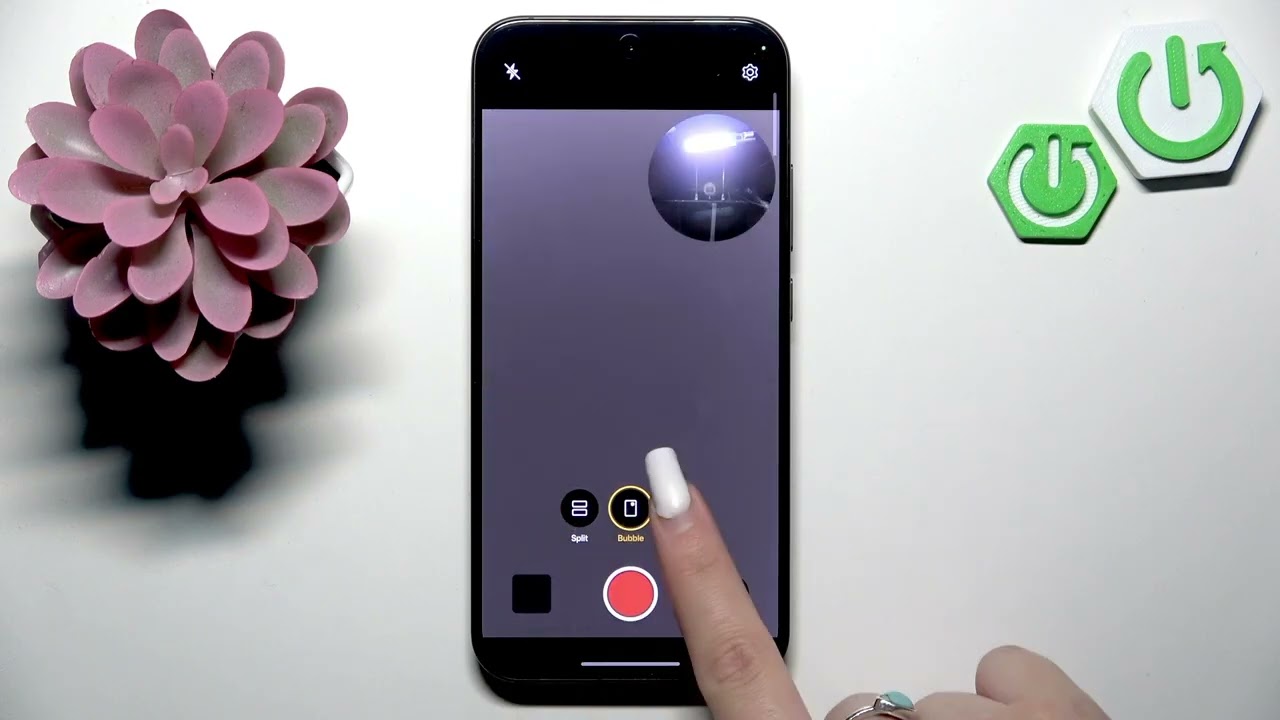
This video shows how to use Dual-View Video Mode on the OPPO Reno15 Pro. You will learn step-by-step how to open the Camera app, go to More, select Dual-View Video and change the layout between split, bubble or picture-in-picture. Use both front and main cameras at the same time to record vlogs, reactions, interviews or live demos. Simple, fast tips to start recording and get the best framing for your Dual-View clips on OPPO Reno15 Pro.
How to use Dual-View Video Mode on OPPO Reno15 Pro?
How to record with both front and back cameras on OPPO Reno15 Pro?
Where is Dual-View Video in the OPPO Reno15 Pro Camera app?
0:00 Introduction: OPPO Reno15 Pro and Dual-View overview
0:10 What Dual-View Video Mode does (split screen and PIP)
0:25 Open Camera app and scroll to More
0:31 Tap the Dual-View Video icon to enable it
0:41 Change layout: split, bubble or picture-in-picture
0:52 Start recording using the record button
1:07 Outro and quick tips (like/subscribe)
#OPPOReno15Pro #DualView #CameraTips #Vlogging
Find out more:
https://www.hardreset.info/devices/op...
Follow us on Instagram ► / hardreset.info
Like us on Facebook ► / hardresetinfo
Tweet us on Twitter ► / hardreseti
Support us on TikTok ► / hardreset.info
Use Reset Guides for many popular Apps ► https://www.hardreset.info/apps/apps/
Повторяем попытку...
Доступные форматы для скачивания:
Скачать видео
-
Информация по загрузке:






![🔴 Forest Bird Feeder | Relaxing Nature Sounds from the Forest [ 2026/1/25 ]](https://image.4k-video.ru/id-video/lVxDbCZ8Y5w)