How to Add Direct Group Check-In in Hotel Software, Indic Infosoft | Walk-In Group Entry Process
Автор: Indic Infosoft
Загружено: 2026-02-21
Просмотров: 16
Описание:
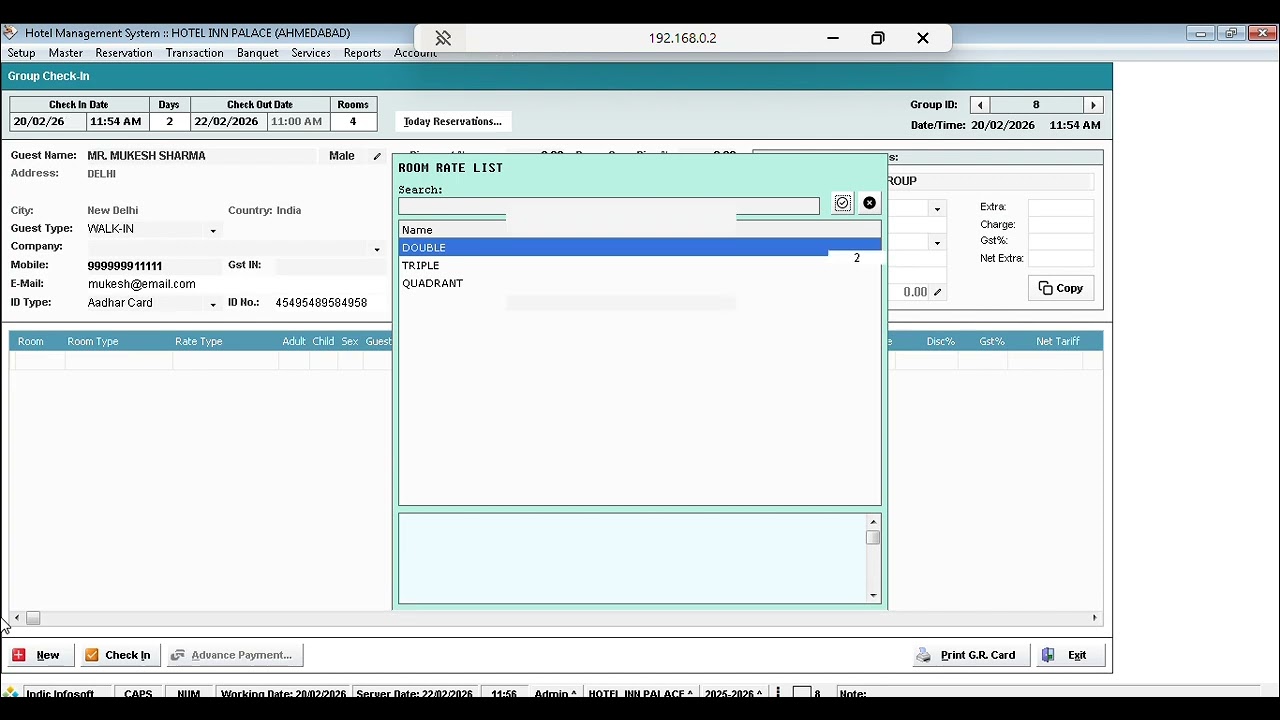
In this video, we explain how to create a Direct Group Check-In when multiple guests arrive without prior reservation.
If a corporate team, family group, or travel group comes directly to the hotel, you can easily create a Group Master and assign multiple rooms under one booking.
Steps Covered in This Video:
✔ Go to Front Office
✔ Click on Group Check-In / New Group
✔ Create Group Master Name (Company / Family / Event Name)
✔ Select Multiple Rooms
✔ Enter Guest Details for Each Room
✔ Set Room Tariff & Plan
✔ Add Advance Payment (if any)
✔ Confirm Group Check-In
Software Automatically Handles:
✅ Separate folio for each room
✅ GST calculation as per slab
✅ Advance posting in accounts
✅ Room rent auto posting
✅ Company ledger posting (if required)
This feature is very useful for:
Corporate bookings
Wedding groups
Tour & travel groups
Event guests
After watching this video, you will be able to manage direct group arrivals smoothly without any confusion.
If you find this helpful, Like 👍 Share 🔁 and Subscribe 🔔 for more hotel software (Indic Infosoft) tutorials.
Call for Demo: +91 6354469425
#HotelSoftware #GroupCheckIn #WalkInGroup #FrontOfficeTraining #HotelManagementSystem #HotelSoftware #GroupWalkin #GroupGuest #PMS #IndicInfosoft #AtithiSoftware #AtithiHotel
Повторяем попытку...
Доступные форматы для скачивания:
Скачать видео
-
Информация по загрузке:












![Как я делаю ДЛИННЫЕ видео в Grok за 0₽? [ГАЙД 2026]](https://imager.clipsaver.ru/JqmsTdUdfeY/max.jpg)