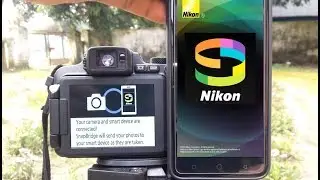
Nikon SnapBridge pairing issue resolved - by following exact steps
Автор: LEXPIX
Загружено: 2016-12-31
Просмотров: 338373
Описание:
Watch my latest SnapBridge video for faster connection. • Видео The latest update makes it easier to connect than this older version / method.
After updating to the latest firmware on your camera, download the Nikon SnapBridge to your smartphone from the App Store is using an iPhone.
Using iPhone, you have to pair the devices EACH and every time you want to use the app.
After you are finished using the app, unpair the device in the app itself (End Pairing) then select Forget this Device from the bluetooth options under General Settings on your phone. You may even have to shut off then turn your camera back on to initiate the paring process again.
A bit clunky, but it works.
The remote shooting function is very basic, just touch focus and shutter release function. You can download your images to the smartphone and tag their location and sync the camera clock with the the smartphone.
Some of the Nikon gear I've used or still own:
Nikon D850 https://amzn.to/2EJyr97
Nikon D500 https://amzn.to/2PPcsE2
Nikon Z6 + FTZ Adapter https://amzn.to/396W9dq
Nikon D810 https://amzn.to/370ShbV
Nikon D600 https://amzn.to/2ZkyYHK
Nikon D700 https://amzn.to/2PQoLjr
Nikon D5500 https://amzn.to/2Slsd7q
Nikon D5600 https://amzn.to/2SmvYtk
Nikkor Z 35mm F/1.8s https://amzn.to/2MlvSOM
Nikkor Z 14-30 F/4s https://amzn.to/2MnwKlH
Nikkor 14-24 F/2.8 https://amzn.to/2rmpqzz
Nikkor 24-70 F/2.8G https://amzn.to/34SSKLE
Nikkor 70-200 F/2.8G https://amzn.to/34W1Ojf
Nikkor 200-500 F/5.6E https://amzn.to/2EM2Pj1
My recommended SD memory card for high bitrate 4K video.
SanDisk 32 GB SDHC SD Extreme Pro UHS-II Memory Card Class 10 https://amzn.to/2sc6cgG
Thanks for visiting my LEXPIX Photography Channel.
Повторяем попытку...

Доступные форматы для скачивания:
Скачать видео
-
Информация по загрузке: