How to Auto Login in Windows
Автор: HOWTECH
Загружено: 2013-05-30
Просмотров: 906
Описание:
In this tutorial you will learn how to auto log in into Windows.
Don't forget to check out our site http://howtech.tv/ for more free how-to videos!
/ ithowtovids - our feed
/ howtechtv - join us on facebook
https://plus.google.com/1034403827176... - our group in Google+
In this tutorial you will learn how to auto log in into Windows.
Upon completion of these steps, Windows will stop asking for a user name and password when your computer starts up:
Step 1: Click Start. In the search box, carefully type the following:
Netplwiz
then ENTER
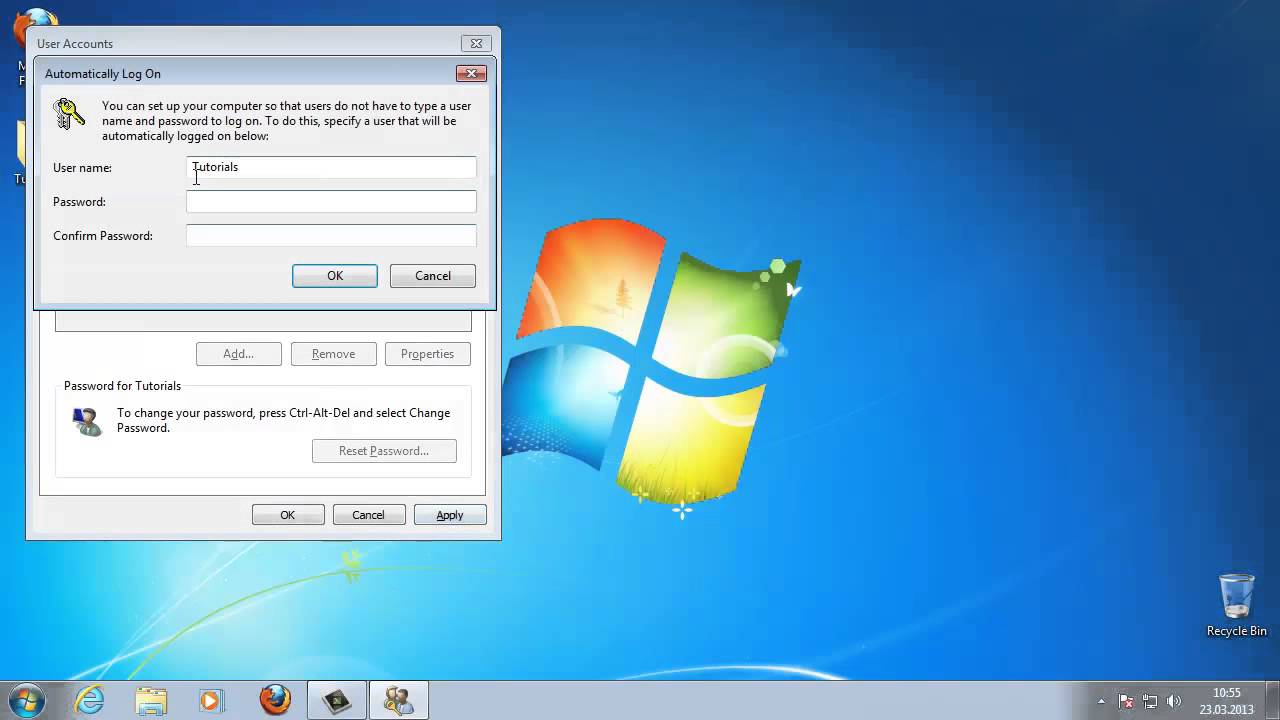
This will load the Advanced-User-Accounts applet in Control Panel.
Step 2: - Deselect the „Users must enter a username" checkbox found at the top of the Users tab.
Step 3: Click Apply.
Step 4: - Insert credentials -- username and password -- when prompted. Click OK .
Step 6: Click OK.
Windows will now log on automatically everytime your computer will start.
Повторяем попытку...
Доступные форматы для скачивания:
Скачать видео
-
Информация по загрузке: