Adorama layflat photobook review
Автор: Digital Scrapbooking HQ
Загружено: 2013-10-10
Просмотров: 4055
Описание:
http://digitalscrapbookinghq.com/ador...
Adorama layflat photobook review
Have you tried printing a layflat style book yet?
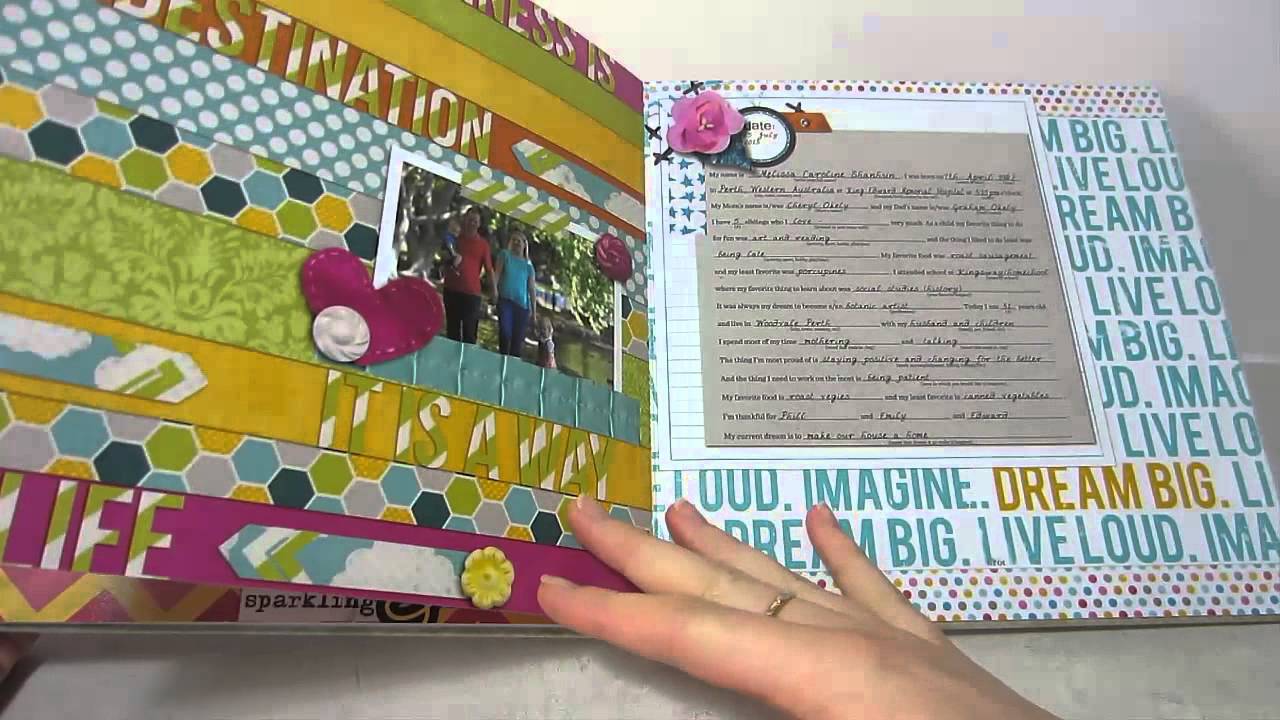
I recently ordered an 8x8 inch layflat photobook from AdoramaPix. I took take advantage of an awesome $3 photobook deal from Adorama Pix and paid about $25 all up for the book (including postage).
I am so excited to share a look inside my album today! You may have heard me saying, on more than one occasion that you should print your layouts.
I've scrapped hundred of layouts since 2008 and I have hundreds printed. Since I tend to print off layouts in themed albums (think December Daily, Home Renovation books, Baby's First Year etc) many layouts about me have't been printed yet.
In fact, I've only printed about five layouts about me, but I've scrapper 30 or 40 layouts!
Well, today changes all that.
Adorama Pix Layflat Photobook Review
Overall the quality of the Adorama book is great.
I ordered mine in Lustre (Matte) finish.
Adorama Pix layflat photobook review
Things I liked
Quick service & turnaround time. It took just 3 days to print my book, and it arrived in about two weeks at my door in Australia!
The sturdiness of the book. It's not delicate at all and I'd be happy for my toddler to look through it
The quality of the prints. The photo quality was great and the colours were true to life
Things I didn't like
The online book editor. After working with a number of online systems I'd rate it about a 6-10. It took me quite a while to work out that I didn't have to manually resize every photo to make it fit the page (Thankfully, the Daily Digi has put up this great tutorial now!)
The cover. It had an unexpected metallic print. I think it may look great for a photo, but for digital paper, not so much.
The photo paper. Shock horror, right? I actually prefer the magazine-style paper than photos. I feel that as a photo print, the pages look a lot more digi compared with having a flat finish.
The thickness of the book. It's almost twice as thick as the other books with the same number of pages
The size of the book. The pages are true 8x8 inches and the binding method means the book is a lot bigger than my Shutterfly and Snapfish books (only an issue if you like a uniform look on your bookshelves)
The cost. A 26 page 8x8 is usually $45 dollars (see details here) If you'd like to try Adorama - there's a 40% off coupon here.
Overall, I'd say that I'm happy with my photobook, but due to the cost and metallic cover, I will probably stick to . However, that is devi
There are a lots of photobook printer around, or you can print pages individually through a variety of photo printing services. Once you've chosen a printer you still have decide on a size, cover type and more. Decisions, decisions! If you want some unbiased reviews The Daily Digi provides several great posts here.
I have printed with:
Shutterfly (but is has to be a GREAT deal as the postage to Australia is $13.99)
MyPicTales
Snapfish Australia
Wendyzine Photobook Toolkits ROCK!I recommend using Wendyzine's actions to get your photobook printed perfectly. I've used her actions for photobooks printed by Shutterfly and MyPicTales and I've been thrilled with the results. Wendy explains more at the Daily Digi.
What's your favourite way to print layouts?
Melissa
PS If you are keen to see how my other photobooks turned out, here's where to see printed layouts by Snapfish, My Pictales and Shutterfly
Повторяем попытку...
Доступные форматы для скачивания:
Скачать видео
-
Информация по загрузке: