ACER Connect X6E 5G – How to Enable and Set Up Failover Mode
Автор: HardReset_info Tests
Загружено: 2025-07-12
Просмотров: 40
Описание:
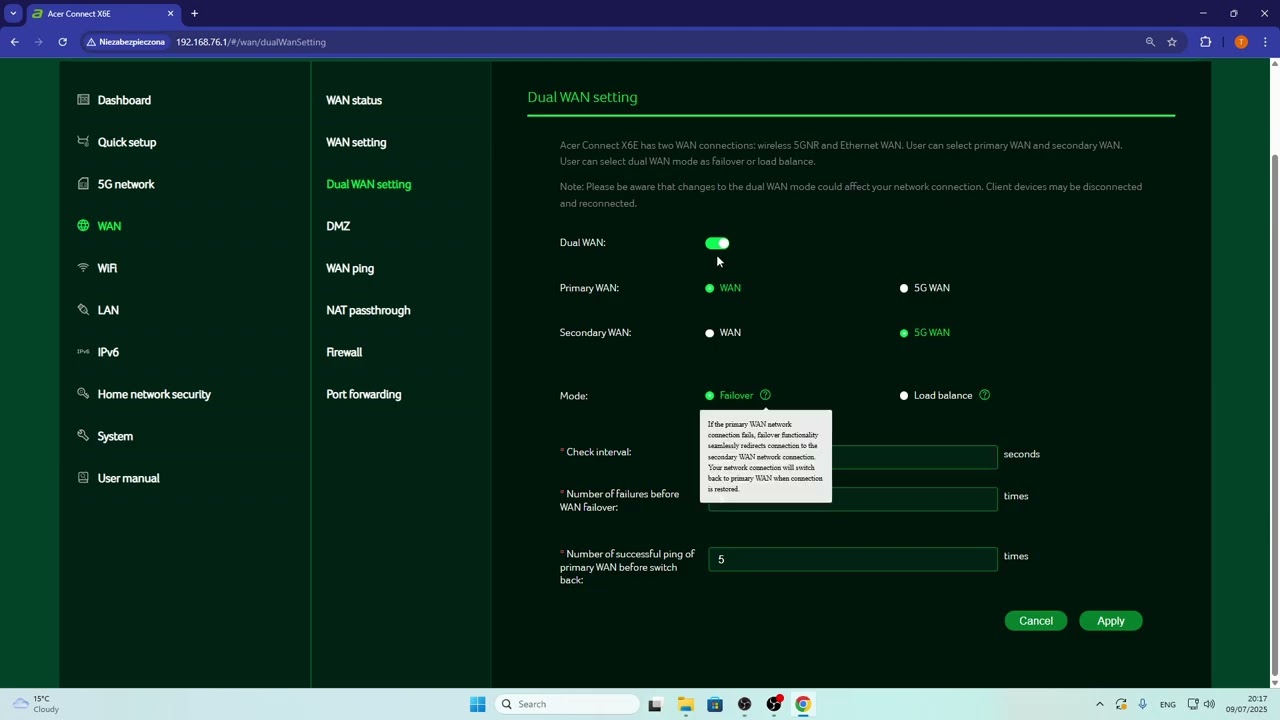
If you want to keep your internet connection stable on the ACER Connect X6E 5G router, enabling failover mode is a great solution. In this video, we show you step by step how to access the admin panel, find the dual WAN settings, and set up failover mode on your ACER Connect X6E 5G. You’ll learn how to choose your primary and secondary WAN connections, adjust the check interval, and set the number of failures before switching to a backup connection. This helps ensure your network automatically switches to a backup if your main internet goes down, keeping you connected at all times. Whether you use a wired or 5G WAN, this guide will help you set up failover mode quickly and easily on your ACER Connect X6E 5G router.
How to enable failover mode on ACER Connect X6E 5G?
How to set up dual WAN failover on ACER Connect X6E 5G router?
Where are the failover settings in ACER Connect X6E 5G admin panel?
0:00 Introduction
0:07 Open ACER Connect X6E admin panel
0:20 Find dual WAN settings
0:42 Enable failover mode
1:00 Adjust check interval and failure attempts
1:51 Select primary and secondary WAN
2:20 How failover and recovery works
2:58 Summary and tips
#ACERConnectX6E5G #FailoverMode #DualWAN #RouterSetup
Find out more:
https://www.hardreset.info/devices/ac...
Follow us on Instagram ► / hardreset.info
Like us on Facebook ► / hardresetinfo
Tweet us on Twitter ► / hardreseti
Support us on TikTok ► / hardreset.info
Use Reset Guides for many popular Apps ► https://www.hardreset.info/apps/apps/
Повторяем попытку...
Доступные форматы для скачивания:
Скачать видео
-
Информация по загрузке: