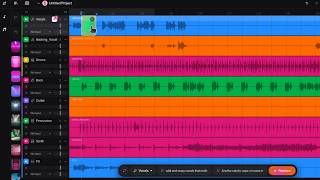
How to Use SUNO Studio to Turn ONE Vocal into a FULL POP STACK!
Автор: ChillPanic
Загружено: 2025-12-01
Просмотров: 7259
Описание:
Get 500 SUNO Prompts: https://chillpanic-shop.fourthwall.co...
**CHAPTERS**
00:00 - SUNO Studio Vocal Demo
00:38 - Generating Vocal Doubles in SUNO Studio
02:31 - Generating Vocal Harmonies in SUNO Studio
04:51 - Mixing SUNO Stems in Fl Studio
07:49 - Final Result
Today I’m seeing if SUNO Studio can generate harmonies and backing vocals. I take one lead line from one of my own songs and upload it into SUNO Studio, then use the upload/replace feature to generate doubles, layered harmonies, and a full pop stack from that single vocal. I play with audio influence and weirdness, try things like “belted vocals” and “layered harmonies,” export the multitrack stems, and then bring everything back into FL Studio to time-align, pan, EQ, high-pass, and de-ess the stack so it actually sits behind the lead.
If you’ve ever wondered how to use SUNO Studio for vocal production instead of just “type a prompt, get a song,” or you’ve asked yourself, “Can SUNO Studio actually do my doubles and harmonies for me?” this video walks through a full real-world example: one vocal take in, a full pop vocal stack out. By the end, I compare my original vocal stack to the SUNO Studio stack and decide which one sounds better.
This is for you if you can sing one line but struggle with harmonies, hate recording a million backing takes, or just want your tracks to sound more like a finished mix and less like a demo. Keywords for the robots: Suno Studio tutorial, Suno AI vocal harmonies, AI backup singer, pop vocal stack, vocal production.
#sunoai #sunostudio #suno #aimusic #aimusicgenerator
Повторяем попытку...

Доступные форматы для скачивания:
Скачать видео
-
Информация по загрузке:

![[Brackets & Parentheses] The Secret to Controlling Suno AI Music with Lyrics](https://ricktube.ru/thumbnail/hM1ywgBogrI/mqdefault.jpg)