Express Scribe Hot-Key Timestamp Time Code Tutorial - Pham Transcription Services
Автор: Pham Transcription Services
Загружено: 2013-08-17
Просмотров: 36849
Описание:
Express Scribe Hotkey Timestamp TimeCode Tutorial
LEARN MORE about transcription and transcription software at https://www.myofficeowl.com
CONDENSED TRANSCRIPT:
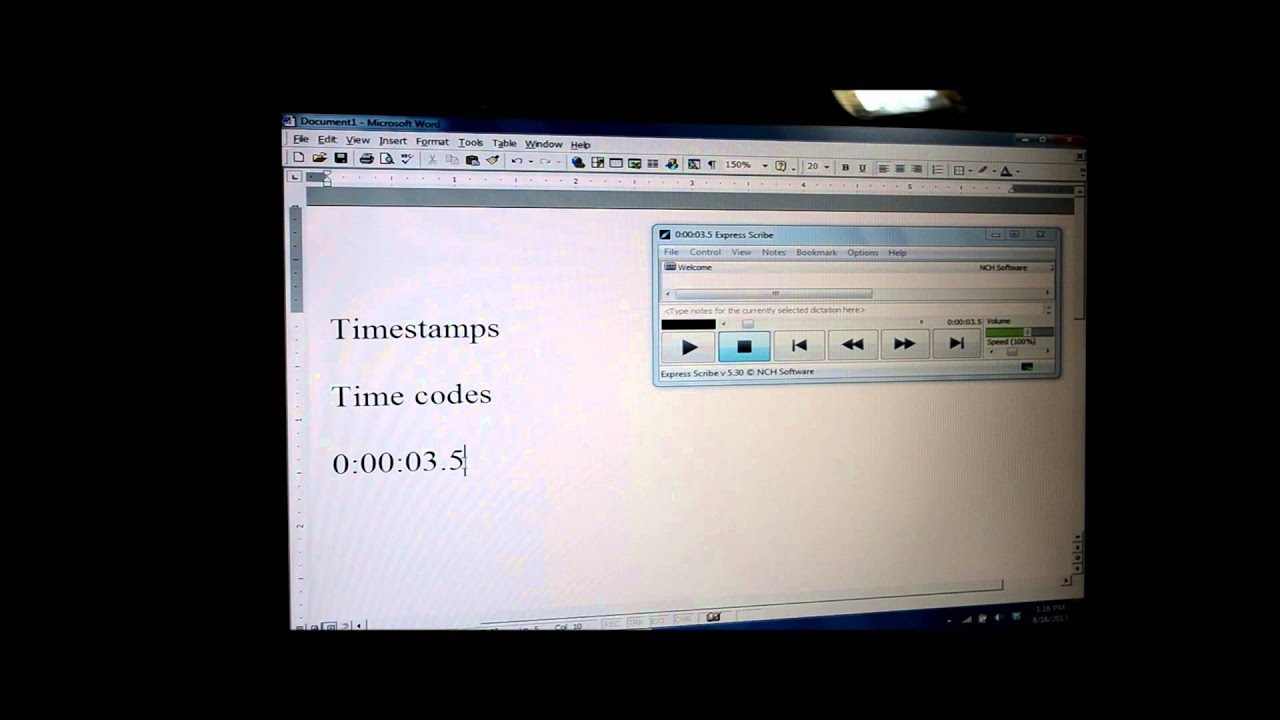
This video is on how to insert what are called timestamps or time codes into a Word document using the Hot-Key feature in Express Scribe.
If I click on the expand and expand the screen in Express Scribe, you can see that there are two different Options tabs. Click on Options, scroll down, click on Other, and it brings up this window.
The third tab is the Hot-Keys tab. Click on that, and it brings you to a screen that shows you the hotkeys that have already been established in the program.
Now we want to add a hotkey for Copy Time, so we're going to add, click on Add, and it brings us another screen. The command we want to use is for copy time, so when we click on this arrow, it gives us all the different commands that you have available to you.
Here you can see it says Copy Time. It also, down here, says Copy System Time. We're not going to use that because Copy System Time means to copy the time that it actually is currently right now, the present time.
So again, click on Copy Time, and now we need to establish a hotkey for that command. So we click on Change, and then you're going to press the key or key combination that you want to use for that hotkey.
You might want to use control, the Ctrl button plus a letter or number, or the Alt button plus a number or a letter.
I personally prefer the F1 key, which I will press now. And you can see it established F1 as the hotkey. I'm going to click OK, and now it shows in this window the F1 key has been established for Copy Time.
Click OK again, and I'm going to minimize this screen.
And now it's brought us to the website for NCH, which is the company who created Express Scribe. You won't need this window or to do anything here unless you would like to read more about the Hot-Key options.
So now we've established our hotkey that copies the time. I've used F1.
To paste, you would use your keyboard to do the normal functions with paste or you click, you know, edit and then paste or Ctrl+V to paste. That takes too long, so for me I like to use the F2 key.
And what I've done is I've gone into my actual program to reprogram my keyboard itself. Every keyboard is different, so that all depends on your own personal preference.
Now you can see I've got the Welcome audio file on my Express Scribe, and if, say, I go into it a little bit further and it's at 3 seconds, 3.5 seconds, and if I click on F1, it's going to copy that time. If I click on F2, it's going to paste that time. And there you'll see that it'll come up into your Word document.
Now because the F1 key was established using Express Scribe, when Express Scribe is closed the F1 key reverts back to its original function, which in my case for my keyboard is the Help button. But because I established F2 as the paste hotkey, and I changed that in the actual program of my keyboard, no matter what program I'm in, that F2 is now always going to be a paste function.
So what do you use time codes or timestamps in a Word document for anyway?
Well, for me, I use it for two different main reasons. One is if I have a client who requests that timestamps are added at certain intervals, and I also like to use the timestamp if I'm doing a transcript and I come across a name or something else that I just, I'm not sure how to spell it, then I'll use a timestamp so I can go back to that specific spot in the file and listen to it again. It's also very helpful if I have a spot in the audio file that I just don't understand what they said at all. Then I can go back to that specific spot in the audio file and listen to it again and get that down correctly.
Now what I also like to do is, when I'm searching for that spot then back in the transcript, it's easier for me to do some type of a search than to try to look for where all the time codes are sitting. So what I do is -- I've learned this little tip from another transcriptionist -- you put a couple of X's before the time, and then maybe if you want to, you can say something, type something like indiscernible, you know, you weren't able to understand it. And then when you go back into your transcript later, all you have to do is a find, and you're going to try and find all the XX's. And it'll take you to those spots where you've had the time codes set up. It makes it a little bit easier when you're going back through a second time, especially if it's a longer transcript.
Повторяем попытку...
Доступные форматы для скачивания:
Скачать видео
-
Информация по загрузке:











![Почему работает теория шести рукопожатий? [Veritasium]](https://imager.clipsaver.ru/ggI1xKzoANs/max.jpg)




![Best of Driving Deep House [2026] | Chill Vocal Mix to Boost Focus, Maximize Concentration #7](https://imager.clipsaver.ru/CDnUiT9PNWc/max.jpg)