AOS 10 Series – Part 4 – Adding CX switch to Central and config of tunnel/mixed mode SSID.
Автор: Airheads Broadcasting
Загружено: 2023-02-27
Просмотров: 9201
Описание:
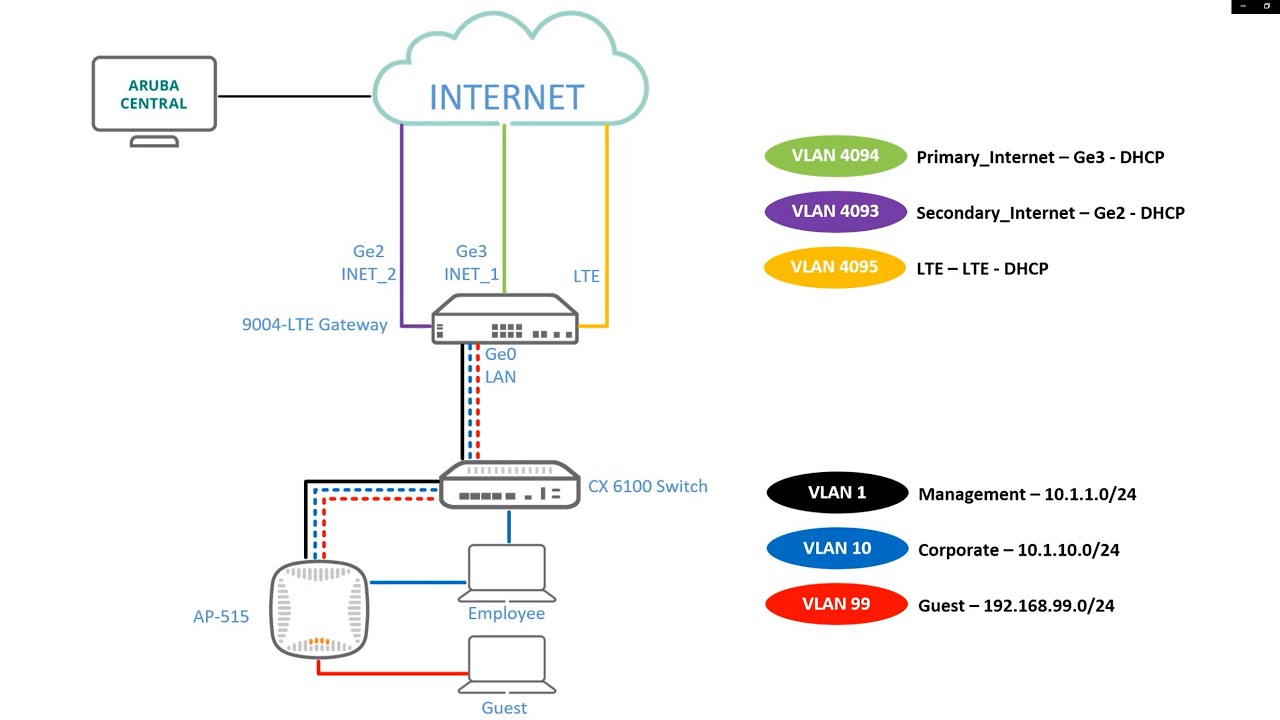
In this video I am going to show you how to add an HPE Aruba Networks CX switch keeping the existing configuration to HPE Aruba Networks Central. Then we are going to configure both a tunnel and mixed mode SSID and show how to tunnel clients to a gateway and in case of mixed mode also how to bridge one client and tunnel the other.
⏰Timestamps:
00:22 Adding HPE Aruba Networks CX switches to GLCP
01:02 Add device to GLCP and apply subscription
02:16 View switch in Central and move group (retain CX switch configuration)
03:36 Switch GUI and MultiEdit configuration
04:18 Assign switch to site
05:08 Network diagram
06:18 Configuration of tunnel mode SSID
08:03 Configuration of VLAN’s on switch
08:40 Configuration of VLAN’s on gateways
09:21 View GRE tunnels in L3 router/firewall
10:00 Show clients in Central
11:10 View gateway cluster in Central
11:48 View access tracker in ClearPass
12:02 Interesting commands in CLI of AP
12:47 Configuration of mixed mode SSID
Повторяем попытку...

Доступные форматы для скачивания:
Скачать видео
-
Информация по загрузке: