ycliper

Популярное

Музыка Кино и Анимация Автомобили Животные Спорт Путешествия Игры Юмор

Интересные видео

2025 Сериалы Трейлеры Новости Как сделать Видеоуроки Diy своими руками

Топ запросов

смотреть а4 schoolboy runaway турецкий сериал смотреть мультфильмы эдисон
Скачать

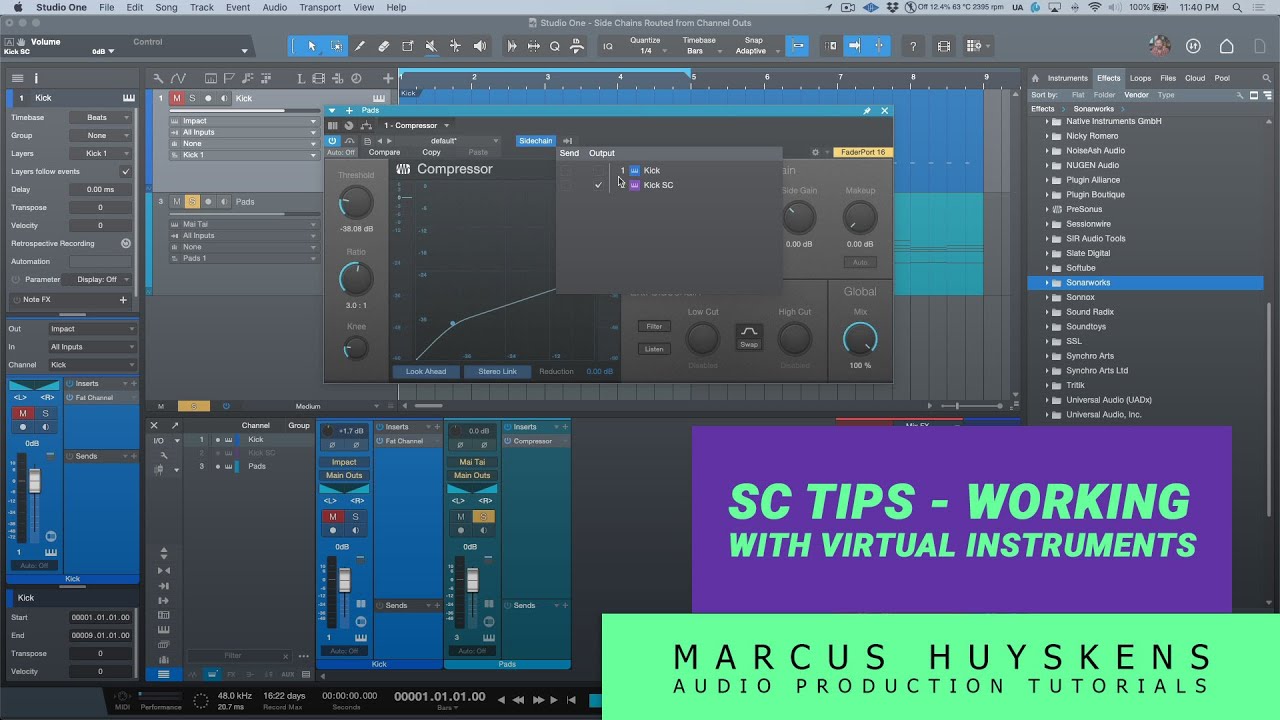
Side Chain Tips when Working with Virtual Instruments in PreSonus Studio One

Автор: Marcus Huyskens Music

Загружено: 2022-12-23

Просмотров: 3662

Описание: In this video, I complete the vortex that I was pulled into when exploring Side Chain Sends, and take a look at a using the "receive from output of channel" option in place of using a Pre-Fader Send when working with Virtual Instruments being used as a key to the Side Chain of other Virtual Instruments.

Blog Article - https://marcus-huyskens-music.com/mh-...

Facebook -   / marcushuyskensmusic  
Twitter -   / marcushuyskens  
IG -   / mhuyskens  

#PreSonus #StudioOne #Tutorials

Не удается загрузить Youtube-плеер. Проверьте блокировку Youtube в вашей сети.
Повторяем попытку...
Side Chain Tips when Working with Virtual Instruments in PreSonus Studio One

Поделиться в:

Доступные форматы для скачивания:

Скачать видео

  • Информация по загрузке:
Скачать аудио

Похожие видео

How External Side Chains behave when Rendering Stems in PreSonus Studio One

How External Side Chains behave when Rendering Stems in PreSonus Studio One

Performing THROUGH Note Fx & Track Controls in PreSonus Studio One

Performing THROUGH Note Fx & Track Controls in PreSonus Studio One

Acustica Audio STONE PRO – A Modular Analog Mixing Experiment

Acustica Audio STONE PRO – A Modular Analog Mixing Experiment

Working with the LFE Channel in PreSonus Studio One - Part 1

Working with the LFE Channel in PreSonus Studio One - Part 1

Using the Surround Delay Plug-in in Studio One 6.5

Using the Surround Delay Plug-in in Studio One 6.5

How To Use AI For Chord Progressions In Music Production!

How To Use AI For Chord Progressions In Music Production!

Studio One Pro 7 - My Top 4 Features

Studio One Pro 7 - My Top 4 Features

Immersive Audio / DolbyATMOS / Binaural

Immersive Audio / DolbyATMOS / Binaural

Waves IDX  Intelligent Dynamics | My New Quick Fix Plug-in of Choice

Waves IDX Intelligent Dynamics | My New Quick Fix Plug-in of Choice

How To Use The FX Bus In Studio One For Creative Effects Control (Sidechaining Trick Included!)

How To Use The FX Bus In Studio One For Creative Effects Control (Sidechaining Trick Included!)

MUST-SEE DJ Gear at NAMM 2026 (Hercules T10, Rane System One, RMX-IGNITE, DJM-V5)

MUST-SEE DJ Gear at NAMM 2026 (Hercules T10, Rane System One, RMX-IGNITE, DJM-V5)

PreSonus Studio One

PreSonus Studio One

Working with 3D IR's with Open AIR2 in Studio One 6.5

Working with 3D IR's with Open AIR2 in Studio One 6.5

Dolby ATMOS on a Budget

Dolby ATMOS on a Budget

Working with the LFE Channel in PreSonus Studio One - Part 2

Working with the LFE Channel in PreSonus Studio One - Part 2

Mixing Lead Guitars in PreSonus Studio One - Free Excerpt

Mixing Lead Guitars in PreSonus Studio One - Free Excerpt

Splitting & Merging Multichannel Files in Studio One 6.5

Splitting & Merging Multichannel Files in Studio One 6.5

How to Tune Guitar to Play 174Hz

How to Tune Guitar to Play 174Hz

NAMM What’s New 2026 Day 2

NAMM What’s New 2026 Day 2

Welcome to Fender Studio Pro 8

Welcome to Fender Studio Pro 8

© 2025 ycliper. Все права защищены.


  • Контакты
  • О нас
  • Политика конфиденциальности


Контакты для правообладателей: [email protected]