MediaFire File Download + Setup Guide ✅ (Complete Tutorial)
Автор: Zhizhen Solutions (至臻)
Загружено: 2025-08-29
Просмотров: 669
Описание:
How to Download Zhizhen Schematics with MediaFire
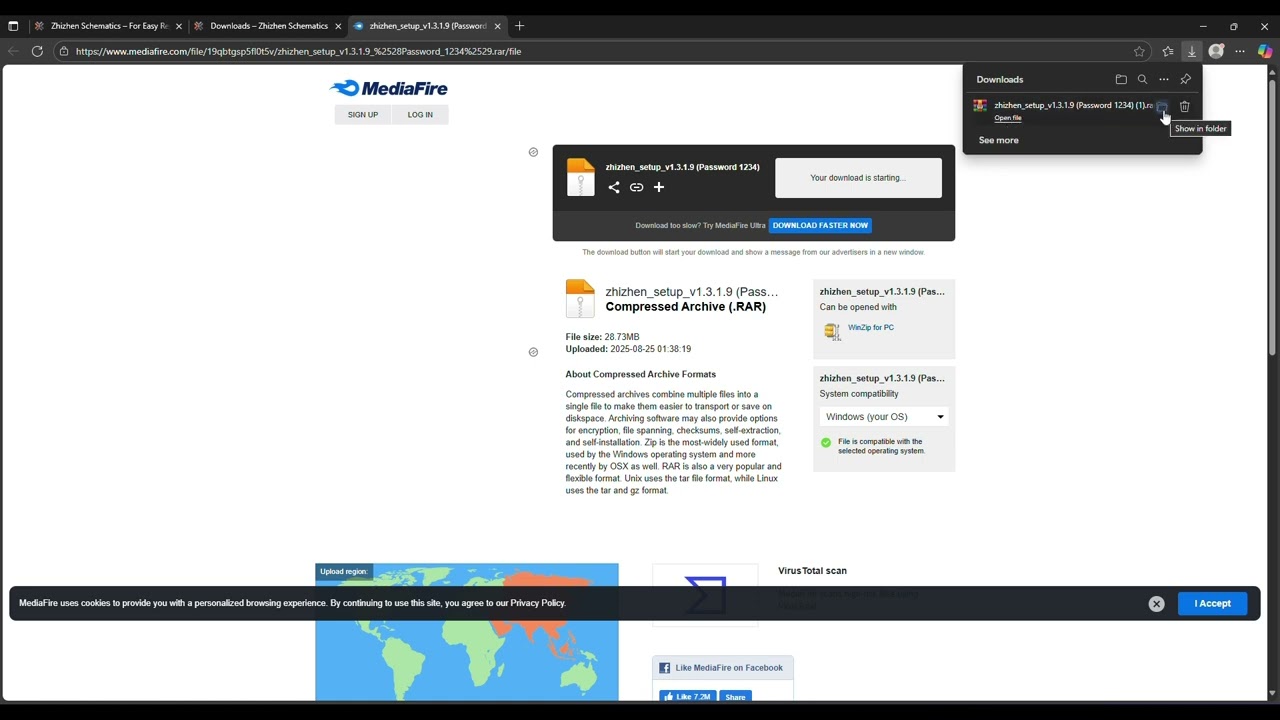
1️⃣ Go to the official website www.zhizhensolutions.com and click on the MediaFire download link.
2️⃣ On the MediaFire page, press Download (green button).
3️⃣ Wait for the file to finish downloading ⬇️.
4️⃣ Open your Downloads folder and locate the .RAR file.
5️⃣ Extract the file with the given password (1234).
6️⃣ Inside, you’ll find the installer (.msi) → double-click to install. ✅
🚀 Zhizhen Solutions License Promo (23 Aug – 30 Sept 2025, GMT+8)
💳 Price + Free Bonus :
• 3 Months – $6 → +1 Month 🎁
• 6 Months – $11 → +2 Months 🎁
• 1 Year – $20 → +3 Months 🎁
💻 Double PC Plans :
• 3 Months – $10 → +1 Month 🎁
• 6 Months – $18 → +2 Months 🎁
• 1 Year – $35 → +3 Months 🎁
🌟 Get extra months FREE – no extra cost!
📞 Contact Support
General Support (Zhizhen's Support) : WhatsApp | wa.me//+60142459788
Welcome Distributor & Reseller : WhatsApp | wa.me//+60147964300
Повторяем попытку...
Доступные форматы для скачивания:
Скачать видео
-
Информация по загрузке:


![Включаем секретный протокол MTproxy для Telegram против замедлений. [goTelegram скрипт]](https://imager.clipsaver.ru/3O7iigCHd8U/max.jpg)