How to Run a Type in Program Without Having to Type it in
Автор: Adventures in Nostalgia (1)
Загружено: 2022-09-20
Просмотров: 650
Описание:
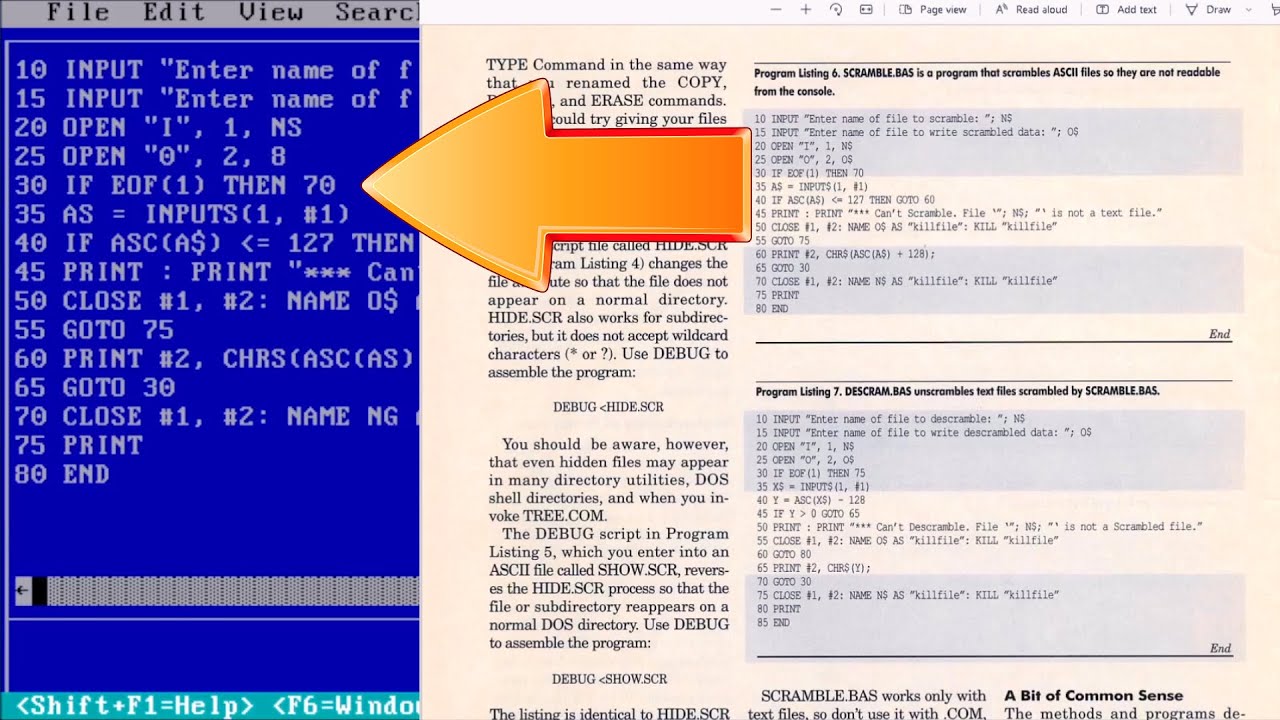
In this video we discuss how to run a type in program without having to type it in
A type-in program or type-in listing was computer source code printed in a home computer magazine or book. It was meant to be entered via the keyboard by the reader and then saved to cassette tape or floppy disk. The result was a usable game, utility, or application program.
A reader would take a printed copy of the program listing, such as from a magazine or book, sit down at a computer, and manually enter the lines of code. Computers of this era automatically booted into a programming environment – even the commands to load and run a prepackaged program were really programming commands executed in direct mode. After typing the program in, the user would be able to run it and also to save it to disk or a cassette for future use. Users were often cautioned to save the program before running it, as errors could result in a crash requiring a reboot, which would render the program irretrievable unless it had been saved. While some type-in programs were short, simple utility or demonstration programs, many type-ins were fully functional games or application software, sometimes rivaling commercial packages.
Type-ins were usually written in BASIC or a combination of a BASIC loader and machine code. In the latter case, the opcodes and operands of the machine code part were often simply given as DATA statements within the BASIC program, and were loaded using a POKE loop, since few users had access to an assembler.[a] In some cases, a special program for entering machine code numerically was provided. Programs with a machine code component sometimes included assembly language listings for users who had assemblers and who were interested in the internal workings of the program.
The downside of type-ins was labor. The work required to enter a medium-sized type-in was on the order of hours. If the resulting program turned out not to be to the user's taste, it was quite possible that the user spent more time keying in the program than using it. Additionally, type-ins were error-prone, both for users and for the magazines. This was especially true of the machine code parts of BASIC programs, which were nothing but line after line of data, e.g. DATA statements in the BASIC language. In some cases where the version of ASCII used on the type of computer the program was published for included printable characters for each value from 0–255, the code could have been printed using strings that contained the glyphs that the values mapped to, or a mnemonic such as [SHIFT-R] instructing the user which keys to press. While a BASIC program would often stop with an error at an incorrect statement, the machine code parts of a program could fail in untraceable ways. This made the correct entry of programs difficult
Welcome to the Adventure! This is Adam. If this is your first time here thank you for stopping by. On this channel we discuss #retrocomputing pre Windows XP operating systems and related software. You will find how to videos, and demonstrations, among many other projects. There is a little bit here for all manner of retro computing enthusiasts.
Patreon: / adventuresinnostalgia
I appreciate you spending time here with me on the channel. If you would like to join me for more on retrocomputing and pre Windows XP content please subscribe and click the bell icon so you don’t miss anything.
Повторяем попытку...
Доступные форматы для скачивания:
Скачать видео
-
Информация по загрузке: