Introducing HEDD CTRL – The New Network Remote Control for MK2 Monitors
Автор: HEDD Audio GmbH
Загружено: 2025-11-20
Просмотров: 1102
Описание:
HEDD CTRL is the brand-new network-based remote control for the entire HEDD MK2 and HEDD BASS series. Available for macOS and Windows, it gives you full access to every monitoring parameter through a simple network connection that works with any standard switch.
This video is the first introduction and official walkthrough of HEDD CTRL.
If you are using HEDD MK2 speakers, this is the fastest way to understand the software, the workflow, and how to control and optimize your system.
You’ll learn how to navigate all major areas of the interface:
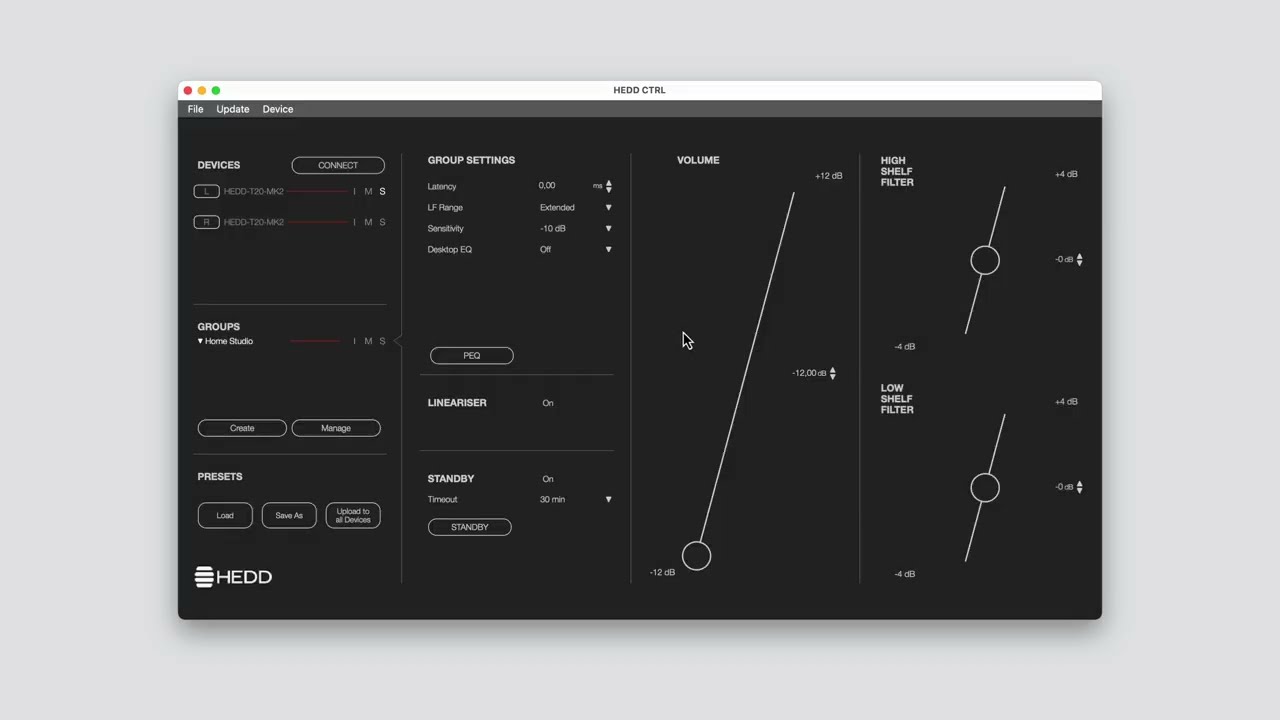
Device Management Panel
Shows all connected MK2 speakers and BASS subs. Identify devices, mute or solo, rename them, and assign physical positions for accurate preset handling.
Groups
Create and manage groups to keep your multi-speaker setup organized. Groups share key parameters such as latency, LF range, sensitivity, desk filter, Linearizer, and PEQ.
Control Panel
Quick access to volume, high and low shelves, and alignment tools. Adjustments update instantly through the network connection.
PEQ
Every speaker and group includes a fully flexible 10-band parametric EQ. Adjust points directly on the graph or enter exact values for frequency, gain, and Q.
Presets
All settings can be stored within presets. Once uploaded, presets live inside the speaker’s internal DSP. The network connection is no longer required afterward.
Future episodes will show advanced setups, multi-room workflows, Linearizer use-cases, and detailed room tuning techniques.
Learn more at https://hedd.audio/pages/ctrl
00:00 – Intro
00:19 – Interface Overview
00:42 – Device Management Panel
01:00 – Groups & Group Management
01:41 – Control Panel
01:52 – Parametric EQ (PEQ)
02:13 – Presets & Saving to Speakers
Повторяем попытку...
Доступные форматы для скачивания:
Скачать видео
-
Информация по загрузке: