PIC16F877A interface LM35 temperature sensor project tutorial using MikroC code & Proteus demo.
Автор: Learning Microcontrollers
Загружено: 2022-10-09
Просмотров: 4298
Описание:
Hello Guys,
Welcome to learning microcontrollers,
Guys I have been making lectures on electronics and embedded system since 2019 for free for everyone on youtube.
My videos are based on powerpoint presentations for the viewers for easy understanding of the circuit.
Now you guys have a chance to support my channel by buying these presentations.
The file contains over 180 project presentations.
This will allow me to buy new sensor and modules to make new and better videos for you guys.
Names of the patreons will be in my next video.
Link to patreon page:
https://www.patreon.com/user/shop/ove...
/////////////////////////////////////////////////////**********************************///////////////////////////////// Hello guys,
Welcome to Learning Microcontrollers youtube Channel,
Guys I have also compiled course on Udemy as well. Where you will learn under my direct supervision in a more supervised way.
Here is the links to the courses I have on Udemy, By taking any of these courses you will be supporting my channel aswell.
This will help me to make more videos with better hardware in the future. I hope you look forward to it.
Courses Links:
1- https://www.udemy.com/course/pic16f87...
2- https://www.udemy.com/course/mikroc-f...
3- https://www.udemy.com/course/mikroc-f...
4- https://www.udemy.com/course/pic-micr...
5- https://www.udemy.com/course/learn-ar... ///////////////////////////////////////////////////// Hello guys,
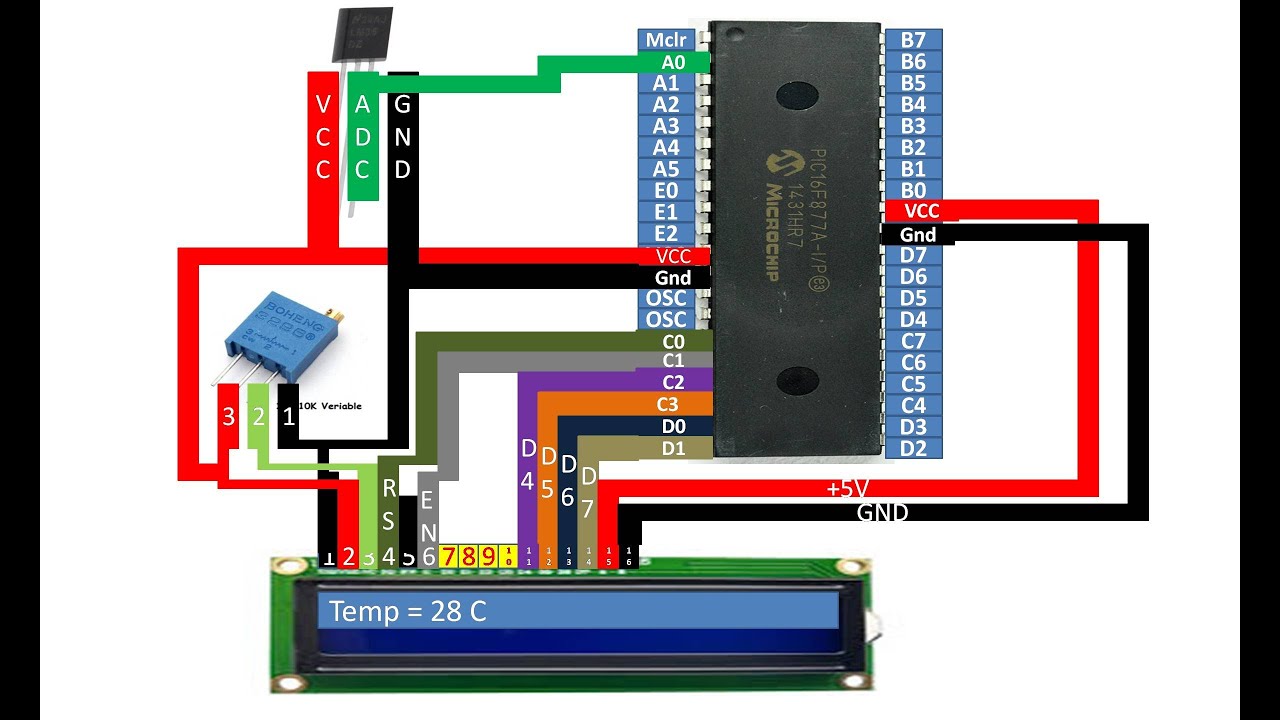
This tutorial is about how to interface an LM35 sensor with a PIC16F877A microcontroller and it displays output on a 16x2 LCD. Demonstration is on proteus software.
Become a Patreon and support my channel using link below:
https://patreon.com/user?u=81261678
How to setup PIC hardware video link:
• Setting up a PIC16F877A/PIC16F887/PIC18F****
How to setup Lm016 16x2 LCD video link:
• PIC16F877A interface Lm016 16x2 JHD LCD. U...
Code of current video is as under:
// Lcd pinout settings
sbit LCD_RS at RC0_bit;
sbit LCD_EN at RC1_bit;
sbit LCD_D7 at RD1_bit;
sbit LCD_D6 at RD0_bit;
sbit LCD_D5 at RC3_bit;
sbit LCD_D4 at RC2_bit;
// Pin direction
sbit LCD_RS_Direction at TRISC0_bit;
sbit LCD_EN_Direction at TRISC1_bit;
sbit LCD_D7_Direction at TRISD1_bit;
sbit LCD_D6_Direction at TRISD0_bit;
sbit LCD_D5_Direction at TRISC3_bit;
sbit LCD_D4_Direction at TRISC2_bit;
float temp;
char temp1[6];
float celcius;
void main() {
LCD_init();
Delay_ms(500);
ADC_init();
Delay_ms(500);
Lcd_Cmd(_LCD_CURSOR_OFF);
Delay_ms(100);
Lcd_Cmd(_LCD_CLEAR);
Delay_ms(100);
while(1)
{
temp = ADC_read(0);
Delay_ms(50);
celcius = ((temp * 5.0)/1024) * 100;
Delay_ms(50);
floattostr( celcius , temp1 );
Delay_ms(50);
LCD_OUT(1,1, "Temp = " );
LCD_OUT(1,9, temp1);
LCD_OUT(1,16, "C");
Delay_ms(100);
}
}
Повторяем попытку...
Доступные форматы для скачивания:
Скачать видео
-
Информация по загрузке:


![Пожалуй, главное заблуждение об электричестве [Veritasium]](https://image.4k-video.ru/id-video/6Hv2GLtnf2c)