ycliper

Популярное

Музыка Кино и Анимация Автомобили Животные Спорт Путешествия Игры Юмор

Интересные видео

2025 Сериалы Трейлеры Новости Как сделать Видеоуроки Diy своими руками

Топ запросов

смотреть а4 schoolboy runaway турецкий сериал смотреть мультфильмы эдисон
Скачать

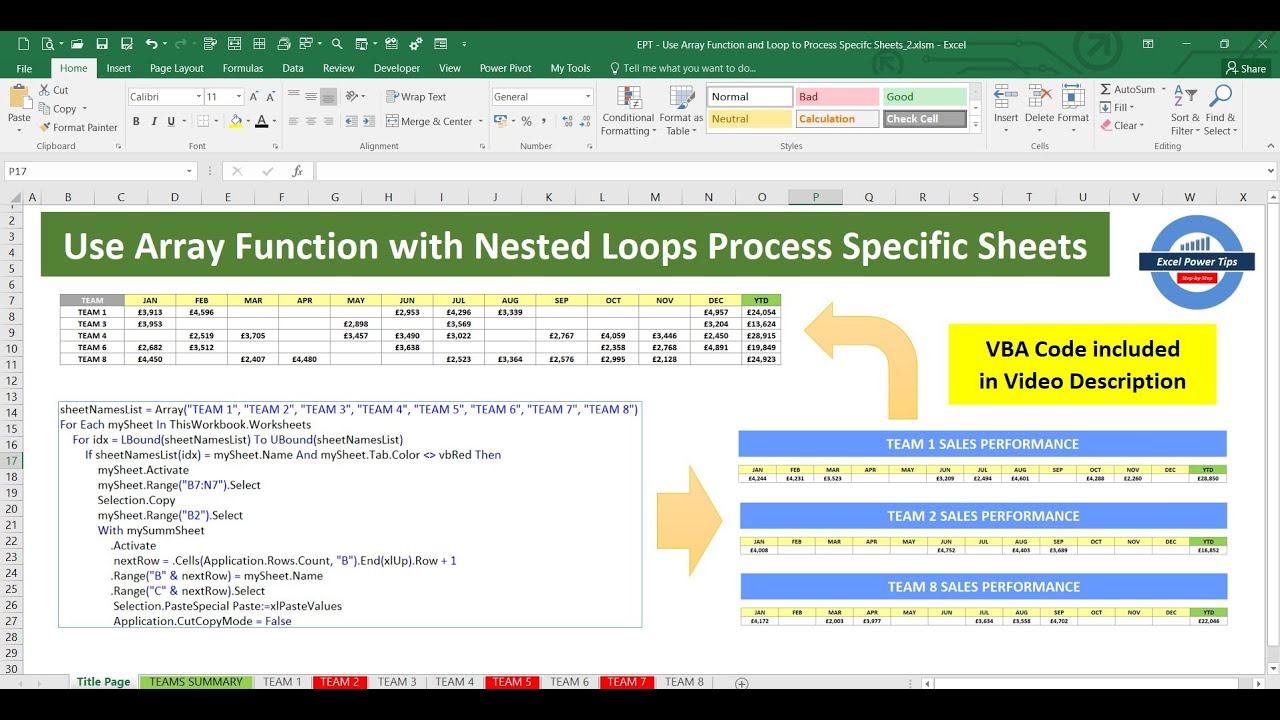
Use the Excel Array Function and Nested Loops to Process Specific Sheets (File Link Included)

Автор: ExcelPowerTips

Загружено: 2024-07-19

Просмотров: 216

Описание: Hey Excellers!

Another ExcelPowerTip showing how you can use the Excel VBA Array Function together with Nested Loops to process specific worksheets to copy and paste into a summary sheet.

I have also made the VBA code dynamic so that it will only process worksheets that have no colour and will ignore any sheets that is coloured red. You can change the colour of the tab from red to no colour and the VBA Macro will then pick it up and also the other way around.

VBA Code included below for you.

Download the complete Excel workbook here:

https://docs.google.com/spreadsheets/...

Hope you find this tip useful and can apply it to your work.

LIKE - SUBSCRIBE - SHARE - COMMENT - ENJOY!

----------------------------------------------------------------------------------------------------------------------
Public Sub Use_Arrays_Function_with_Loop_Process_Specific_Sheets()
' Developed by ExcelPowerTips - 2024
' Visit my YouTube Channel:    / @excelpowertips7447  

Dim mySheet As Worksheet
Dim mySummSheet As Worksheet
Dim sheetNamesList As Variant
Dim idx As Integer

Application.ScreenUpdating = False
Set mySummSheet = Worksheets("TEAMS SUMMARY") 'Sheet0

' Put your list of sheet names in an Array Function
sheetNamesList = Array("TEAM 1", "TEAM 2", "TEAM 3", "TEAM 4", "TEAM 5", "TEAM 6", "TEAM 7", "TEAM 8")

Debug.Print "First Array List Index = " & LBound(sheetNamesList) ' shows the index of the First element of the Array (usually 0)
Debug.Print "Last Array List Index = " & UBound(sheetNamesList) ' shows the index of the Last element of the Array (this will be the number of elements - 1)

With mySummSheet
.Activate
.Range("B7:R200").ClearContents
End With

' Use a loop to look through all the sheet names and check to see if its in the Array List using
' another nested loop and if it is then process it in terms of copying the sales data to the summary sheet
sheetNamesList = Array("TEAM 1", "TEAM 2", "TEAM 3", "TEAM 4", "TEAM 5", "TEAM 6", "TEAM 7", "TEAM 8")
For Each mySheet In ThisWorkbook.Worksheets
For idx = LBound(sheetNamesList) To UBound(sheetNamesList)
If sheetNamesList(idx) = mySheet.Name And mySheet.Tab.Color NOT EQUAL vbRed Then
mySheet.Activate
mySheet.Range("B7:N7").Select
Selection.Copy
mySheet.Range("B2").Select
With mySummSheet
.Activate
nextRow = .Cells(Application.Rows.Count, "B").End(xlUp).Row + 1
.Range("B" & nextRow) = mySheet.Name
.Range("C" & nextRow).Select
Selection.PasteSpecial Paste:=xlPasteValues
Application.CutCopyMode = False
End With
End If
Next idx
Next
mySummSheet.Range("B2").Select
Application.ScreenUpdating = True

End Sub
------------------------------------------------------------------------------------------------------------------------

Не удается загрузить Youtube-плеер. Проверьте блокировку Youtube в вашей сети.
Повторяем попытку...
Use the Excel Array Function and Nested Loops to Process Specific Sheets (File Link Included)

Поделиться в:

Доступные форматы для скачивания:

Скачать видео

  • Информация по загрузке:

Скачать аудио

Похожие видео

Excel VBA Arrays, Resize (ReDim, Preserve) Arrays, Create Functions That Return Dynamic Arrays

Excel VBA Arrays, Resize (ReDim, Preserve) Arrays, Create Functions That Return Dynamic Arrays

IF Formula in Excel With Multiple Conditions | If Else Statement in Excel | Nested IF And Or

IF Formula in Excel With Multiple Conditions | If Else Statement in Excel | Nested IF And Or

Loop Through a Named Range in Excel VBA

Loop Through a Named Range in Excel VBA

Microsoft Access VBA Loops: A Comprehensive Overview & Summary

Microsoft Access VBA Loops: A Comprehensive Overview & Summary

Vitality Bank Excel Modules 1-4 SAM Capstone Project A (STEP BY STEP) AssignXpert Official

Vitality Bank Excel Modules 1-4 SAM Capstone Project A (STEP BY STEP) AssignXpert Official

Excel Dynamic Array Totals

Excel Dynamic Array Totals

Мастер цикла кода VBA в Excel – 3 типа циклов VBA

Мастер цикла кода VBA в Excel – 3 типа циклов VBA

VBA FOR BEGINNERS

VBA FOR BEGINNERS

Циклы Excel VBA For — руководство для начинающих

Циклы Excel VBA For — руководство для начинающих

The Windows 11 Disaster Microsoft Didn’t See Coming

The Windows 11 Disaster Microsoft Didn’t See Coming

Data Entry By Group wise Userform Excel VBA

Data Entry By Group wise Userform Excel VBA

Использование функции суммы Excel на нескольких вкладках

Использование функции суммы Excel на нескольких вкладках

Advanced Excel Formula Examples

Advanced Excel Formula Examples

VBA to BROWSE & COPY Data from SELECTED File in Excel

VBA to BROWSE & COPY Data from SELECTED File in Excel

Пользовательская форма Excel VBA для поиска и обновления данных — пример пользовательской формы E...

Пользовательская форма Excel VBA для поиска и обновления данных — пример пользовательской формы E...

Why the Radius Is NOT 21 – Quarter Circle Geometry Puzzle

Why the Radius Is NOT 21 – Quarter Circle Geometry Puzzle

Превращение старого ноутбука в домашний сервер! (2026)

Превращение старого ноутбука в домашний сервер! (2026)

Bill Gates PANICS as Gamers ABANDON Windows 11 — Gamers Going Towards Linux

Bill Gates PANICS as Gamers ABANDON Windows 11 — Gamers Going Towards Linux

Excel VBA: Copy Data from one Sheet to Another (Absolute Vs. Relative Macro Recording)

Excel VBA: Copy Data from one Sheet to Another (Absolute Vs. Relative Macro Recording)

Create Summary Dashboard from Multiple Excel Data Sheets | Project Management

Create Summary Dashboard from Multiple Excel Data Sheets | Project Management

© 2025 ycliper. Все права защищены.


  • Контакты
  • О нас
  • Политика конфиденциальности


Контакты для правообладателей: [email protected]