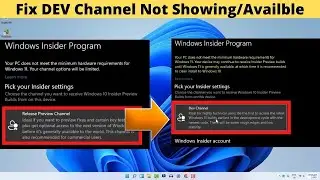
Windows 11 - 3 Ways To Fix BETA Channel Not Showing & Working (Missing) | Switch From DEV To Beta
Автор: How To MobiPC
Загружено: 2021-08-04
Просмотров: 15275
Описание:
#betachannelnotshowing #switchfromdevtobetachannel #betachannelmissing
Windows 11 - 3 Ways To Fix BETA Channel Not Showing & Working (Missing) | Switch From DEV To Beta | Windows Insider Program
In this video i will show you 3 Ways To Fix BETA Channel Not Showing & Working (Missing) in windows 11/10 Under Windows Insider Program.
and switch from dev channel to beta channel in windows insider program setting very easily.
There are 3 Ways To Fix BETA Channel Not available in windows insider program.
1. Using Registry Edit
2. CMD Command
3. Using Script
Now navigate to the following registry path.
Computer\HKEY_LOCAL_MACHINE\SOFTWARE\Microsoft\WindowsSelfHost\UI\Selection
Set the UIBranch Value to Beta
Set the ContentType to Mainline
Change the UIRing String value to External
Computer\HKEY_LOCAL_MACHINE\SOFTWARE\Microsoft\WindowsSelfHost\Applicability
Set the BranchName value to Beta
Set the ContentType to Mainline
Change the Ring String value to External
Alternative Fix as per Microsoft:
Open Command Prompt in elevated mode and type the following command.
bcdedit /set flightsigning on
Once the command is executed successfully then restart the system once. After the restart, Open Windows Insider Settings and check beta channel available or not. Mostly this will fix the issue.
Script Download Link:- https://www.mediafire.com/file/h9nwcx...
If you like the tutorial, then please support my YouTube channel by subscribing and clicking the bell icon for notification of future videos. Do drop a like and share the video if you find it helpful.
Thank you...!!
Повторяем попытку...

Доступные форматы для скачивания:
Скачать видео
-
Информация по загрузке: