IP Transition Demonstration ISATAP Windows
Автор: ITFreeTraining
Загружено: 2018-11-23
Просмотров: 6403
Описание:
In this video from ITFreeTraining, we’ll take a dive into configuring ISATAP for Windows. ISATAP is a transition technology which enables internal IPv4 networks to connect to an internal IPv6 network.
Access the rest of the course: http://ITFreeTraining.com/ipv6
Download the PDF handout: http://ITFreeTraining.com/handouts/ip...
Network
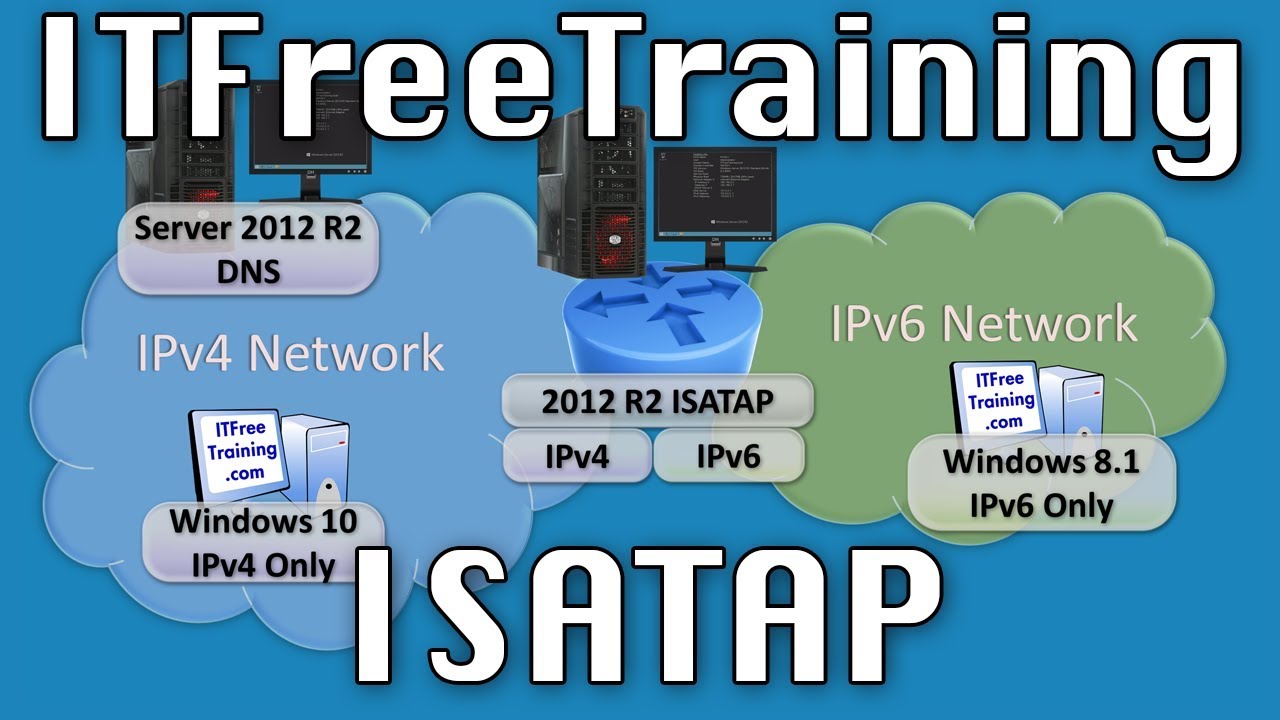
0:20 In this video, there is an IPv4 network with a computer running Windows 10 and an IPv6 network with a computer running Windows 8.1. ISATAP will be used to allow both these computers to communicate with each other even though they are on networks running different versions of the internet protocol. The process of configuring each computer is the same, however using different operating systems makes it easier to know which computer is being configured.
0:50 To connect one network to the other network, a router will be installed between both networks. This router will be running Windows Server 2012 R2. The router effectively provides a bridge between the two networks. In order to achieve this, the server will have two network cards, one connected to each network with an IP Address on each network. The administrator could also use Linux or a hardware router if they so chose. ISATAP uses DNS to find resources on the network. In this case, the Windows 10 computer requires access to a DNS server in order to locate the ISATAP router.
Demonstration looking at Windows 10 network configuration
1:38 The Windows 10 computer has the IPv4 and IPv6 protocols enabled. The IPv4 protocol is configured with a static IP Address. The IPv6 protocol is configured to obtain an IPv6 address automatically.
1:43 To view the network configuration of the computer, right click on the start menu and select “Network Connections”.
1:50 Network Connections will show all the network connections that are currently configured on this computer. On this computer there is only one network card. To see the configuration of the network card, right click the network card and select the option “Properties”.
2:04 The network properties box shows all the clients, services and protocols that are currently configured for that network card. To view any options configured for them, select the option and select “Properties”.
2:05 To view the properties of the IPv4 protocol, select “Internet Protocol Version 4 (TCP/IPv4)” and press Properties. In this case a static IP Address and DNS server have been configured. Once you have finished looking at the options you can press Close, to close the window. ISATAP does not require a static IP Address; a dynamic IP Address can also be used. In this example a static IP Address was used to show what configuration was used and also that no additional dynamic configuration is performed. The only other configuration that ISATAP requires is a DNS look up, thus the need for a DNS server to be available on the network.
2:18 Notice that the IPv6 protocol “Internet Protocol Version 6 (TCP/IPv6)” is present, however it is not ticked. This means the IPv6 protocol is not currently enabled. ISATAP will later allocate an IPv6 address to this computer, however it does not require the IPv6 protocol to be enabled in order to do this. Essentially, ISATAP will create an IPv6 packet. The IPv6 packet will be placed into an IPv4 packet and sent to the router. The router will remove the IPv4 packet and route the IPv6 packet like any other packet on the network.
3:25 To better understand how the computer is configured, I will open a command prompt. To do this, right click the start menu and select “Command Prompt”.
3:30 To see the basic network configuration of the computer, run the command “IPConfig”. In the output from the command there will be a section called “Tunnel adapter isatap”. This is present on a Windows computer by default and does not require any additional configuration. If ISATAP is not running, the “Media State” will be shown as “Media disconnected”. If ISATAP is running, the Media State will change to “Connected”.
See http://ITFreeTraining.com/ipv6/isatap... for the rest of this description that is too long for YouTube.
References
“Installing and Configuring Windows Server 2012 R2 Exam Ref 70-410” pg 204
Credits
Trainer: Austin Mason http://ITFreeTraining.com
Voice Talent: HP Lewis http://hplewis.com
Companion Document: Phillip Guld https://philguld.com
Video Production: Kevin Luttman http://www.KevinLuttman.com
Quality Assurance: Brett Batson http://www.pbb-proofreading.uk
Повторяем попытку...
Доступные форматы для скачивания:
Скачать видео
-
Информация по загрузке: