ycliper

Популярное

Музыка Кино и Анимация Автомобили Животные Спорт Путешествия Игры Юмор

Интересные видео

2025 Сериалы Трейлеры Новости Как сделать Видеоуроки Diy своими руками

Топ запросов

смотреть а4 schoolboy runaway турецкий сериал смотреть мультфильмы эдисон
Скачать

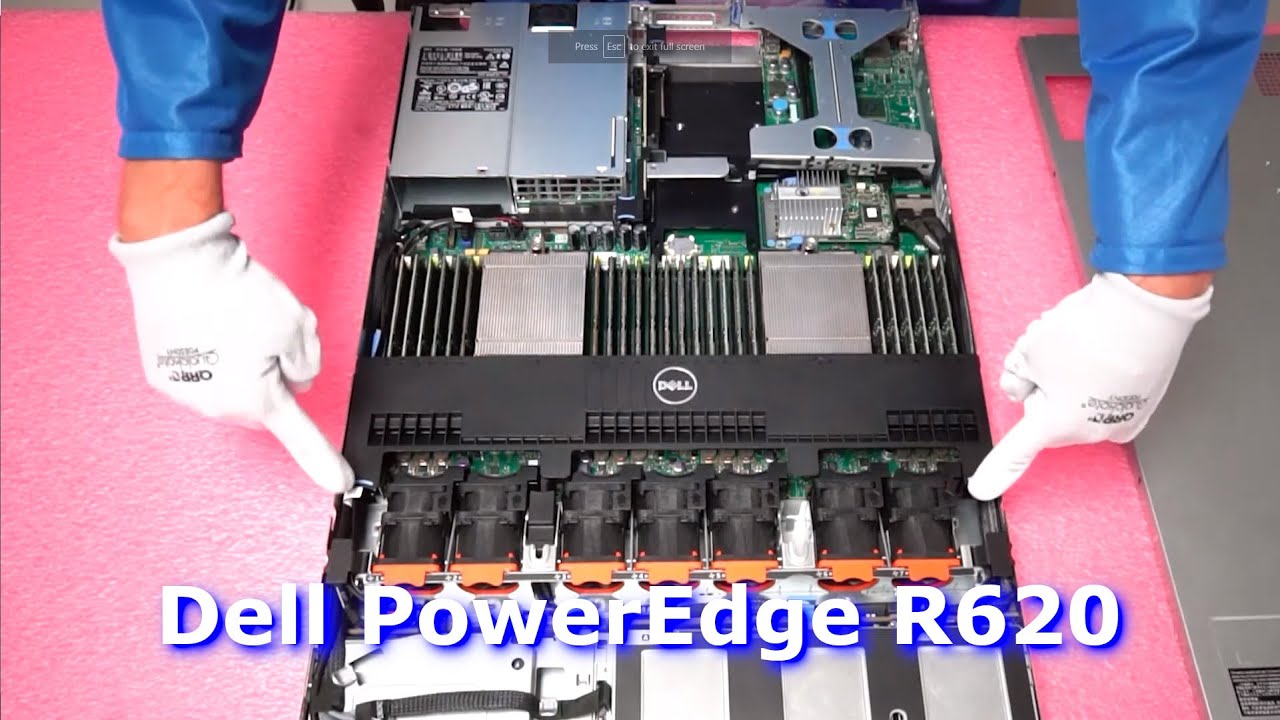
Dell PowerEdge R620 Server Memory Spec Overview & Upgrade Tips | How to Configure the System

Автор: Cloud Ninjas

Загружено: 2020-12-04

Просмотров: 7459

Описание: Dell PowerEdge R620 Server Memory "How To Guide" for RAM installation and configuration. In this video, we will review best practices for loading memory modules inside your R620 server and provide a general overviews of all the different options including speeds, sizes and memory types accepted.

The PowerEdge R620 is part of the Dell 12th Generation family of servers. This 1U server operates on dual Intel E5-2600 V1 or V2 series processors which is an LGA2011 CPU socket. The R620 server is the next gen to the popular Dell PowerEdge R610 server. There are 24 DIMM slots running on DDR3 memory modules. Speed options: 1066MHz 1333MHz 1600MHz or 1866MHz. Note 1866 will clock down to 1600 speed. Size options: 2GB 4GB 8GB 16GB 32GB or wait for it...64GB!

You can use two types of memory for your Dell R620: ECC Registered also know as RDIMM or Load Reduced also know as LRDIMM. This is very key. If you are just starting with your R620 and you believe you will want to scale up in the future, then LRDIMMs will be the best option for scalability as we will discuss more below. The big difference between ECC Registered and Load Reduced is the maximum configuration for the Dell R620. ECC Reg will only max out at 512GB via (16 x 32GB) DDR3 PC3-12800R 1600MHz Server Memory. Whereas, LRDIMMs will provide triple the capacity. You heard that right. Triple capacity! You can max your R620 with 1.5TB via (24 x 64GB) DDR3 PC3-12800L 1600MHz Load Reduced Server Memory. Now this is very puzzling. Why can you use 24 x 64GB with LRDIMM and we can only use 16 x 32GB with RDIMM? Great question. This is known as the Rank Rule and we will solve this riddle in depth in the video. Another common question. Were 64GB DDR3 ECC Registered memory modules invented? Unfortunately, they do not exist. Only LRDIMMs support 64GB DDR3 DIMMs.

This system is a dual CPU socket 1U rackmount server. Each CPU manages three Memory Channels. Each memory channel controls three DIMM slots. Note: This is very important. All 32GB DDR3 DIMMs are Quad Rank and this is the main reason the Rank Rule becomes an issue for the Dell PowerEdge R620 server. Dell has labeled & color coded the memory channels. White is the first DIMM slot in every channel. Followed by black and then green. The proper configuration for dual CPUs is in duplicates of eight, which will evenly spread the load across each channel. We will discuss this in more depth in our video and also show you how to install the DIMMs inside your Dell PowerEdge R620 server.

Learn more about all the different memory options for your PowerEdge R620 server. Dell brings us yet another high-performing server with the R620 offering storage, powerful processing, and massive memory. This hyper-dense 2-socket, 1U rack server is perfect for small-business demanding enterprise-level performance in a limited space. Made to handle high-performance computing, this server supports Intel Xeon E5-2600 v1/v2 series processors.

Build your own refurbished Dell PowerEdge R620 server and custom configure to your preferred specs. We have all form factor options in stock. 4 Bay SFF. 8 Bay SFF. 10 Bay SFF.
https://cloudninjas.com/collections/d...

Buy Dell PowerEdge R620 Server Memory Upgrades -https://cloudninjas.com/collections/p...

Buy Dell PowerEdge R620 Server Solid State Drive Upgrades -
https://cloudninjas.com/collections/d...

Please smash that subscribe button and learn more about Cloud Ninja’s server upgrades.

Follow us on:
  / realcloudninjas  
  / realcloudninjas  

Не удается загрузить Youtube-плеер. Проверьте блокировку Youtube в вашей сети.
Повторяем попытку...
Dell PowerEdge R620 Server Memory Spec Overview & Upgrade Tips | How to Configure the System

Поделиться в:

Доступные форматы для скачивания:

Скачать видео

  • Информация по загрузке:
Скачать аудио

Похожие видео

Обзор и обновление памяти сервера Dell PowerEdge R640 | Как установить память | Поддерживаемые мо...

Обзор и обновление памяти сервера Dell PowerEdge R640 | Как установить память | Поддерживаемые мо...

Обзор сервера Dell PowerEdge R630 | Советы по установке памяти | Как настроить модули DDR4 DIMM

Обзор сервера Dell PowerEdge R630 | Советы по установке памяти | Как настроить модули DDR4 DIMM

⚡️ МИЛОВ: Нефть по $39 добила бюджет рф! Масштабный блэкаут и аварии ЖКХ СРАЗУ В НЕСКОЛЬКИХ городах

⚡️ МИЛОВ: Нефть по $39 добила бюджет рф! Масштабный блэкаут и аварии ЖКХ СРАЗУ В НЕСКОЛЬКИХ городах

10 кВт! Бесплатная энергия с помощью двух электродвигателей 💡⚡💡 Liberty Engine 5.0

10 кВт! Бесплатная энергия с помощью двух электродвигателей 💡⚡💡 Liberty Engine 5.0

Лучшая Музыка 2026🏖️Зарубежные песни Хиты🏖️Популярные Песни Слушать Бесплатно 2026 #342

Лучшая Музыка 2026🏖️Зарубежные песни Хиты🏖️Популярные Песни Слушать Бесплатно 2026 #342

Dell PowerEdge R620 Server CPUs | Intel Xeon Processors Options | LGA2011 Socket | CPU Install

Dell PowerEdge R620 Server CPUs | Intel Xeon Processors Options | LGA2011 Socket | CPU Install

💾СОБРАЛ NAS НА TrueNAS💽 НЕ ПОНИМАЮ, КАК ЖИЛ БЕЗ НЕГО САМОДЕЛЬНОЕ ХРАНИЛИЩЕ ЭТО ПРОСТО

💾СОБРАЛ NAS НА TrueNAS💽 НЕ ПОНИМАЮ, КАК ЖИЛ БЕЗ НЕГО САМОДЕЛЬНОЕ ХРАНИЛИЩЕ ЭТО ПРОСТО

This might be my favorite new mini server...

This might be my favorite new mini server...

Знакомство с моими новыми серверами Homelab — Часть 2. Маленький Dell R320

Знакомство с моими новыми серверами Homelab — Часть 2. Маленький Dell R320

Обзор и обновление памяти сервера Dell PowerEdge R540 | Как установить память | Поддерживаемые мо...

Обзор и обновление памяти сервера Dell PowerEdge R540 | Как установить память | Поддерживаемые мо...

Dell R620 - adding an SSD Drive and installing Windows Server 2019

Dell R620 - adding an SSD Drive and installing Windows Server 2019

Dell PowerEdge R620 HDDs & SSDs | Hard Drives | Solid State Drives | Testing with Dell Diagnostics

Dell PowerEdge R620 HDDs & SSDs | Hard Drives | Solid State Drives | Testing with Dell Diagnostics

Путина предадут элиты и он исчезнет как Мадуро: будущее РФ отработано в Венесуэле. Мишустин на смену

Путина предадут элиты и он исчезнет как Мадуро: будущее РФ отработано в Венесуэле. Мишустин на смену

Как установить графический процессор в Dell PowerEdge R610 | Nvidia Quadro P2000

Как установить графический процессор в Dell PowerEdge R610 | Nvidia Quadro P2000

DELL POWER EDGE R620 Server | Hardware Configuration & Intial Setup Explained | BEST FOR HOME SERVER

DELL POWER EDGE R620 Server | Hardware Configuration & Intial Setup Explained | BEST FOR HOME SERVER

Dell PowerEdge R620 Server Memory Overview & Upgrade | How to Install Memory | Supported DIMMs

Dell PowerEdge R620 Server Memory Overview & Upgrade | How to Install Memory | Supported DIMMs

Dell R650 vs R640 | Server Comparison

Dell R650 vs R640 | Server Comparison

Я купил новый СЕРВЕР!! (Настройка и установка VMware ESXi)

Я купил новый СЕРВЕР!! (Настройка и установка VMware ESXi)

Обновление BIOS сервера Dell PowerEdge R620 | Как обновить BIOS | Файл EFI BIOS | Менеджер загрузки

Обновление BIOS сервера Dell PowerEdge R620 | Как обновить BIOS | Файл EFI BIOS | Менеджер загрузки

120 МИЛЛИАРДОВ: КТО и Зачем создал БИТКОИН? Тайна Сатоши Накамото

120 МИЛЛИАРДОВ: КТО и Зачем создал БИТКОИН? Тайна Сатоши Накамото

© 2025 ycliper. Все права защищены.


  • Контакты
  • О нас
  • Политика конфиденциальности


Контакты для правообладателей: [email protected]