Create maps in Stata with spmap
Автор: Eric Lenz
Загружено: 2021-02-03
Просмотров: 21421
Описание:
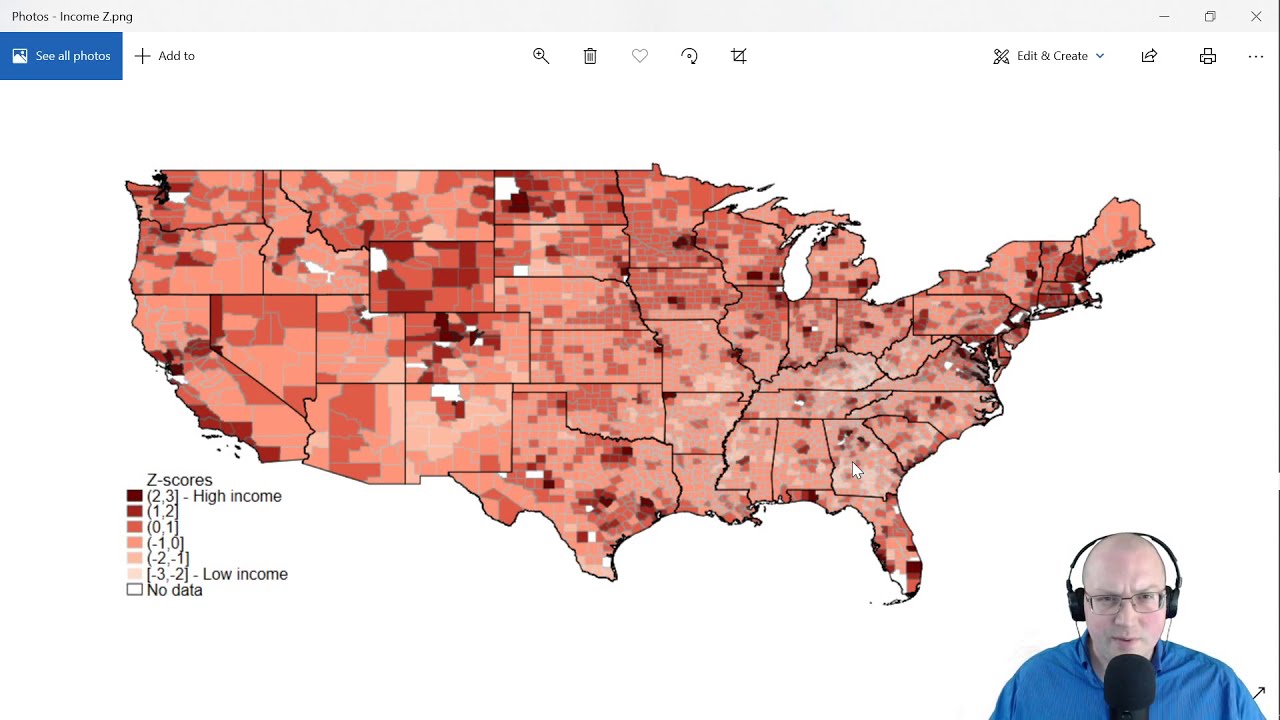
How can you create nice maps in Stata? Kevin Crow and William Gould at StataCorp write a nice walkthrough for the spmap command. I follow their basic outline using income per person and county coordinate data. Then I show how to customize the color palette, change the legend, and display z-scores.
The data is from the IRS Statistics of Income (SOI) and American Community Survey (ACS) Migration Flows from 2014 to 2018. The income measure is adjusted gross income per nonmover (person); however, in my code I name the variable "IncPerHousehold". The measure of nonmovers is a number of people; however, the ACS survey is administered per household and asks questions about the number of people.
The data and program: https://drive.google.com/file/d/1TwJr...
The steps for spmap by Kevin Crow and William Gould at StataCorp: https://www.stata.com/support/faqs/gr...
A list of FIPS codes by county: https://en.wikipedia.org/wiki/List_of...
A list of color schemes for spmap: http://repec.sowi.unibe.ch/stata/pale...
My website: https://sites.google.com/view/lenz
---Contents of this video---
00:00 - Intro
00:10 - Program code and data
00:18 - Shape (.shp) and Database (.dbf) files
01:23 - Data view
02:04 - Merge main variable (.dta) file and counties.dta
02:47 - Sort and identify non-matching data
03:29 - Spmap command
04:14 - Map
04:42 - fcolor(Blues2) option
05:10 - clnumber(6) option
05:43 - State outlines polygon() option
6:37 - Eliminate non-matching from statecoord.dta
07:58 - Map with state outlines
08:16 - Map with grey county outlines
08:40 - Map with clmethod(stdev)
08:40 - Map with clmethod(stdev)
09:15 - Generate z-scores
09:47 - Map with z-scores
09:56 - Change legend clmethod(custom) clbreaks
11:28 - Website sources
12:02 - Color schemes
Повторяем попытку...
Доступные форматы для скачивания:
Скачать видео
-
Информация по загрузке: