Panorama » How to Use the Lasso Tool
Автор: Precision Planting Product Support
Загружено: 2024-02-22
Просмотров: 302
Описание:
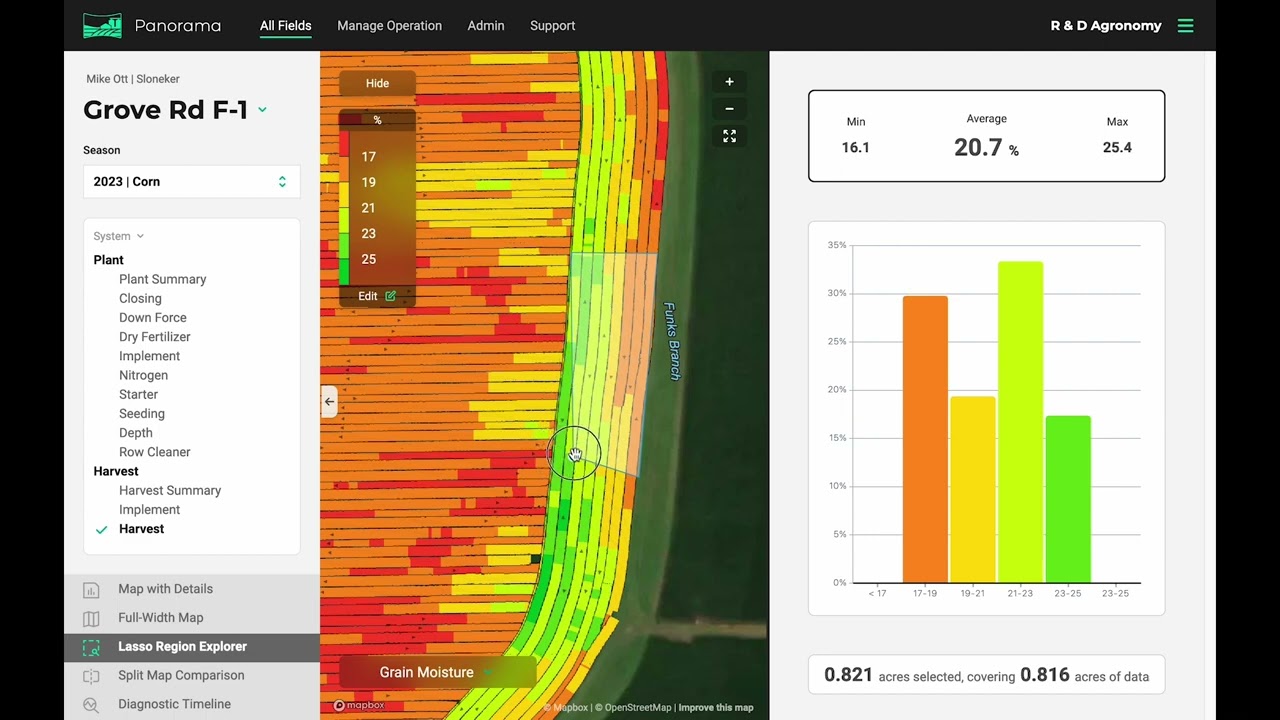
Using the lasso tool in your Panorama by Precision Planting data management account is simple! Manually draw regions to see data from the selected areas on the map.
How to use the lasso tool on the web app:
1. Choose a field and select a map layer.
2. Select the “Lasso Region Explorer” tool on the bottom left column.
3. Draw a portion of the map that you wish to analyze.
4. Bar graphs will automatically populate on the right-hand side, pulling data from the lasso selection only.
How to use the lasso tool on the phone app:
1. Select a field and map layer.
2. Click “tools” on the bottom menu bar and select “lasso.”
3. Draw a portion of the map you wish to analyze.
4. The values will automatically populate at the bottom of the screen above the menu bar.
Panorama from Precision Planting allows you to easily view maps, input summaries, and agronomic data from a Gen 3 20|20. See all your 20|20 farming data on your phone, computer, or platform of your choice through the Panorama data analysis software.
🌱 Learn more about Panorama from Precision Planting here » https://www.precisionplanting.com/pro...
Повторяем попытку...
Доступные форматы для скачивания:
Скачать видео
-
Информация по загрузке: