ycliper

Популярное

Музыка Кино и Анимация Автомобили Животные Спорт Путешествия Игры Юмор

Интересные видео

2025 Сериалы Трейлеры Новости Как сделать Видеоуроки Diy своими руками

Топ запросов

смотреть а4 schoolboy runaway турецкий сериал смотреть мультфильмы эдисон
Скачать

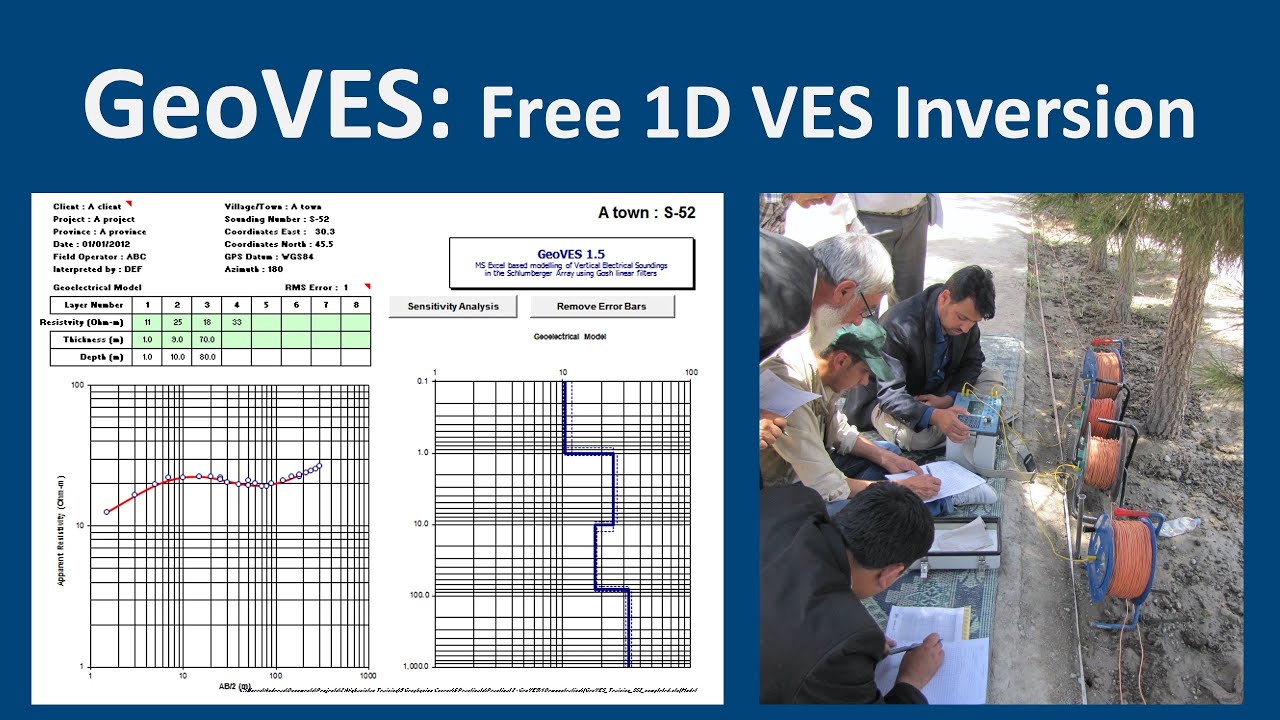
Hydrogeology 101: GeoVES - Free 1D VES inversion for groundwater exploration

Автор: Geosearch International

Загружено: 2021-04-03

Просмотров: 29549

Описание: In this video I will show you how to use GeoVES - a Free Excel-based tool for the 1D inversion of Vertical Resistivity Soundings (VES). GeoVES works with VBA, so you need to enable the Macros in Excel. GeoVES is an XLS file. Do NOT save it in any other format.

00:00 Introduction
00:45 How to use GeoVES
02:41 Loading the data into the Data sheet
04:47 Plot data on the chart
05:11 Send data to GeoVES
08:24 Check data in the Model sheet
08:55 Sensitivity Analysis
09:30 Print the results to PDF
11:00 Final words

Below are the links to the Excel files in Google Drive. Please save the files to your computer and work on a copy of them in Excel. Note that the GeoVES master is read only, so you need to either unlock your copy of the file, or save it as an XLS file.

Link to GeoVES Master XLS file: https://bit.ly/2OpcMvm
Link to GeoVES example from Punjab discussed in the video: https://bit.ly/3rQPRXg
Link to the video on YouTube:    • Hydrogeology 101: GeoVES - Free 1D VES inv...  
Link to a YouTube video on introduction to resistivity surveys:    • Hydrogeology 101: Introduction to Resistiv...  

How to use GeoVES:
1) Enter your field data in the Data Sheet. You will need the deltaV/I of each reading, and their AB/2 and MN spacings. You can also add up to 12 project metadata descriptions and their values.
2) Press "Plot data on chart" and see if the different MN apparent resistivity curves line up. If not, you can shift them by changing the MN spacings.
3) Press "Send data to GeoVES".
4) In the GeoVES sheet, enter the resistivity and thickness values for each layer. Up to 8 layers are allowed, though normally you should not use more than 3 our 4.
5) You can remove any bad data points in the Model sheet. Just delete the "1" next to the bad value.
6) In GeoVES press "Sensitivity Analysis". This will show you how sensitive each part of your model is. The dotted lines show how much each parameter needs to be changed to increase the overall model RMS error by 10%.
7) Plot the workbook or send it straight to PDF. Note that it plots in Black and White to save your ink.

#GeoVES #Resistivity #VES

Не удается загрузить Youtube-плеер. Проверьте блокировку Youtube в вашей сети.
Повторяем попытку...
Hydrogeology 101: GeoVES - Free 1D VES inversion for groundwater exploration

Поделиться в:

Доступные форматы для скачивания:

Скачать видео

  • Информация по загрузке:

Скачать аудио

Похожие видео

Технические условия и спецификации объемов работ (ТЗ и ВОР) для скважин на воду - Гидрогеология 101

Технические условия и спецификации объемов работ (ТЗ и ВОР) для скважин на воду - Гидрогеология 101

Гидрогеология 101: Введение в электроразведку

Гидрогеология 101: Введение в электроразведку

Hydrogeology 101: Groundwater exploration strategy

Hydrogeology 101: Groundwater exploration strategy

Как использовать WINRESIT для моделирования данных вертикального электрического зондирования (ВЭЗ)

Как использовать WINRESIT для моделирования данных вертикального электрического зондирования (ВЭЗ)

IP12Win Software Collecting VES data from Site and interpretation by Schlumberger Curve

IP12Win Software Collecting VES data from Site and interpretation by Schlumberger Curve

Electrical Resistivity Tomography: Imaging Sub-Surface Structures

Electrical Resistivity Tomography: Imaging Sub-Surface Structures

Hydrogeology 101: Theis Method

Hydrogeology 101: Theis Method

ZondIP1D Tutorial Introducción|| Sondeo Eléctrico Vertical || Modelo de Capas || Explor geoeléctrica

ZondIP1D Tutorial Introducción|| Sondeo Eléctrico Vertical || Modelo de Capas || Explor geoeléctrica

The Windows 11 Disaster That's Killing Microsoft

The Windows 11 Disaster That's Killing Microsoft

Липсиц про рекордный рост цен, падение цен на нефть и будущее криптовалют🎙️ Честное слово с Липсицем

Липсиц про рекордный рост цен, падение цен на нефть и будущее криптовалют🎙️ Честное слово с Липсицем

Парадокс ригеля и стропил

Парадокс ригеля и стропил

[2026] Feeling Good Mix - English Deep House, Vocal House, Nu Disco | Emotional / Intimate Mood

[2026] Feeling Good Mix - English Deep House, Vocal House, Nu Disco | Emotional / Intimate Mood

Где начало СХЕМЫ? Понимаем, читаем, изучаем схемы. Понятное объяснение!

Где начало СХЕМЫ? Понимаем, читаем, изучаем схемы. Понятное объяснение!

Парадокс разгибания кривой доски

Парадокс разгибания кривой доски

Гидрогеология 101: Введение в движение грунтовых вод

Гидрогеология 101: Введение в движение грунтовых вод

11 July 2020

11 July 2020

Analyzing Electrical Resistivity data (VES) Using IPI2WIN

Analyzing Electrical Resistivity data (VES) Using IPI2WIN

Tutorial: Geophysical modeling & inversion with pyGIMLi

Tutorial: Geophysical modeling & inversion with pyGIMLi

Гидрогеология 101: Метод испытания на прямолинейную откачку Купера-Джейкоба

Гидрогеология 101: Метод испытания на прямолинейную откачку Купера-Джейкоба

Sondeo Eléctrico Vertical Procesamiento (inversión) de Datos con IX1D SEV´S Geofísica

Sondeo Eléctrico Vertical Procesamiento (inversión) de Datos con IX1D SEV´S Geofísica

© 2025 ycliper. Все права защищены.


  • Контакты
  • О нас
  • Политика конфиденциальности


Контакты для правообладателей: [email protected]