ideCAD Structural | Concrete Design | Structural Design Software
Автор: ideCAD
Загружено: 2022-01-05
Просмотров: 2105
Описание:
ideCAD Structural is an innovative All-in-One Structural Design Software for Architecture, Structural Engineering, and Construction Bim workflows that integrate Architectural, Structural Engineering, and Construction in one revolutionary Structural Design Software Solution.
This tutorial explains how to create a Building Information Model of an Architectural Bim Model from start to finish with building information modeling and share it with a Structural engineer for structural analysis design and details.
In this video, review concrete design.
1. Use the As(-) Concrete Insufficient Rebar Area command from the Output heading.
2. Select the All Failures from the Design Output list in the Visualization dialog.
3. Use the Longitudinal rebar percentage (%-Columns) from the Concrete list.
4. Use the Column command from the Design heading.
5. Check the Columns, Forces-Reinforcement Areas, Capacity Diagrams, and Moment-Curvature tab.
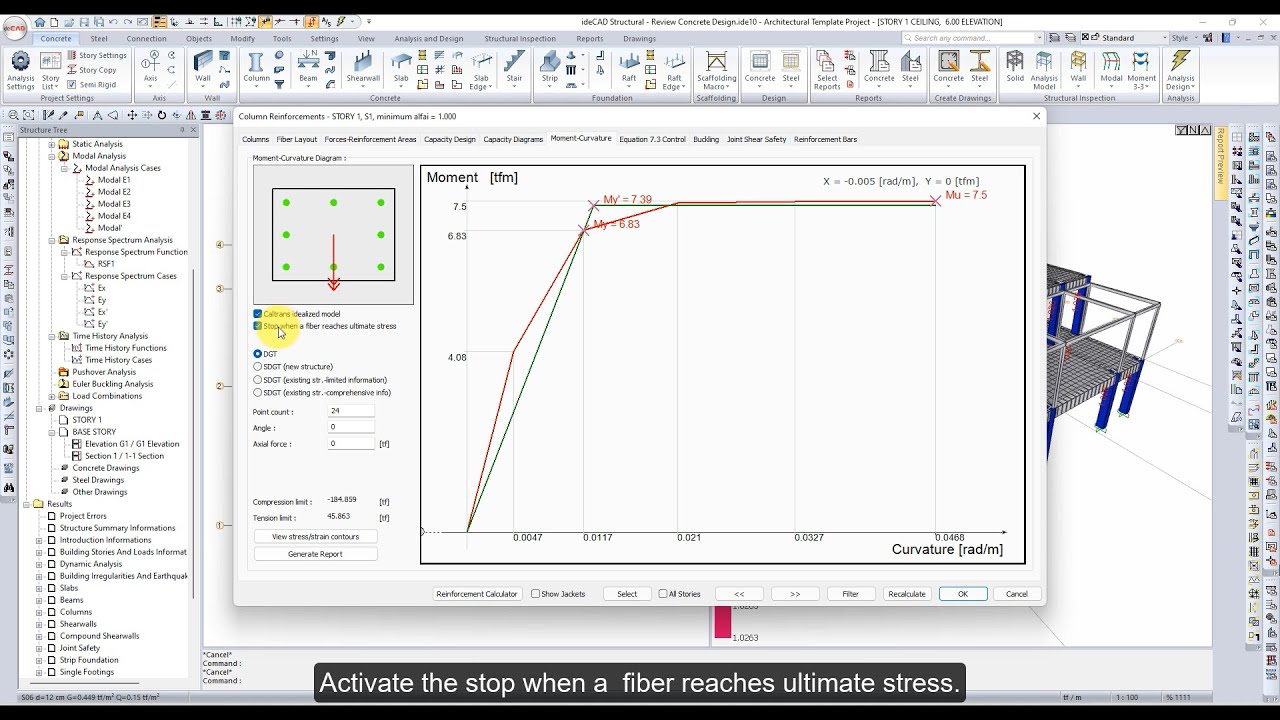
6. Activate the Caltrans idealized model and stop when fiber reaches ultimate stress options in the Moment-Curvature tab.
7. Use the Beam command from the Design heading.
8. Check the Beams, Concrete Configuration, Reinforcement Areas, Forces & Details, and Deflection & Crackings tab.
9. Use the Slab command from the Design heading.
10. Check the Slabs tab.
https://help.idecad.com/ideCAD/Review...
#idecadarchitectural #idecadstructural #idecadone #BIM #BIMsoftware #structuralbim #architecturalbim #structuralengineering
Повторяем попытку...
Доступные форматы для скачивания:
Скачать видео
-
Информация по загрузке: