How To Create Vintage Typography Effects Without Illustrator
Автор: Kittl
Загружено: 2022-08-23
Просмотров: 2530
Описание:
👉 Use These Effects Now: https://kit.tl/vintagetypographyeffects
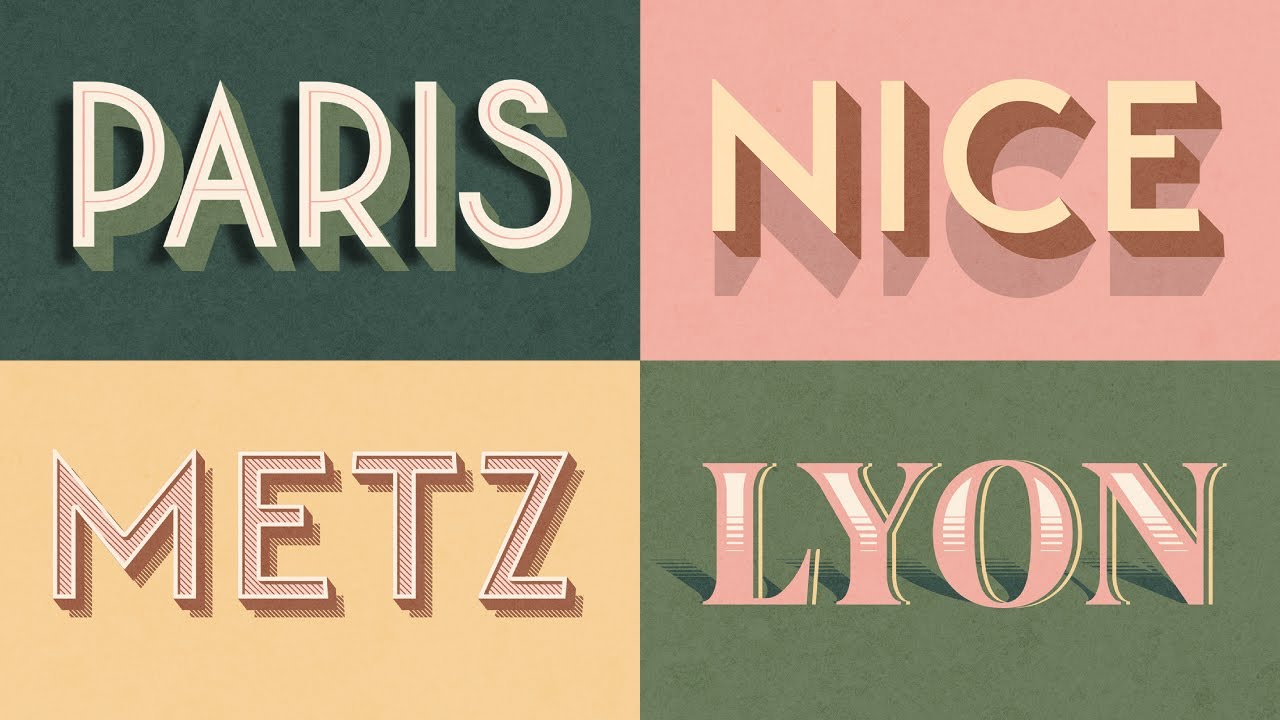
In this video, Drew starts by showing you vintage type specimen pages displaying styles you would have commonly seen in the late 1800s and early 1900s. Then he shows you exactly how to achieve those styles using effects in Kittl! It's super easy. So go grab Kittl at the link above and then follow along with the tutorial. Check out these details below too!👇
🗝️ Checkout these Kittl tutorials next:
↪︎Easily Make Vintage Text Effects: • Видео
↪︎Easily Type On Any Path: • How To Easily Type Text On Any Path Withou...
👥Join the Kittl Discord Group!
↪︎https://kit.tl/discord
🕰️ Timestamps For This Video:
0:00 Create Vintage Type Styles Without Illustrator
0:30 Look At Type Specimen Sheets For Inspiration
0:50 How To Make 3D Lettering With Drop Shadow
2:40 How To Make Vintage Wood Etched Text Effects
3:55 How To Make A 3D Double Shadow Text Effect
5:30 How To Make Vintage Text Decoration With Shadow
📱 Follow Kittl On Social:
/ kittldesign
/ kittldesign
/ kittldesign
/ kittldesign
https://www.kittl.com
🔴 Subscribe to @Kittl
↪︎ / kittldesign
More about this video:
Vintage typography is absolutely stunning. It's simply a marvel how the masters of old were able to consistently craft and product flyers, logos, announcements, and so much more with just their hands and the use of a printing press! But what use to be super difficult in the past is now super easy with the use of design softwares like Kittl.
So if you've been looking for how to make vintage typography in illustrator, you don't have to search any further. What would take you a couple of hours or more to learn in Adobe Illustrator you can now do in a manner of minutes with Kittl. Simple choose one of our premium vintage-inspired fonts (crafted by the masters at Heritage Type Co.), and then select some one-click text effects, change some colors, add some shadow and you're done! We've taken all of the struggle and hassle away when making intense vintage style effects like inset decoration, color cuts, hatch lines, drop shadow, and more.
So why you should use vintage typography? Well there are many reasons why vintage type would be a good idea to use. Maybe you're creating a rugged apparel brand, or a new brewery down the street. Maybe you're opening your own classic barbershop and want some gold lettering on the outside of your shop. Vintage fonts can be used to convey a sense of timelessness and mastery at craft. When people see those timely hand-drawn letters, they get the sense that your business has been around for a good long while (and probably knows a thing or two about the craft). In addition, vintage type can capture attention and has a wow factor to it that a lot of simple and modern design doesn't have. So if you're creating an ad, maybe throw a retro or vintage spin on it to capture your audiences attention and spark some memories of the older generation.
And if you've been looking for how to use vintage typography, this is definitely a great video to get started. Then you can check out the full playlist on typography where we go into detail making different styles of logos, posters, graphics and more. Vintage text effects don't have to be complicated anymore, because Kittl works just like magic!
Similar to an adobe illustrator tutorial, we teach you how to create highly professional designs using Kittl, which is free to use and works right in your browser. So there is no need to download and try to learn design tools like Illustrator and Photoshop, or Affinity Designer.
Thank you so much for using our platform, and for watching this video. Don't forget to subscribe and follow along with the tutorial on the channel.
If there is anything I missed, or if you have more questions, drop a comment below and we will respond asap! Let me know more tutorial ideas as well!
#fonts #graphicdesign #typography
Повторяем попытку...
Доступные форматы для скачивания:
Скачать видео
-
Информация по загрузке: