Editing Pet Profiles
Автор: ToughTail
Загружено: 2026-01-01
Просмотров: 4
Описание:
Keeping your pet's profile up to date helps ToughTail provide more accurate activity tracking and better personalized insights.
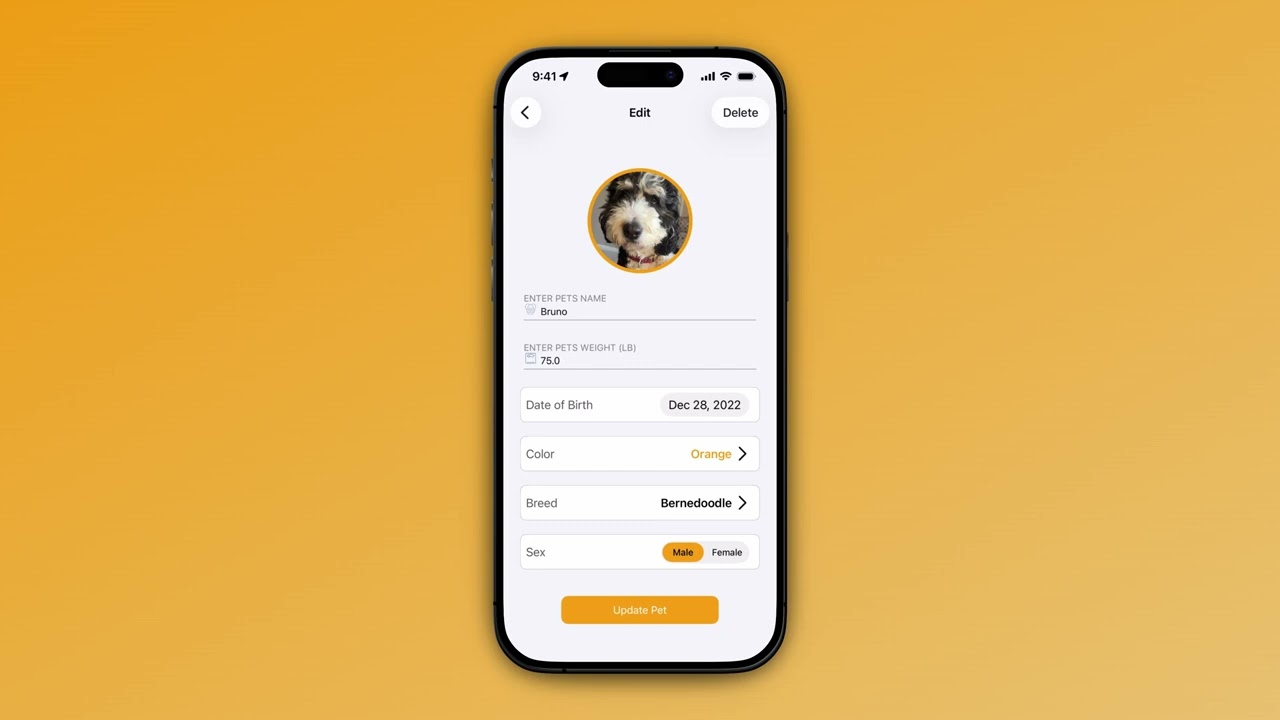
Navigate to the Pets tab and select the pet you want to edit. Tap the Manage Pet button to open the profile editor.
You can update your pet's photo anytime. A clear, recent photo helps you quickly identify them in the app and makes sharing more personal.
Update their name if needed. Adjust their weight as it changes, since this affects calorie calculations. You can also update their date of birth, color, breed, and sex.
If your pet's breed was set incorrectly or they're a mixed breed you've learned more about, updating this helps improve activity insights.
When you're finished, tap Update Pet. Your pet's updated profile is reflected throughout the app immediately, including on the map, in activity reports, and in any shared access with family members.
Повторяем попытку...
Доступные форматы для скачивания:
Скачать видео
-
Информация по загрузке: