ycliper

Популярное

Музыка Кино и Анимация Автомобили Животные Спорт Путешествия Игры Юмор

Интересные видео

2025 Сериалы Трейлеры Новости Как сделать Видеоуроки Diy своими руками

Топ запросов

смотреть а4 schoolboy runaway турецкий сериал смотреть мультфильмы эдисон
Скачать

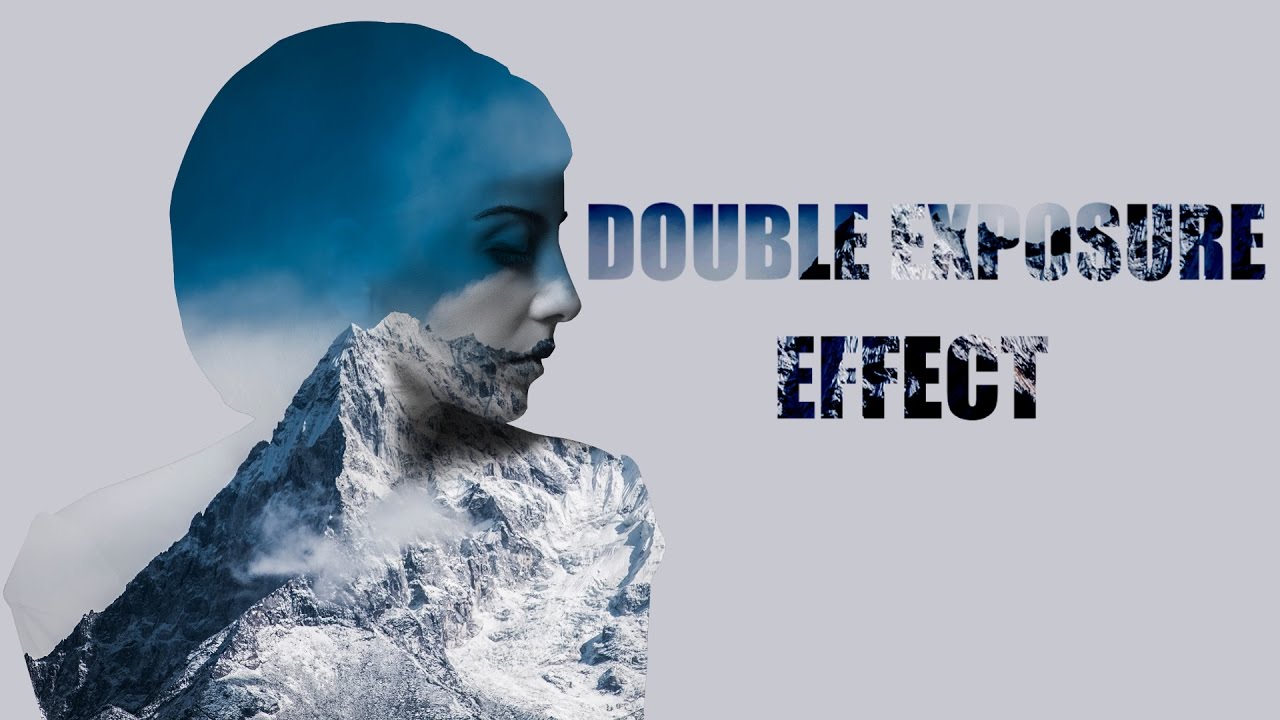
Double Exposure Effect - GIMP Tutorial | Photoshop Alternative | #50

Автор: f&D

Загружено: 2017-02-24

Просмотров: 16084

Описание: GIMP Tutorial #50

Hi Everyone, In this video I'm gonna show you How to create Double Exposure Effect with two Images using the Open Source Image Editing Software called GIMP.

Note:
GIMP is the perfect alternative for Photoshop. Hence you can try this same method in Photoshop as well.

Steps:
1. Open two different Images Separately in GIMP (Here one is the Mountain and other one is a woman)
2. Remove background of the Subject and make it transparent
3. Copy the Subject and paste it on the Mountain Image as New Layer
4. Scale the layer to inside the Image
5. Change mode to Multiply so you can see the blending of the two Images
6. Move the Subject to find the good composition
7. Make Layer to Image Size Now
8. Get Alpha on Selection
9. Move the Mountain Layer top in the Layers dialog
10. Add Layer mask to the Mountain layer with Selection
11. Duplicate the Subject Layer
12. Desaturate it
13. Move that Layer to the Top in the Layers dialog
14. Change it Blending Mode to Multiply
15. Add Layer Mask with White Full Opacity
16. Select Paint brush tool with Black as the Foreground Color and with 90% Opacity
17. Brush everything Except the Facial Features
18. Add a Background Color
19. Fill it with the Color from the Image
20. Do some final touches..

That's it. You can now create a Double Exposure Image with a free Software
Thanks for Watching.
Like, Share and Don't Forget to Subscribe

Watch tutorial Similar to this:
Galaxy Logo Face:    • GIMP Tutorial - Galaxy Logo from Face | Ph...  

Subscribe us:
   / @fdferozdaniel  

Не удается загрузить Youtube-плеер. Проверьте блокировку Youtube в вашей сети.
Повторяем попытку...
Double Exposure Effect - GIMP Tutorial | Photoshop Alternative | #50

Поделиться в:

Доступные форматы для скачивания:

Скачать видео

  • Информация по загрузке:

Скачать аудио

Похожие видео

CARICATURE Tutorial - GIMP | Photoshop Alternative | #51

CARICATURE Tutorial - GIMP | Photoshop Alternative | #51

Double Exposure Effect in Gimp

Double Exposure Effect in Gimp

Как создать эффект двойной экспозиции в GIMP

Как создать эффект двойной экспозиции в GIMP

Lightroom так НЕ УМЕЕТ | Спасаем

Lightroom так НЕ УМЕЕТ | Спасаем "убитые" фото

GIMP 2.10.14: Tuto 133 ( Double exposition )

GIMP 2.10.14: Tuto 133 ( Double exposition )

GIMP Tutorial: Double Exposure Effect

GIMP Tutorial: Double Exposure Effect

Как размыть фон в GIMP (создать малую глубину резкости)

Как размыть фон в GIMP (создать малую глубину резкости)

Gimp 2.10.8 - Double Exposure Effect

Gimp 2.10.8 - Double Exposure Effect

Double Exposure Effect - GIMP 2.8 Tutorial

Double Exposure Effect - GIMP 2.8 Tutorial

Очередное ПОТРЯСЕНИЕ ИИ! Google Снова Разгромил Big Tech! Google Видео Потрясло Всех! xAI в Пентагон

Очередное ПОТРЯСЕНИЕ ИИ! Google Снова Разгромил Big Tech! Google Видео Потрясло Всех! xAI в Пентагон

Микшер каналов / Объясняю самый непонятный инструмент в ФОТОШОПЕ

Микшер каналов / Объясняю самый непонятный инструмент в ФОТОШОПЕ

GIMP Tutorial: Text Portrait Effect in GIMP

GIMP Tutorial: Text Portrait Effect in GIMP

GIMP Tutorial: Disintegration Effect

GIMP Tutorial: Disintegration Effect

Как улучшить качество изображения | Нейросети апскейлеры | Метод AI + Photoshop подробная инструкция

Как улучшить качество изображения | Нейросети апскейлеры | Метод AI + Photoshop подробная инструкция

Double Exposure Effekt in Gimp erstellen | 2 Bilder zusammenfügen

Double Exposure Effekt in Gimp erstellen | 2 Bilder zusammenfügen

Как я перестал обрабатывать фото вручную — экшены + Stream Deck

Как я перестал обрабатывать фото вручную — экшены + Stream Deck

Double Exposure Effect Gimp 2 10

Double Exposure Effect Gimp 2 10

How to Create Brick Wall Portrait in GIMP | Photoshop Alternative | #54

How to Create Brick Wall Portrait in GIMP | Photoshop Alternative | #54

Почему «хороших» людей не уважают? Сделайте это, и вас зауважает даже самый гордый!

Почему «хороших» людей не уважают? Сделайте это, и вас зауважает даже самый гордый!

GIMP Tutorial: Transform Face into Galaxy Silhouette

GIMP Tutorial: Transform Face into Galaxy Silhouette

© 2025 ycliper. Все права защищены.


  • Контакты
  • О нас
  • Политика конфиденциальности


Контакты для правообладателей: [email protected]