ycliper

Популярное

Музыка Кино и Анимация Автомобили Животные Спорт Путешествия Игры Юмор

Интересные видео

2025 Сериалы Трейлеры Новости Как сделать Видеоуроки Diy своими руками

Топ запросов

смотреть а4 schoolboy runaway турецкий сериал смотреть мультфильмы эдисон
Скачать

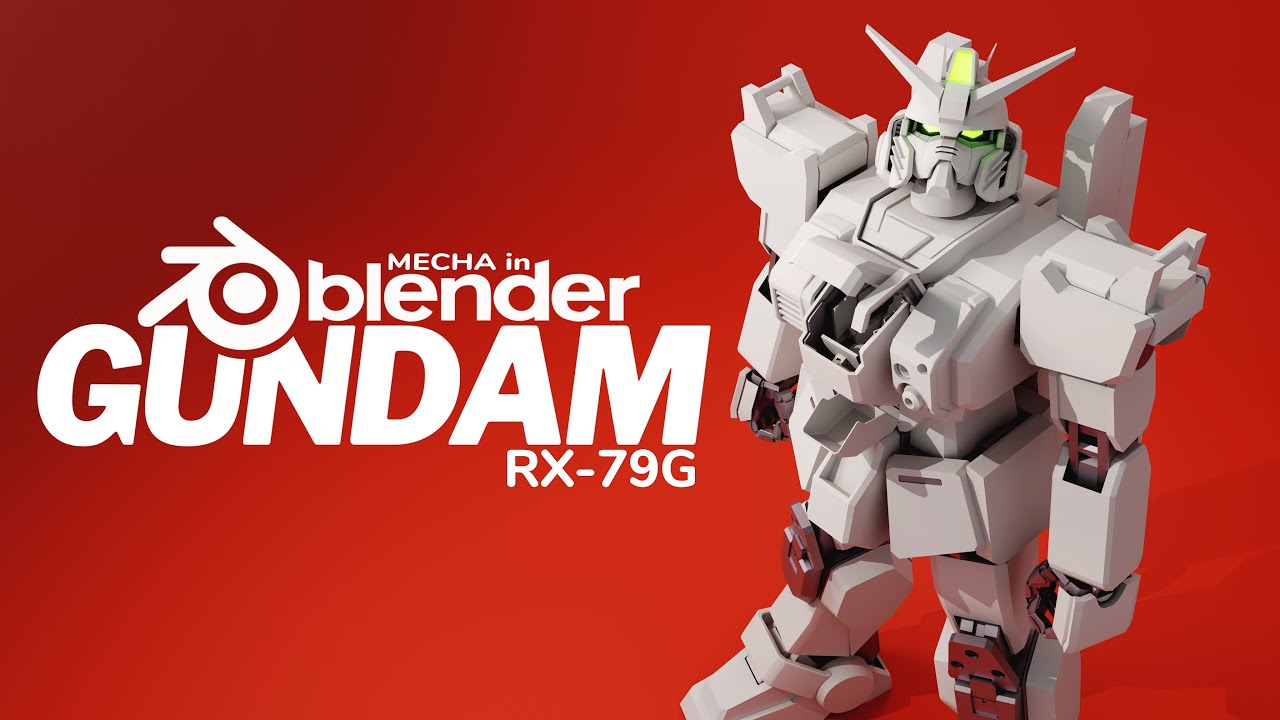
RX-79 Gundam - Mecha in Blender 3D Modeling Timelapse (no audio)

Автор: 3D Jeff Allen

Загружено: 2021-04-10

Просмотров: 85118

Описание: I modeled this in Blender 2.92 with the default shortcut keys and no extra addons. This video is intended for people with a basic understanding of the 3D production process and how Blender works. You should be able to pause the video at any moment to see which shortcut keys I use, but if you're still confused please ask me in the comments below. I'm always looking to improve my workflow, so if you know a better way of doing some of these tedious operations (like applying vertex groups), also please let me know.

Final renders of this project can be found here:
https://www.artstation.com/artwork/Kr...

0:00 Reference Plane Setup
0:20 Chest & Pelvis Blockout
4:40 Backpack Blockout
7:43 Inner Leg Blockout
9:25 Foot Blockout
11:14 Leg Armor Blockout
14:34 Armature Setup
15:48 Leg Bones
18:29 Arm Blockout
20:33 Arm Bones
22:00 Standing Pose & Scene Setup
23:09 Hand Blockout
26:13 Hand Bones & Cleanup
31:00 Cockpit
34:10 Head Blockout
40:20 Head Secondary Details
41:24 Finishing Touches

Every time I post a new series of images from a 3D model I created in Blender, I get many questions about my workflow. After many long-winded answers about pivot points & transform orientations, I still don't think I got my point across with just writing so I thought I would elaborate.

I felt the RX-79[G] Gundam was a great design to demonstrate fundamental 3D modeling, object management (using Collections), and some simple rigging. This phase, the "Blockout" phase, establishes all of the defining features of a mech. Later, a version of this file can be used to create variants or parts for other mechs. I have a total of 4 phases:

1. Blockout Phase - reference plane setup*, basic defining shapes, a simple armature to test rotations while modeling

2. Detail Phase - bevels, booleans, closeup elements, accessories, armature controllers, constraints

3. Material Phase - fix geometry, apply modifiers, create UVs, then export to Substance Painter to texture, and finally back to Blender for test renders

4. Presentation Phase - animations, simulations, lighting setups, camera angles, compositing

This phase of the project took around 15 hours to complete. More examples of completed projects using this workflow can be found on my portfolio page:
https://www.artstation.com/mjeff

Recommended tutorials:

Hard Surface Modeling in Blender by Creative Shrimp
https://blendermarket.com/products/ha...

Master Car Creation in Blender by CG Masters
https://blendermarket.com/products/ma...

*The reference planes are edited scans from the decal guide for the Master Grade RX-79 Gundam model kit. Reference planes from this project can be found here:
https://mjeff3d.gumroad.com/l/RefPlanes

#blender #b3d #gundam

Не удается загрузить Youtube-плеер. Проверьте блокировку Youtube в вашей сети.
Повторяем попытку...
RX-79 Gundam - Mecha in Blender 3D Modeling Timelapse (no audio)

Поделиться в:

Доступные форматы для скачивания:

Скачать видео

  • Информация по загрузке:

Скачать аудио

Похожие видео

Моделирование моего собственного Гандама в Blender — полный процесс + демонстрация действий

Моделирование моего собственного Гандама в Blender — полный процесс + демонстрация действий

RX-78 Gundam - Mecha in Blender 3D Modeling Timelapse (no audio)

RX-78 Gundam - Mecha in Blender 3D Modeling Timelapse (no audio)

IBO Gundam Frame - Mecha in Blender 3D Modeling Timelapse (no audio)

IBO Gundam Frame - Mecha in Blender 3D Modeling Timelapse (no audio)

Mecha Speed Sculpt 210120 (Blender 2.91)

Mecha Speed Sculpt 210120 (Blender 2.91)

Wing Gundam - Mecha in Blender 3D Modeling Timelapse (no audio)

Wing Gundam - Mecha in Blender 3D Modeling Timelapse (no audio)

Что находится ЗА ГРАНИЦЕЙ игровых МИРОВ?

Что находится ЗА ГРАНИЦЕЙ игровых МИРОВ?

Fighter jet 3D modeling process (Su-27 Flanker). Blender timelapse.

Fighter jet 3D modeling process (Su-27 Flanker). Blender timelapse.

Создание мехов в Blender

Создание мехов в Blender

Blender 3D Timelapse - Modeling a MECH - Arbalest Mobile Suit

Blender 3D Timelapse - Modeling a MECH - Arbalest Mobile Suit

Как превратить 2D-изображения в настоящие 3D-модели с помощью ИИ

Как превратить 2D-изображения в настоящие 3D-модели с помощью ИИ

90's Anime in Blender - Tutorial

90's Anime in Blender - Tutorial

Учебник: создание механического шагающего существа в Blender

Учебник: создание механического шагающего существа в Blender

GUNDAM Mobile Suite #gundam #autodeskMaya #timelapse

GUNDAM Mobile Suite #gundam #autodeskMaya #timelapse

3d mech from sketch to animation in blender

3d mech from sketch to animation in blender

🔥Эту модельку сможет повторить каждый новичок в Blender!

🔥Эту модельку сможет повторить каждый новичок в Blender!

MS-06 Zaku II - Mecha in Blender 3D Modeling Timelapse (no audio)

MS-06 Zaku II - Mecha in Blender 3D Modeling Timelapse (no audio)

Airplane 3D modeling process ( DC-10 ). Blender timelapse

Airplane 3D modeling process ( DC-10 ). Blender timelapse

RMS-099 Rick Dias - Mecha in Blender 3D Modeling Timelapse (no audio)

RMS-099 Rick Dias - Mecha in Blender 3D Modeling Timelapse (no audio)

КАК МОДЕЛИРОВАТЬ СЛОЖНЫЕ ФОРМЫ В BLENDER | Удобный способ моделировать комплексные модели

КАК МОДЕЛИРОВАТЬ СЛОЖНЫЕ ФОРМЫ В BLENDER | Удобный способ моделировать комплексные модели

Weight Painting 3d Models for Animation Rigs | Robots & Gundam

Weight Painting 3d Models for Animation Rigs | Robots & Gundam

© 2025 ycliper. Все права защищены.


  • Контакты
  • О нас
  • Политика конфиденциальности


Контакты для правообладателей: [email protected]