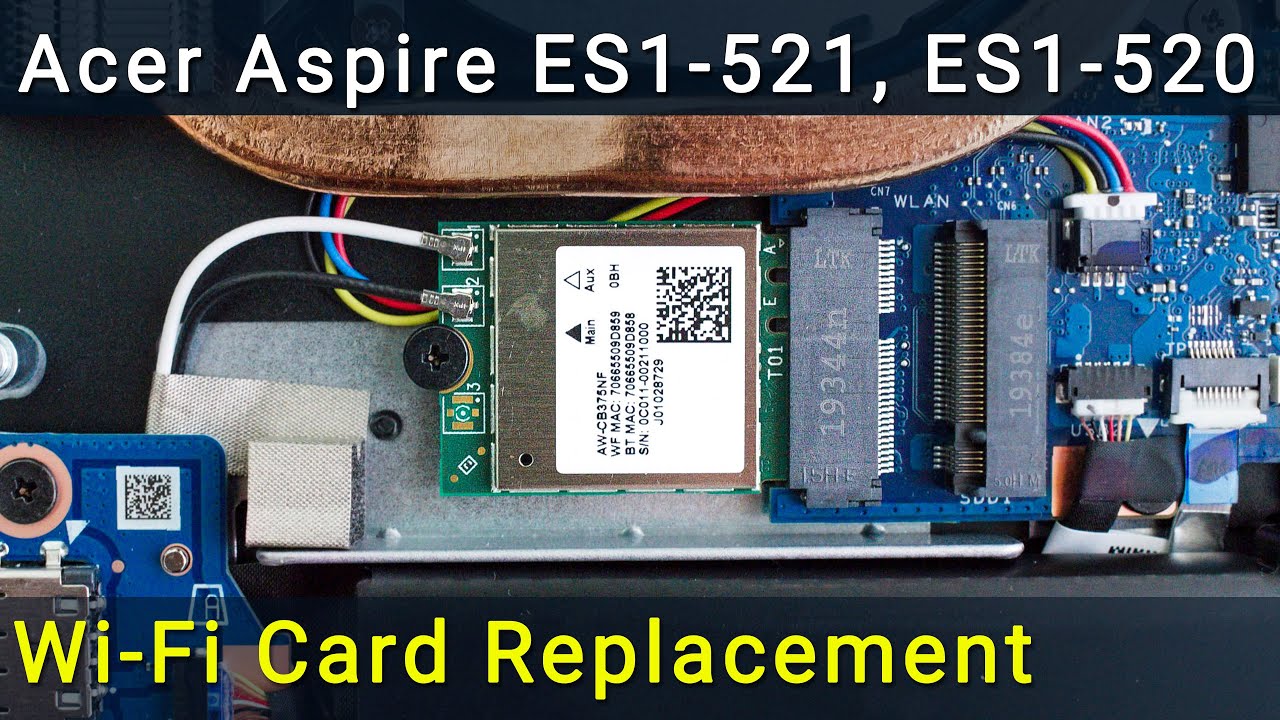
Acer Aspire ES1-520, ES1-521, ES1-522 Wi-Fi Card Repair: Simple Fix for Connection Issues
Автор: How-FixIT
Загружено: 2016-07-20
Просмотров: 2459
Описание:
Fix your Wi-Fi connection problem fast—even if it’s not working at all—with this quick DIY Wi-Fi card swap for Acer Aspire ES1-520, ES1-521, ES1-522 laptop.
Buy tools and wifi card on AMAZON:
Screwdriver Set: https://hfixt.com/spro
Tool Kit: https://hfixt.com/pryt
Tweezers: https://hfixt.com/tzrs
Magnetic Mat: https://hfixt.com/mat
Wi-Fi Card: https://hfixt.com/nwk
Buy tools and wifi card on AliExpress:
Screwdriver set: https://hfixt.com/alis
Tool Kit: https://hfixt.com/alit
Tweezers set: https://hfixt.com/altz
Magnetic Mat: https://hfixt.com/amat
Wi-Fi Card: https://hfixt.com/net
📌*Useful links*
Best Screwdriver Set: • How to Choose the Best Screwdriver Set for...
Repair Tools & Safety Tips: • Electronics Repair for Beginners: How to S...
DIY repair guides: https://how-fixit.com
📱Follow us for more tech tips and guides!
TikTok: / howfixit
Instagram: / howfixit
Facebook: / howfixit
X: https://x.com/howfixit
DESCRIPTION
If your Acer Aspire ES1-520 is suffering a Wi-Fi connection problem or the adapter is flat-out not working, this detailed HowFixit tutorial shows you how to cure it for good by replacing the stock WLAN card. Follow along as we open the chassis, isolate power, and swap the module—exactly the same process on the Acer Aspire ES1-520, ES1-521, ES1-522.
What you’ll learn
✔ Three must-have tools—Phillips #0, plastic spudger, tweezers
✔ Safe shutdown, battery disconnect, and static-free handling
✔ Identifying the tiny Wi-Fi Mini PCI-e card and unplugging its delicate antenna leads
✔ Choosing a Wi-Fi module upgrade that crushes dead zones and lag spikes
✔ Re-seating antennas, re-connecting the battery, and reassembling the base
✔ First-boot checks in Windows 10/11 and fresh driver install for max throughput
Whether your connection vanished after a Windows Update, drops under load, or never shows networks, this ten-minute, under-$30 repair brings your laptop back online—no service shop required. Hit Like, Subscribe, and turn on notifications so you never miss another DIY fix from HowFixit!
❓ Frequently Asked Questions:
Question: What if my Wi-Fi still doesn’t work after replacement?
Answer: Ensure antenna cables are securely connected and the Wi-Fi card is compatible.
Question: Can I use any Wi-Fi card for Acer Aspire ES1-520?
Answer: No, always use a compatible Wi-Fi Mini PCI-e card as linked in the description.
Question: Is it necessary to disconnect the battery?
Answer: Yes, this prevents accidental damage from short circuits.
Question: How long does the Wi-Fi card replacement take?
Answer: Typically, 15-30 minutes for beginners.
AFFILIATE PROGRAM
We are a participant in the Amazon Services LLC Associates Program, an affiliate advertising program designed to provide a means for us to earn fees by linking to Amazon and affiliated sites.
#howfixit #laptoprepair #diy #techguide
Повторяем попытку...
Доступные форматы для скачивания:
Скачать видео
-
Информация по загрузке:







