Goal Zero Home Integration Kit | Tech Video
Автор: EarthtechProducts
Загружено: 2017-10-20
Просмотров: 27551
Описание:
Available now at https://www.earthtechproducts.com/yet...
• SUBSCRIBE IF YOU'RE NEW - https://bit.ly/2qSdoKZ
Follow us on Social Media to stay connected!
Twitter - / earthtechsolar
Instagram - / earthtechproducts
Facebook - / earthtechproducts
Power Outage? No problem. The Goal Zero Yeti Home Integration Kit is an easy-to-install way to use your Yeti Portable Power Station to keep essential circuits in your home running, even when the power isn't.
PLEASE NOTE: Requires installation by a qualified licensed electrician with a thorough knowledge of all applicable electrical and building codes. Only viable with indoor circuit breaker panels. Also must have a Yeti 1000 Portable Power Station or above.
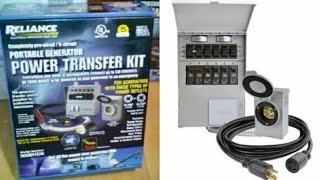
• Includes Reliance Pro/Tran 2 Series 15-Amp, 4-Circuit 120V Manual Transfer Switch.
• Customize your backup power by working with a licensed electrician and selecting up to 4 circuits from your breaker panel. Suggested circuits include fridge/freezer, garage door, outlets in main living areas, light switches, etc.
• Includes Yeti Extension Cable: 10ft 14AWG to connect your Yeti Portable Power Station.
• Circuit Capacity: 4 Circuits, 15A 120V
• Built-in Protection: one per circuit
• Max Wattage: 1875W
• Max Input: 15A
• Contains: Manual Transfer Switch + Yeti Extension Cable
• Requires: Goal Zero Portable Power Station, Yeti 1000 and above: 1000, 1250, 1400 or 3000 however, the Yeti 3000 Lithium provides a great blend of power output and run time
How It Works During a Power Outage:
Once the Transfer Switch has been installed and the Goal Zero Yeti is plugged in using the provided extension cable, powering the circuits in your home is as easy as flipping a switch. Best of all, there are no fumes, noise, or messy gasoline to hassle with.
1. Press the AC button on the Yeti to turn it on. Know it's on when the light on the button glows green.
2. On the Transfer Switch, select the circuits to be powered by the Yeti by moving individual switches from the LINE to GEN position.
3. Your selected circuits are now live.
When power is restored, simply move the switches on the Transfer Switch from GEN to LINE and turn off the Yeti AC port by pressing and holding the AC button for approximately three seconds. There is no need to unplug the Yeti from the Transfer Switch when not in use.
Повторяем попытку...

Доступные форматы для скачивания:
Скачать видео
-
Информация по загрузке:


![МАДУРО рассказал как его БЛЕСТЯЩЕ задержали 😁 [Пародия]](https://ricktube.ru/thumbnail/ENVU2Rhr14k/mqdefault.jpg)