Home Assistant + Shelly IoT Integration - how to build a more reliable system
Автор: Derek Spratt
Загружено: 2021-01-03
Просмотров: 5830
Описание:
In this video I am sharing my experiences developing a home automation system primarily based on Home Assistant (HA) and Shelly IoT devices after watching too many self-promotional 'isn't this great' Home Assistant and Shelly IoT videos online (yes, you guys know who you are) that don't talk about the real-world issues that you will most certainly face ... or how to resolve those issues.
My career spans 4 decades in telecom/IoT building and running tech firms with global operations with a degree in electrical engineering with customers in industrial automation, building controls and healthcare where reliability and performance count.
Link to my master HA configuration file here: http://www.spratts.net/Misc/configura...
Link to my NodeRed flows file here: http://www.spratts.net/Misc/flows.json
Rule # 1 - disable Shelly Cloud - it is a cute toy and should not be used for any serious control/automation processes - it is free and you get what you pay for (and since your internet connection will go down at some point you don't want to be relying on it to turn off your furnace). I have had lots of issues with it not updating/syncing consistently.
Rule #2 - don't use the included shelly integrations in HA as they rely on device polling (restful API) which pollutes and slows down your network with tons of unreliable data packets - take the somewhat painful jump into MQTT and get a quieter and much more reliable network, and be able to tune IoT device comms and monitor them much more easily as well
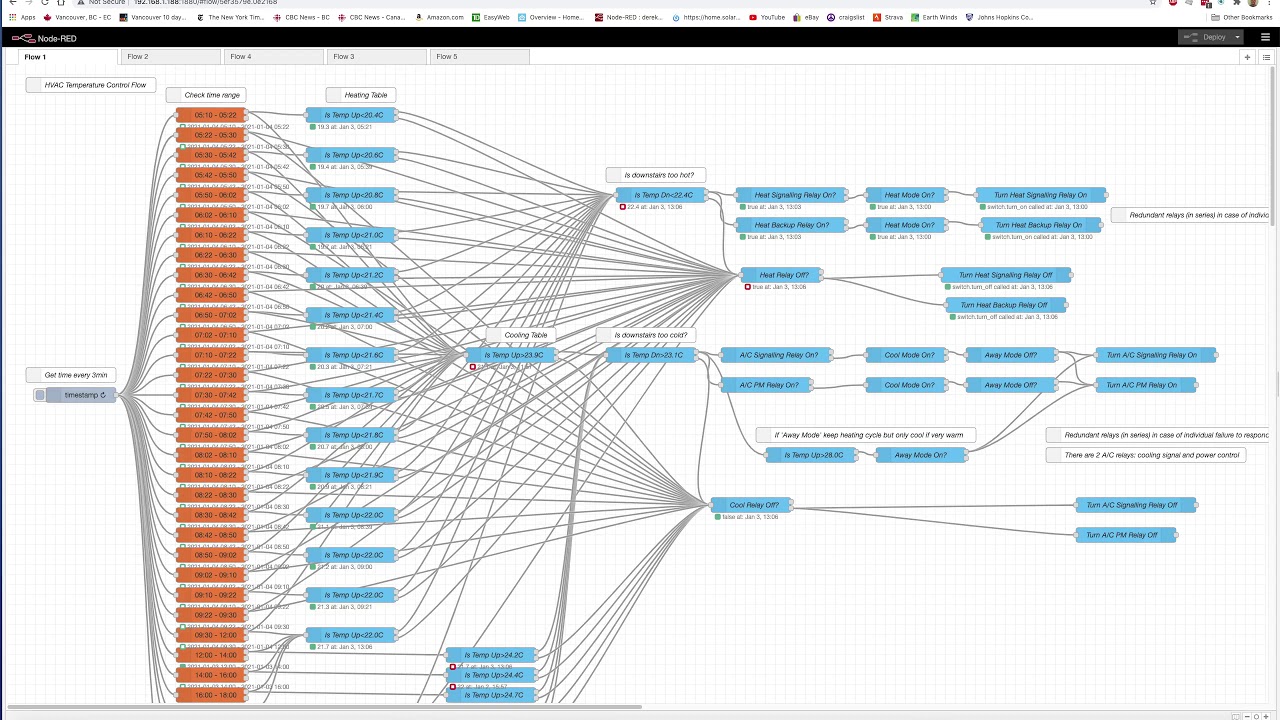
Rule #3 - don't rely on HA for state machines and process flows - add NodeRed and enjoy graphical programming - and NodeRed (NR) runs separately from HA so will keep running even when HA is being rebooted and/or is acting poorly - and NR can also be used to monitor MQTT comms and also be used to setup watchdog logic to allow rebooting of IoT devices and also HA itself
Recommendations: use a dedicated computer to host HA - cheap and very reliable vs a VM that is coupled to a PC or Mac that may crap out as it is running tons of other s/w; tune your MQTT settings to reduce the frequency of broadcasts from IoT devices; tune your MQTT QoS levels; use the ARC Chrome plugin extension to allow you to program your IoT devices more precisely; invest in redundant IoT devices when they are being used in critical processes like controlling your furnace (if one fails in the 'on' state the other will still be able to turn it off)'; use the shelly firmware internal 'auto off' timer function to add an additional layer of protection so that if HA doesn't correctly signal to turn off an important device it will do so on its own after a period of time, etc.
Update Jan 10, 2021 - I replaced a Shelly1 device today due to random self-turn-offs; also finding a # of my shelly devices won't complete their firmware updates at the moment - they were previously updating. Hmmm. No burning need to update them but ...
Update Jan 11, 2021 - Found an undocumented work-around for forcing an update to a stubborn Shelly device: use the Chrome/ARC extension so you can use a GET or PUSH of the following command to the Shelly in question: http://x.x.x.x/ota?url=http://archive... which may fail (change to the latest V# and it might work - current is V1.9.3) and then go into the Shelly device web server page directly using a browser and re-try the update - which finally worked for me (seems that attempting an OTA update was enough to unstick the device update) - this is a typical example of the guessing game involved in solving problems with Shelly devices and HA - there is pretty good documentation but it can have omissions or bugs in the docs and/or bugs in the s/w that you need to suffer through ...
Update Jan 24, 2021 - I did an upgrade to an A2 class micro SD memory card on my Raspberry Pi 4B and the UI is now much more responsive and fluid - no more lengthy delays in loading pages. After spending a lot time researching my problem with the Samsung Evo+ SD card degradation after 7 months of continuous HA use, it turns out that even HA itself is not thrilled about running on SD cards given the poor endurance of the cheap NAND memory cells used in SD cards vs. SSDs (an HA implementation on an SD card typically dies in under 2 yrs). Yes it is possible to configure Raspberry Pi SBCs to boot from a USB SSD with its much improved reliability/endurance, but it is not a perfect solution because warm reboots sometimes hang with the Pi 4B (power is momentarily lost during a warm reboot which can hang the process when relying on an external SSD) - if you can get it to work you are rewarded with a much more responsive/fast/long term reliable HA implementation. So what HA has done is develop its own tiny hardware SBC platform called 'Home Assistant Blue' which has a 6 core CPU, 4G RAM, a 128G SSD, has HA pre-installed, and costs $150 - it should be much more responsive and reliable so I have ordered one.
Повторяем попытку...
Доступные форматы для скачивания:
Скачать видео
-
Информация по загрузке:






![Matter et Thread en 2024 🏡 Home Assistant à la rescousse de Jeedom [HA, Jeedom, MQTT, Domotique]](https://image.4k-video.ru/id-video/tr_kP_Qfyh0)