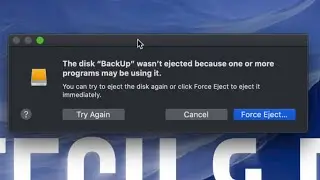
Easy fix for "Disk wasn't ejected because…”
Автор: Quick Tutorials
Загружено: 2023-08-15
Просмотров: 3444
Описание:
Our favorite setup:
Laptop - M2 MacBook Air: https://amzn.to/3HCJa5E
Desktop - M2 Mac Mini: https://amzn.to/48UQFAV
Apple Studio Display: https://amzn.to/3uee8hm
How to eject a stuck hard drive? You're done with work, about to unplug your external hard drive or SD card so you can pack up and head out and when you click eject you're hit with the infamous "The disk wasn't ejected because one or more programs may be using it" -message.
This might just be one of the most annoying issues with macOS. Here's a quick 30-second fix to the issue that works most times. Full disclosure - we've run into situations when even relaunching Finder doesn't fix the issue, in those cases we usually end up either logging out and back in, restarting the computer, or simply hitting that "Force Eject..." button.
Does this bug you? What's your solution? Let us know in the comments below.
When you purchase through links on our site, we may earn an affiliate commission at no extra cost to you. This helps us continue to create guides like this for our audience.
Повторяем попытку...

Доступные форматы для скачивания:
Скачать видео
-
Информация по загрузке: