ycliper

Популярное

Музыка Кино и Анимация Автомобили Животные Спорт Путешествия Игры Юмор

Интересные видео

2025 Сериалы Трейлеры Новости Как сделать Видеоуроки Diy своими руками

Топ запросов

смотреть а4 schoolboy runaway турецкий сериал смотреть мультфильмы эдисон
Скачать

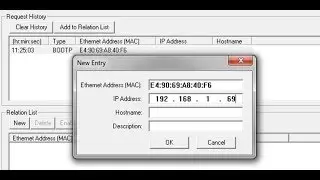
How to Use BootP to Set IP Address in CompactLogix

Автор: McNaughton-McKay Electric Company

Загружено: 2018-03-23

Просмотров: 71071

Описание: McNaughton-McKay's Auston Davidson, shows you how to configure the IP address of your CompactLogix PLC using the BootP DHCP Utility. The configuration can be completed by using your computer, PLC’s Ethernet port, and an Ethernet cable. The procedure is available for all Ethernet capable Allen Bradley PLCs with BOOTP enabled.

Website: www.mc-mc.com

Contact Us: 844-687-6262 or https://www.mc-mc.com/Locations

Subscribe on YouTube: https://www.youtube.com/channel/UC7RQ...

LinkedIn:   / mcnaughton-mckay  

Facebook:   / mcnaughtonmc.  .

Twitter:   / mcnaughtonmckay  

Blog: https://www.mc-mc.com/roller/blog/

Our videos are made available for your convenience and we hope you find them helpful. Please note, however, that the information contained in the videos is subject to our disclaimer and should not be relied upon as professional advice or services. We cannot overstate the importance of reviewing the national electric code and any pertinent local codes for approved installation, use, storage and repair procedures and precautions; failure to do so may result in property damage, injury or death. Always consult with your professional advisors to determine the products to suit your intended purposes.

LEGAL DISCLAIMER:
The text, sound, graphic, video and other information and materials made available on our website (including but not limited through our resources center and video center) or by us through YouTube or any other social media platform (all such information and materials referred to as “our information”) are provided voluntarily by McNaughton-McKay Electric Company “AS IS” and “AS AVAILABLE.” “Information” includes any comments we may make on any website or social media platform regarding any video or other materials. Information may change at any time, and McNaughton-McKay assumes no responsibility to provide updates or revisions. McNaughton-McKay disclaims all express and implied warranties with respect to information and to the products described, including implied warranties of non-infringement, merchantability and fitness for a particular purpose. Applicable law may not allow the above exclusion of implied warranties, so the exclusion may not apply, but shall apply to the maximum extent allowed by law. McNaughton-McKay cannot and does not represent or warrant that information will be error-free, up-to-date, comprehensive or complete, or otherwise meet your requirements, or those of your customers or business partners.

Your use of our resource center, video library and of information is further subject to our website terms of use. Please visit the website terms of use at https://www.mc-mc.com/TermsofUse.

Не удается загрузить Youtube-плеер. Проверьте блокировку Youtube в вашей сети.
Повторяем попытку...
How to Use BootP to Set IP Address in CompactLogix

Поделиться в:

Доступные форматы для скачивания:

Скачать видео

  • Информация по загрузке:

Скачать аудио

Похожие видео

PLCGurus.NET - BOOTP Ethernet Configuration

PLCGurus.NET - BOOTP Ethernet Configuration

Установите Ethernet-адрес CompactLogix с помощью BOOTP

Установите Ethernet-адрес CompactLogix с помощью BOOTP

PLC Programming Fundamentals - How To Use BOOTP / DHCP Tool Set An IP Address Of a New Rockwell PLC

PLC Programming Fundamentals - How To Use BOOTP / DHCP Tool Set An IP Address Of a New Rockwell PLC

Configure an IP address for Allen-Bradley® I/O EtherNet/IP™ adapters

Configure an IP address for Allen-Bradley® I/O EtherNet/IP™ adapters

Взлом WiFi за 60 секунд | Как взламывают Ваш роутер будьте осторожны!

Взлом WiFi за 60 секунд | Как взламывают Ваш роутер будьте осторожны!

Учебное пособие Allen Bradley RSLogix 5000: создание нового проекта, написание вашей первой прогр...

Учебное пособие Allen Bradley RSLogix 5000: создание нового проекта, написание вашей первой прогр...

Шлюз Prosoft PLX31-EIP-MBTCP с ПЛК Allen Bradley 1769-L33ER/Modbus TCP

Шлюз Prosoft PLX31-EIP-MBTCP с ПЛК Allen Bradley 1769-L33ER/Modbus TCP

Configure an IP address for Allen Bradley® I O EtherNet IP™ adapters

Configure an IP address for Allen Bradley® I O EtherNet IP™ adapters

asignar ip desde bootp tool

asignar ip desde bootp tool

Как поменять gpon роутер ростелеком на любой другой. Пошаговая инструкция для новичка

Как поменять gpon роутер ростелеком на любой другой. Пошаговая инструкция для новичка

How to set 1734-AENT IP Configuration/ Communication and Assign through Boot P DHCP Tool|SudarkTech

How to set 1734-AENT IP Configuration/ Communication and Assign through Boot P DHCP Tool|SudarkTech

Сисадмины больше не нужны? Gemini настраивает Linux сервер и устанавливает cтек N8N. ЭТО ЗАКОННО?

Сисадмины больше не нужны? Gemini настраивает Linux сервер и устанавливает cтек N8N. ЭТО ЗАКОННО?

Set PLC IP address with BOOTP

Set PLC IP address with BOOTP

Compactlogix L18ERM hardware

Compactlogix L18ERM hardware

Добавление Powerflex 525 к RSlogix 5000 через Ethernet

Добавление Powerflex 525 к RSlogix 5000 через Ethernet

Как работают АНТЕННЫ? Самое понятное объяснение!

Как работают АНТЕННЫ? Самое понятное объяснение!

Difference Between EDS Files and Add On Profiles

Difference Between EDS Files and Add On Profiles

Настройка связи Ethernet/IP для 1734-AENT и Powerflex 40 с адаптером 22-COMM-E

Настройка связи Ethernet/IP для 1734-AENT и Powerflex 40 с адаптером 22-COMM-E

Setting the IP in a micrologix PLC, Setting the IP in your computer, Configuring your RSLinx driver.

Setting the IP in a micrologix PLC, Setting the IP in your computer, Configuring your RSLinx driver.

Ethernet/IP Address Commissioning Tool

Ethernet/IP Address Commissioning Tool

© 2025 ycliper. Все права защищены.


  • Контакты
  • О нас
  • Политика конфиденциальности


Контакты для правообладателей: [email protected]