Text spammer for WhatsApp and Snapchat - Spam'em tutorial and download link
Автор: burhanuday
Загружено: 2017-12-22
Просмотров: 12486
Описание:
I have been working on this project for sometime now, it is a spammer that works on WhatsApp as well as Snapchat. In this video i have shown how to use it as well as download link. It can send 600 messages/minute
It is an open source spammer and its code is posted on Github. Please star my project and if you wish to, you can also donate to me using Paypal - https://www.paypal.me/burhanuday
Project link - http://gestyy.com/wa9oVL
(please support by viewing an ad)
Wait for 5 seconds and press the skip button when it appears
Download link - http://gestyy.com/wa9pCW
(please support by viewing an ad)
Wait for 5 seconds and press the skip button when it appears
DO NOT FORGET TO STAR THE PROJECT ON GITHUB!!!!
Spam'em
Spam’em is a text spammer which can be used in any app messenger that supports the ‘Enter key is send method’. What this means is that any messenger that allows users to send a text message by pressing the Enter key on the virtual keyboard can be exploited to send thousands of messages. Right now, Spam’em has been tested successfully on WhatsApp and Snapchat and I am trying to add support for more messengers.
Spam’em has a send rate of 600 messages/ min or 10 messages/second. Sending 600 messages can take a long time on slow internet connections so caution is advised.
How to use
Setting up Spam’em:
Step 1: You can compile the project on your own or just download a pre compiled apk file from the Releases Tab
Step 2: When you start Spam’em for the first time, you will be presented with the tutorial page. Press the ‘Enable’ button, you will be taken to the language and input page. Over there enable Spam’em keyboard and go back to the app. Note: I do not collect user data; the warning that you see is the default warning for all third-party keyboards.
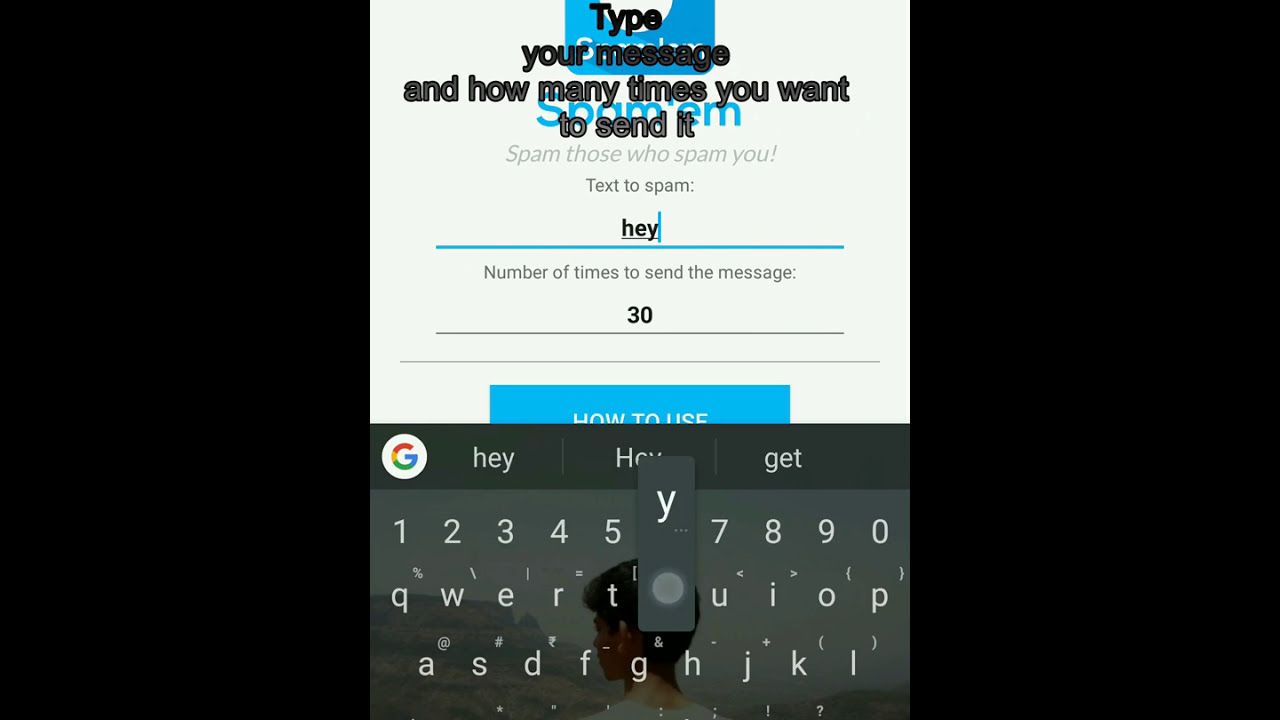
Step 3: Now press continue to the app. In the first text field, enter the message you want to be bombarded and in the second text field, enter the number of times you want to send the message. Spam’em is now set up and ready to be used. Read further to learn how to use it in WhatsApp.
WhatsApp:
Step 1: Start WhatsApp and go to settings. In WhatsApp settings, go to ‘Chats’ and then enable ‘Enter key is send’ option. (IMPORTANT!)
Step 2: Go to the chat you want to spam the message in. Click on the WhatsApp text field to open your default keyboard. Now drag down your notification bar without closing the keyboard. Over there you will see the notification ‘Change Keyboard’. Press it and select Spam’em ‘English (United Kingdom)’.
Step 3: Spam’em menu will now come up. You can see that the cursor is blinking, for Spam’em to work properly, you need to stop it from blinking. To do this, tap on the ‘mic’ icon in the chat once.
Step 4: Now press the SEND button and click on the text field. After a 3 second delay, Spam’em will start sending the messages.
Step 5: To send messages again, repeat steps 3 and 4.
NOTE:- Sending over 600 messages can take a long time depending on your internet connection. Caution is advised!
If you have any queries or questions ask in the comments please.
Contributors:-
Video by Burhanuddin Udaipurwala:
Instagram - / burhanuday
Повторяем попытку...
Доступные форматы для скачивания:
Скачать видео
-
Информация по загрузке:







![Плавание по морям на Linux — зачем и как [Цензурированная версия]](https://imager.clipsaver.ru/OG7ZSckYZfY/max.jpg)