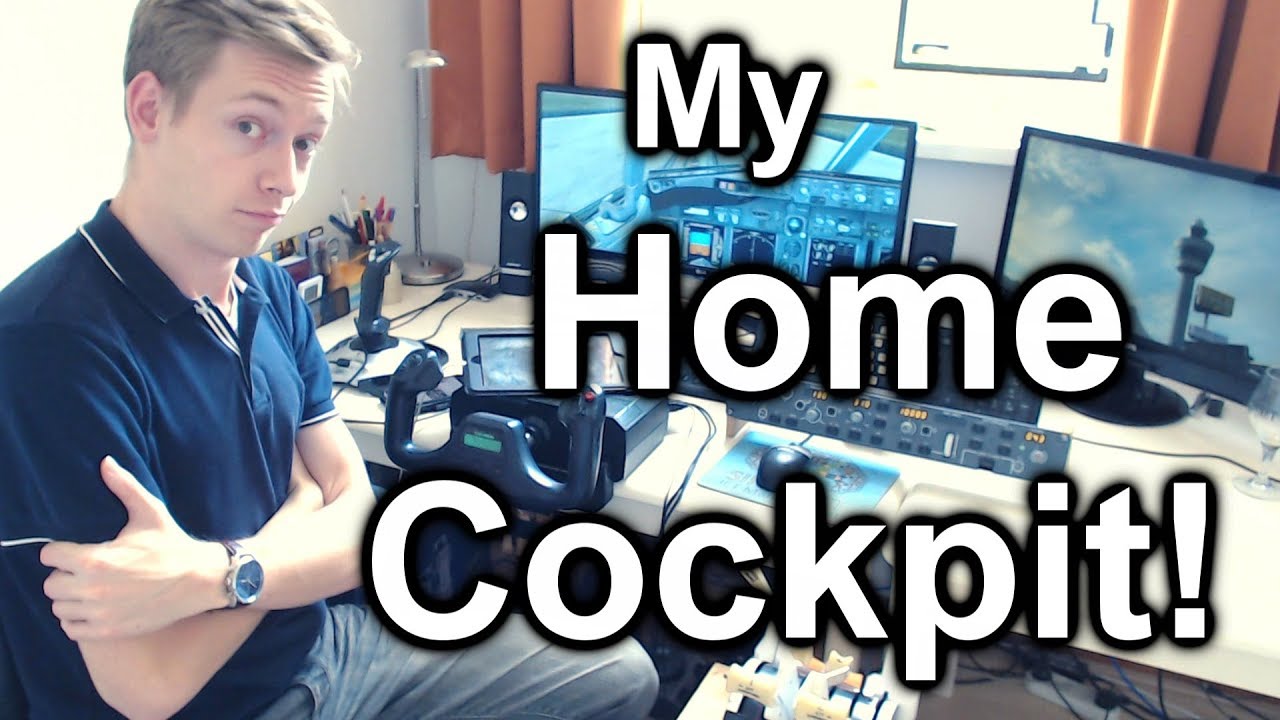
Detailed Tour of My Home Cockpit!
Автор: AviationPro
Загружено: 2018-10-18
Просмотров: 170552
Описание:
Check out my home cockpit! In this video, I'll show you my setup, how my buttons are programmed and much more! :) 👉 If you appreciated this content, please consider a donation! PayPal link: https://bit.ly/3EA04xP 👇👇 MORE INFO & TIMESTAMPS HERE!! 👇👇
Thanks for watching! Please share and like this video, it helps a lot! :)
👉 WHY do People 'Play' Flight Simulator? Check it out: • WHY do People 'Play' Flight Simulator? #msfs
👉👉 -- A special thanks to my $5+ patrons! -- 👈👈
Ben, Roberto, Luca, Steve, Jeff, Sean, Janek, Daniel, Chris, Martin, & Jean-Gabriel!
✅ If you appreciated this video, and if you'd like to support AviationPro... become a patron as well! Visit:
/ aviationpro
👉👉 -- Check this! -- 👈👈
10 Tips to Keep your Flightsim Hobby Affordable!
• 10 Tips to Keep Your Flightsim Hobby Affor...
LATEST VATSIM Flight: NEW PMDG Boeing 747-8 from Milan to Copenhagen!
• ✈️👨✈️ My FIRST PMDG Boeing 747-8 Flight o...
PMDG Boeing 747-8 Review
• Full Review: The PMDG Boeing 747-8 Expansi...
How to Manually Land an Airliner in Flight Simulator!
• How To Manually Land an Airliner in Flight...
Multi Crew VATSIM Flight in the PMDG 777! Manchester to Frankfurt!
• 👨✈️✈️👨✈️ Multi Crew VATSIM Flight: Manch...
👉👉 -- SUPPORT AVIATIONPRO -- 👈👈
If you want to help me making more of these videos in the future, please consider supporting AviationPro! Your help and contributions are much appreciated and help me finance some of the costs associated with this channel. Thanks! :)
✅ PayPal: https://bit.ly/3EA04xP
✅ AviationPro Support Page:
http://aviationpro.nl/support
👉👉 -- INFO & TIMESTAMPS -- 👈👈
A guided tour through my 'home cockpit', showing you all my hardware, what buttons I have programmed and how! Feel free to draw some inspiration from this video for your own home cockpit! As you can see, sometimes with just a few materials and/or a bit of creativity you can create yourself a great sim setup.
Obviously, my cockpit is aimed at flying Boeings, but other aircraft work as well, like the Dash-8 or Airbus.
TIMESTAMPS:
👉 - Intro: 0:00
👉 - My PC: 0:24
👉 - Overview: 1:12
👉 - Headset: 1:53
👉 - Joystick: 2:11
👉 - iPad: 5:46
👉 - Yoke: 6:48
👉 - Rudder: 8:56
👉 - Throttles: 9:20
👉 - Monitor & Speakers: 14:19
👉 - Keyboards: 14:34
👉 - CPFlight MCP 737EL: 16:02
👉 - 2nd Monitor: 16:48
👉 - Remoteflight COMM: 17:09
👉 - Other important stuff: 17:36
👉 - Extra stuff: 17:55
👉 - Outro: 18:23
MY SPECS:
Windows 10® Pro 64-Bit
Intel® Core™ i7-6700K CPU @ 4.60 GHz
16 GB DDR4 RAM
Sapphire R9 390 Nitro 8G with back plate
FLIGHTSIM HARDWARE:
2x Logitech Extreme 3D Pro Joystick
Saitek Pro Flight Yoke System + Throttle
Saitek Throttle Quadrant
Cockpitsimparts 737 Throttle Handles (programmed with gameport to USB adapter)
CPFlight MCP 737EL
2x Jabra UC Voice 750 MS Headset
MAIN ADDITIONAL HARDWARE:
LG 29UM59-P, 29" UltraWide Monitor
Philips Brilliance 226CL Monitor
Simple Medion front speakers and Philips rear speakers (quadraphonic audio setup)
Simple mouse
2x keyboard of which one labeled
KEYBOARD SETUP & SETUP PHOTOS:
If you want an Excel overview file of my keyboard setup, and/or photo's of my flight controls and their configurations, please send me an email! Visit http://aviationpro.nl to contact.
👉👉 -- STAY TUNED WITH AVIATIONPRO! -- 👈👈
🌎 Follow me on Facebook!
/ aviationpronl
🌎 Follow me on Twitter!
/ aviationpronl
🌎 Check out my website for much more!
http://aviationpro.nl
#homecockpit #flightsimulator #prepar3d
Повторяем попытку...
Доступные форматы для скачивания:
Скачать видео
-
Информация по загрузке:


![Tutorial: Boeing 737 NG Cold & Dark Startup + FMC Programming! [2019] [PMDG] [P3D 4.4]](https://image.4k-video.ru/id-video/Mgv5_QYr0K4)