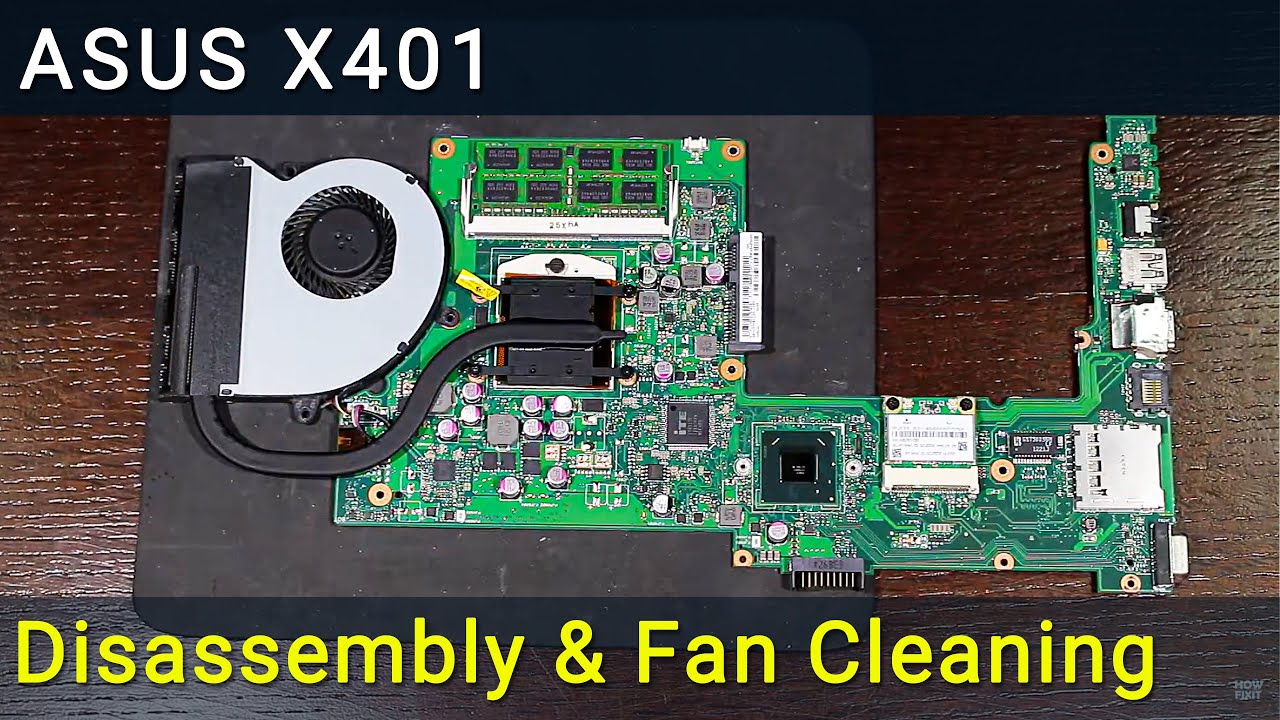
Asus X401 Overheating Fix: Disassembly, Fan Cleaning, and Thermal Paste Replacement
Автор: How-FixIT
Загружено: 2016-03-15
Просмотров: 9204
Описание:
We'll cover how to fix CPU overheating and fan noise issues on your Asus X401, X401A, X401E, X401K, X401U laptop in this DIY tutorial, where I'll show you how to disassemble, clean, and upgrade thermal paste for maximum performance.
Buy tools and parts on AMAZON:
Screwdriver Set: https://hfixt.com/spro
Opening Tool Set: https://hfixt.com/pryt
Magnetic Mat: https://hfixt.com/mat
Tweezers: https://hfixt.com/tzrs
Thermal paste: https://hfixt.com/past
Thermal pads: https://hfixt.com/tpad
Global AliExpress:
Screwdriver set: https://hfixt.com/alis
Opening tool set: https://hfixt.com/alit
Magnetic Mat: https://hfixt.com/amat
Tweezers set: https://hfixt.com/altz
Thermal paste: https://hfixt.com/alip
Thermal pads: https://hfixt.com/apad
🚀✨ Useful links
How to fix laptop overheating: • How to Fix Laptop Overheating: 8 Solutions...
The best thermal paste for laptop: • The Best Thermal Paste for PC CPU, GPU and...
Laptop Cooling Pad Efficiency: • Laptop Cooling Pad Efficiency Test Reveale...
More DIY repair guides: https://how-fixit.com
Follow us for more tech tutorials:
Instagram: / howfixit
Facebook: / howfixit
Twitter: / howfixit
💻 DESCRIPTION
Welcome to HowFixit Channel- Your DIY Tech Fix Destination! We'll cover how to fix CPU overheating and fan noise issues on your Asus X401 laptop in this DIY tutorial, where I'll show you how to disassemble, clean, and upgrade thermal paste for maximum performance.
Laptop overheating occurs when the internal temperature rises beyond optimal levels, compromising the system's functionality. This can be attributed to accumulated dust, a malfunctioning fan, or deteriorating thermal paste. Addressing these issues promptly is crucial for the longevity and efficiency of your device.
By following these comprehensive steps, you've not only revived your device's performance but also extended its lifespan. Remember to perform these maintenance tasks periodically for continued optimal functioning.
The video guide applies to the following models of this laptop series: Asus X401, X401A, X401E, X401K, X401U
🛠️ Key Takeaways:
DIY guide to disassemble Asus X401, clean fan, and replace thermal paste.
Essential tools: HowFixit Screwdriver Set, Spudger, Thermal Paste, Tweezers, Antistatic Brush.
Bonus content on thermal paste testing, cooling pads, and undervolting.
Thermal paste replacement: Proper application for CPU and GPU.
Empower yourself to solve laptop overheating and fan noise issues.
💡 Frequently Asked Questions:
Q: How often should I clean my laptop's fan?
A: It's recommended to clean your laptop's fan every 6-12 months, depending on your usage and the environment.
Q: Can I use any thermal paste for replacement?
A: While many thermal pastes work well, it's advisable to use a high-quality, non-conductive thermal paste for optimal performance and safety.
Q: Is it safe to disassemble my laptop?
A: If done carefully and following the instructions, it's generally safe.
Q: What if my laptop still overheats after maintenance?
A: Explore bonus content links on cooling pads and undervolting solutions in the video description and check the Useful Links section!
AFFILIATE PROGRAM
We are a participant in the Amazon Services LLC Associates Program, an affiliate advertising program designed to provide a means for us to earn fees by linking to Amazon and affiliated sites.
#howfixit #fixit #guide #diylaptoprepair #techrepair #diy
Повторяем попытку...
Доступные форматы для скачивания:
Скачать видео
-
Информация по загрузке:


![Как сжимаются изображения? [46 МБ ↘↘ 4,07 МБ] JPEG в деталях](https://image.4k-video.ru/id-video/Kv1Hiv3ox8I)




![Best of Driving Deep House [2026] | Chill Vocal Mix to Boost Focus, Maximize Concentration #7](https://image.4k-video.ru/id-video/CDnUiT9PNWc)